FlyingPress Pricing in 2026: The CDN Costs Twice the Licence, and an Expired Licence Stops the Plugin
Updated October 2026
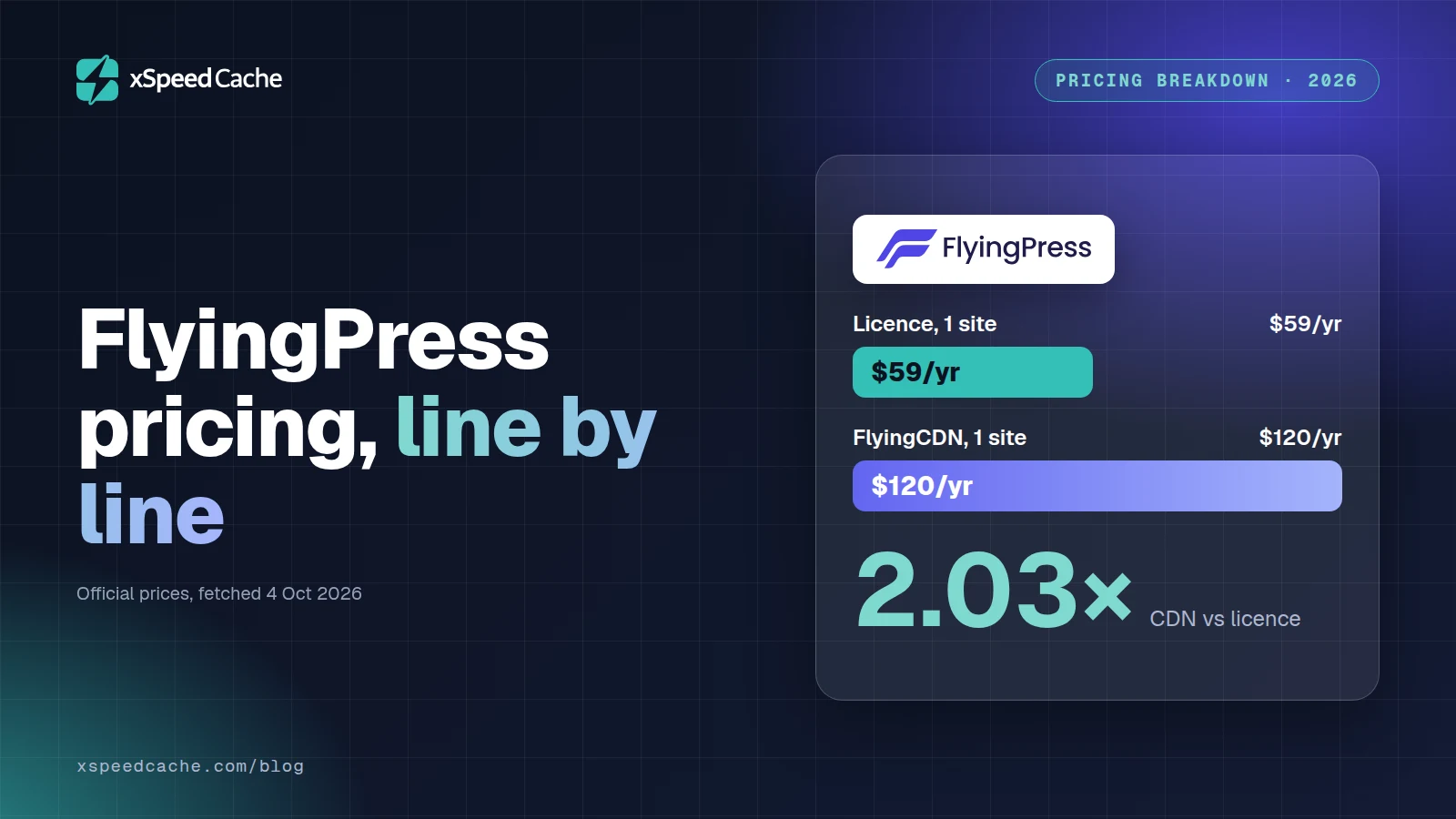
FlyingPress sells four licences, and the cheapest is $59 a year for one site, read off its own pricing page on 4 October 2026. The delivery network the same vendor sells alongside it costs $10 per domain per month, which is $120 a year, according to FlyingPress’s own billing documentation. The comparison people expect from a pricing article is which plugin is cheaper. The more useful comparison is which line on the invoice is the big one, because on every tier of this particular ladder the licence is the small one as soon as the optional network is switched on. This article prices all four tiers, adds the delivery network at its published rate, and reads what the vendor’s terms say happens on the day you stop paying.
Quick Summary: What a FlyingPress Licence Costs to Run
| If you want… | Do this | Why |
|---|---|---|
| One site, optimized on your own server | Starter at $59 a year, network off | The plugin does page caching, critical CSS and image work without the network attached |
| One site, with edge delivery as well | Budget $179 a year, not $59 | $59 licence plus $120 for one domain on the network |
| Three sites with edge delivery | Budget $469 a year | The network line is $360 of it, which is 76.8% of the bill |
| Twenty-five client sites | Unlimited at $279, not Business at $229 | $50 more removes the cap entirely, and you will cross 25 |
| A trial before any money moves | FlyingPress | 14 days of full access, no charge until it ends |
| To keep a working plugin after you stop paying | Something else | Their terms state you cannot use FlyingPress once the licence expires |
Four Numbers Decide This, and Only One Is on the Pricing Page
A caching plugin’s price page answers one question: what does the licence cost for N sites. That answer is necessary and it is nowhere near sufficient, because three other numbers land on the same annual budget and none of them appears on the page you are reading when you decide.
The four numbers, in the order they hit a real budget:
- The licence. What you pay for the right to run the plugin on a stated number of sites.
- The vendor’s own paid services. Anything the plugin is designed to hand work to, billed separately and usually per site.
- The expiry terms. What you are holding on the first day after you stop paying, which decides whether the annual fee is maintenance or rent.
- The exit terms. How long you have to change your mind, and what the vendor keeps if you do.
Set those four out for any product in this category and the ranking changes. FlyingPress is a useful case precisely because all four are published, in plain language, on pages anyone can read. Most of its competitors publish two.
The Licence Ladder, Read Off the Page This Morning
Four tiers, all annual, all identical in features. Nothing is gated by price: the Starter licence at one site gets the same page caching, the same critical CSS generation, the same image optimization and the same real-user Core Web Vitals tracking as the Unlimited licence, per the feature list FlyingPress publishes. What the ladder sells is seats.
| Tier | Price per year | Sites | Cost per site at the cap |
|---|---|---|---|
| Starter | $59 | 1 | $59.00 |
| Pro | $109 | 3 | $36.33 |
| Business | $229 | 25 | $9.16 |
| Unlimited | $279 | unlimited | falls with every site added |
Every figure was fetched from flyingpress.com/pricing/ on 4 October 2026. Two things on that page are worth more than the numbers. Staging and development sites do not count against the licence, which its FAQ states directly, and that is not universal in this market. Upgrades are prorated: the FAQ says you “can upgrade plans anytime and pay only the difference”, so starting low costs nothing later.
The jump from 3 sites to 25 is the shape every buyer notices first, and it is the same shape WP Rocket’s ladder has between 3 and 50. It is worth less attention than the step above it.
Why the Business Tier Has the Narrowest Window on the Ladder
Business is $229 for 25 sites. Unlimited is $279 for any number. The gap is $50 a year, which is 21.8% more than Business and removes the site cap completely.
Run that against how agencies actually grow and the Business tier almost disappears. At 25 sites, Business works out at $9.16 per site and Unlimited at $11.16. Add one more client and Business does not stretch: you upgrade, pay the difference, and arrive at Unlimited anyway. The only buyer for whom Business is the correct purchase is one who is confident of staying under 25 sites for the whole licence year, and the reward for that confidence is $50.
Compare the per-site arithmetic as the fleet grows and the case gets starker. Unlimited is $10.73 per site at 26 sites, $5.58 at 50 and $2.79 at 100. Business cannot reach any of those numbers because it cannot reach any of those site counts. A ladder whose second-top rung is beaten by its top rung for $50 is a ladder with three real rungs on it, and reading it that way saves an upgrade email later.
The Second Invoice: Ten Dollars a Domain, Every Month
FlyingCDN is the delivery network FlyingPress sells for use with the plugin. Its documentation describes it as “a high-performance content delivery network (CDN) built exclusively for FlyingPress users”, powered by Cloudflare Enterprise, and says plainly that it “is an optional add-on”. Optional is the important word, and it is the vendor’s own. The plugin caches, minifies and optimizes images without it.
The billing article, dated 29 October 2025 and fetched 4 October 2026, is specific: “FlyingCDN is charged at $10 per domain per month. This includes 100GB bandwidth. Additional bandwidth costs $5 per 100GB.” Three details in the same article decide what that costs in practice. Bandwidth counts all traffic, cached and uncached. A site means a root domain, and every subdomain on it counts as the same site. Each added site is billed separately.
So the unit of the second invoice is the domain, while the unit of the first invoice is the licence seat. Those two units do not scale together, and that is the whole finding.
| Tier | Licence | Network on every site | Annual total | Network share |
|---|---|---|---|---|
| Starter, 1 site | $59 | $120 | $179 | 67.0% |
| Pro, 3 sites | $109 | $360 | $469 | 76.8% |
| Business, 25 sites | $229 | $3,000 | $3,229 | 92.9% |
| Unlimited, 25 sites | $279 | $3,000 | $3,279 | 91.5% |
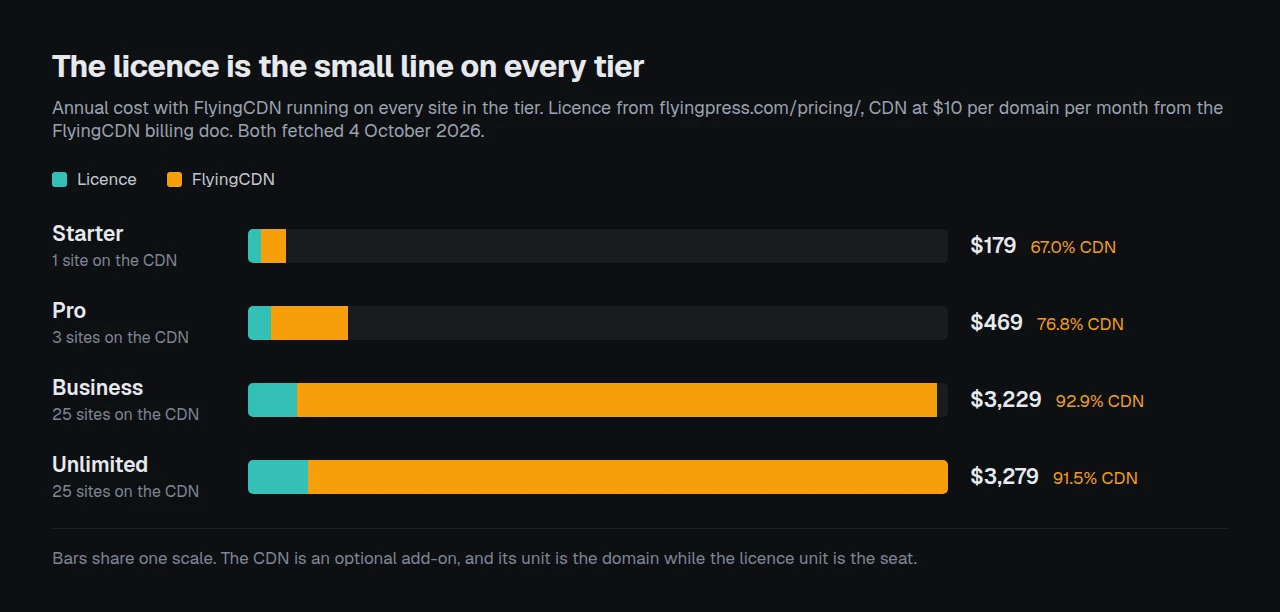
At one site the network costs 2.03 times the licence. At 25 sites on the Unlimited tier it costs 10.75 times the licence. Bandwidth above the included 100GB a month pushes it further: a domain serving 300GB a month pays $20 a month, which is $240 a year, or more than four times the Starter licence on its own.
None of that is a criticism of the price. Cloudflare Enterprise routing at $10 a domain is a defensible rate, and the alternative is usually a separate CDN contract with its own minimum. It is a criticism of every pricing comparison that stops at the licence column, including the ones that rank FlyingPress as the cheap option.
An Expired Licence Does Not Degrade the Plugin, It Disables It
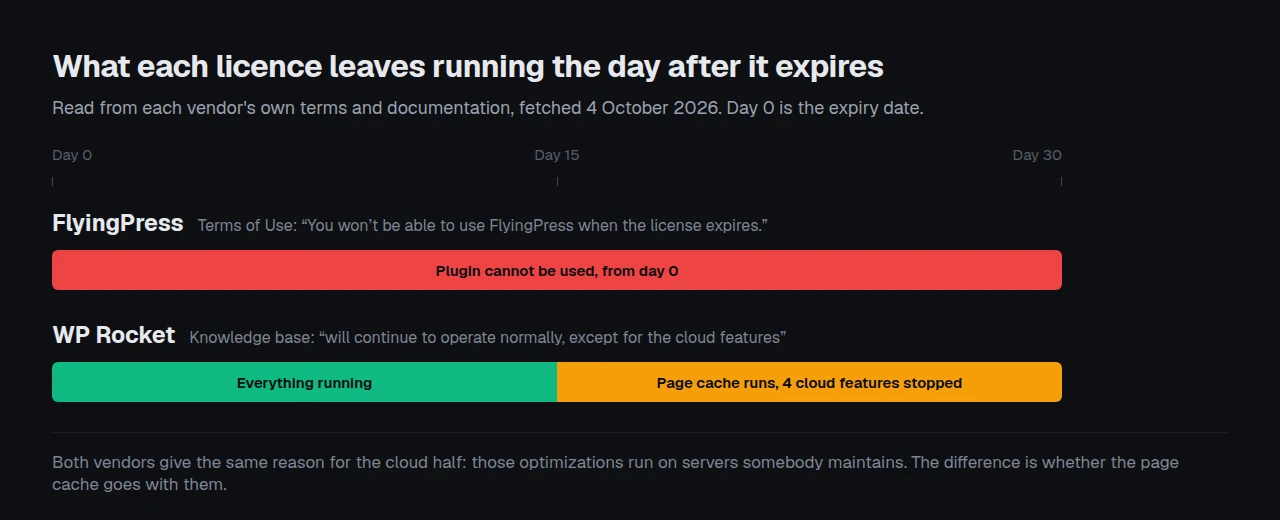
This is the most consequential sentence in FlyingPress’s published terms, and it is the one least likely to be read before purchase. The Terms of Use say: “Consider FlyingPress as a service rather than a ‘plugin’. FlyingPress has ongoing costs to optimize your site because some optimizations are done from our servers. An active license is required to download the plugin, get support and get updates. You won’t be able to use FlyingPress when the license expires.”
Set that against the same clause from the obvious alternative. WP Rocket’s knowledge base article on licence expiry, fetched 4 October 2026, lists what stops: support, plugin updates, dynamic exclusion updates, the free RocketCDN plan, and four cloud features. Then it draws the line: “After the license expires, the WP Rocket will continue to operate normally, except for the cloud features that will stop working 15 days after license expiration.”
| What happens when the licence lapses | FlyingPress | WP Rocket |
|---|---|---|
| Page caching keeps running | ❌ Terms say the plugin cannot be used | ✅ Documented as operating normally |
| Cloud-processed optimizations keep running | ❌ Covered by the same clause | ❌ Stop 15 days after expiry |
| Updates and support continue | ❌ Require an active licence | ❌ Require an active licence |
| The vendor publishes an itemised list | ❌ One sentence covers everything | ✅ A dedicated article with five named items |
Both vendors give the same reason for the cloud half, and it is a fair one: those features run on servers somebody pays for. The difference is scope. One contract treats the licence as access to a service, so lapsing ends the service. The other treats it as maintenance on software you keep running. That table is two rows to nothing in WP Rocket’s favour, and lapse behaviour is one line of four rather than the decision. On the line above it, the purchase itself, FlyingPress wins on a trial WP Rocket does not offer at all. That difference is worth more than the $0.95 separating their one-site prices, and it is the single most useful thing to know before the renewal lands on a card nobody is watching. The fuller treatment of what a lapse costs is in our write-up of what six things stop when a WP Rocket licence lapses.
The Refund Window Is Measured in Hours, Not Days
FlyingPress’s pricing FAQ answers the refund question like this: “We offer a 14-day free trial. No refunds needed - pay only if you continue after the trial.” Read on its own, that reads as a vendor with no refund policy, and two of our own earlier articles took it that way.
The dedicated Trial and Refund Policy page says something more precise, and more generous than “none”. Charges happen only after the trial ends or on renewal, and you can cancel before the charge date. If you were charged because you forgot to cancel, the page sets out three bands: within 24 hours of the charge, a 100% refund; between 24 hours and 7 days, a refund minus a 20% processing fee; after 7 days, no refunds.
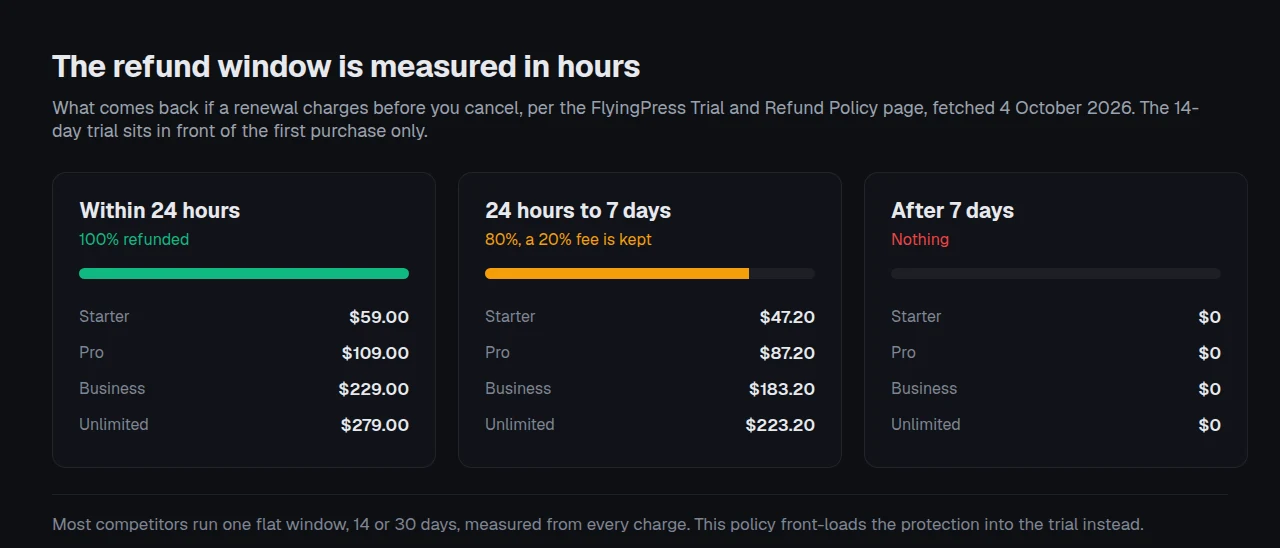
| When you ask | What comes back | Starter $59 | Pro $109 | Business $229 | Unlimited $279 |
|---|---|---|---|---|---|
| Within 24 hours | 100% | $59.00 | $109.00 | $229.00 | $279.00 |
| 24 hours to 7 days | 80% | $47.20 | $87.20 | $183.20 | $223.20 |
| After 7 days | Nothing | $0 | $0 | $0 | $0 |
That is a real policy and it protects the first purchase well, because the trial sits in front of it. The asymmetry is at renewal. A first purchase is protected by 14 days of free access before any money moves. The renewal a year later is protected by 24 hours after the money has moved, and the vendor states it sends email reminders before both the trial end and the renewal. Most competitors in this category run a flat 14 or 30 day money-back window that treats the first charge and the fifth identically. FlyingPress front-loads the protection instead. Knowing which model you are buying matters more than knowing the number of days. For reference on the flat-window side of that split, WP Rocket’s pricing page states a 14 day refund policy and no trial, and xSpeed Cache, which is ours, carries a 14-day money-back guarantee measured from the charge on every paid plan including the lifetime ones.
What “Unlimited” Excludes, in the Vendor’s Own Words
The Unlimited tier is unlimited for an agency and not for a host, and the restriction is written down. The Terms of Use state: “You may not use FlyingPress as an integrated part of your hosting service for all your clients (e.g., bundling FlyingPress with your hosting stack or auto-installing it on all hosted sites), whether free or paid.”
Client work is explicitly allowed. The same document permits client site usage “in situations where the license holder maintains an ongoing relationship with the client as a consultant”, and separately forbids resale and licence sharing across multiple users or communities. For a studio running sites under maintenance contracts, $279 covers the lot. For a hosting company planning to ship it as part of a stack, the tier that looks like the answer is not one. That distinction is normal in this market and it is rarely this clearly worded.
Worth noting for anyone comparing deployment scale: there is no published count of how many sites run FlyingPress. It is not in the wordpress.org plugin directory, so no active-install figure exists, confirmed by a direct API query on 4 October 2026. The HTTP Archive Core Web Vitals Technology Report’s census of 2,048 technologies, fetched the same day, publishes origin counts for WP Rocket at 354,098 and Perfmatters at 11,548 out of 9,731,427 crawled origins, and carries no count for FlyingPress at all. Its own pricing page cites the Chrome UX Report and HTTP Archive for its performance claims, which is the right instrument, but neither source yields a deployment number for it. The same census carries no origin count for our own plugin either, so that limitation cuts both ways and no article should turn a directory bucket into a measured deployment figure.
The Four-Line Invoice: Price Any Caching Plugin Before You Buy It
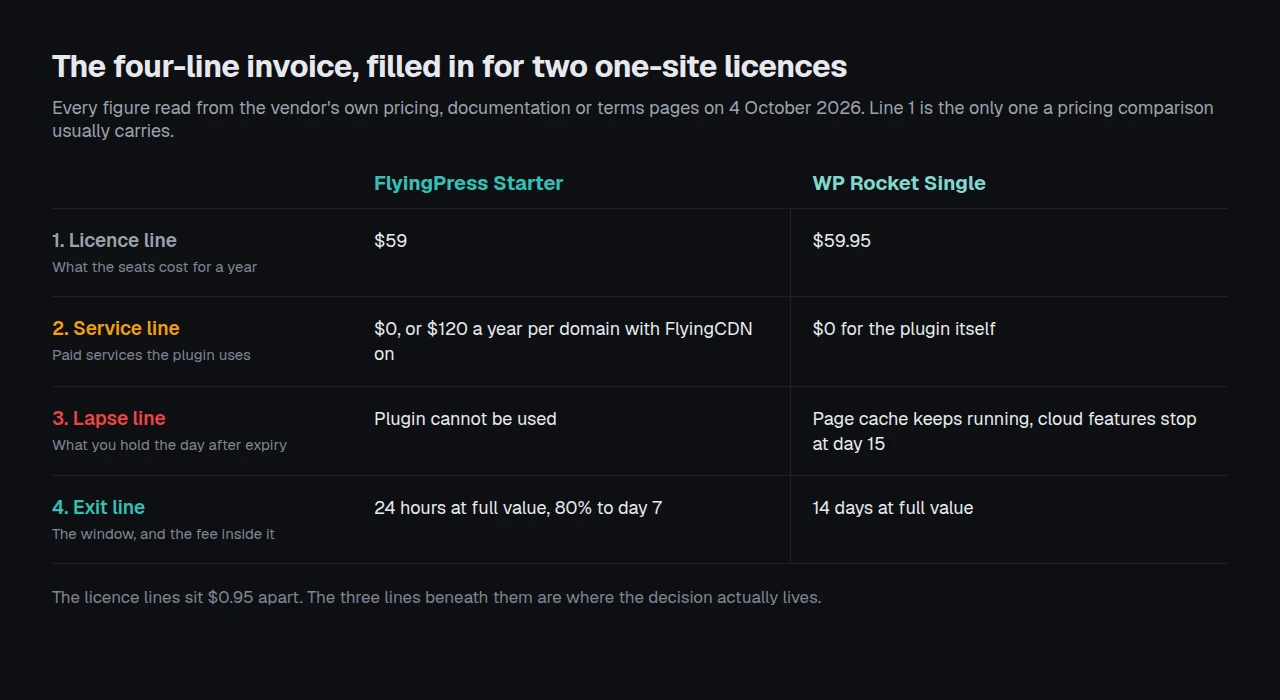
Here is the framework, and it takes about ten minutes per product. Write four lines, not one, and fill them from the vendor’s own pages rather than a roundup.
- Licence line. Annual or one-time, at the site count you will actually hit within twelve months, not today’s count.
- Service line. Every paid service the plugin hands work to, at the unit the vendor bills in. Check whether that unit is the site, the domain, the pageview or the gigabyte, because it decides how the line grows.
- Lapse line. Find the sentence in the terms that says what happens when the licence expires. If there is no such sentence, write “unpublished” and treat that as a cost.
- Exit line. The refund window, measured from the charge, and the fee deducted inside it.
Filled in for FlyingPress Starter the four lines read: $59, $0 or $120 depending on one switch, plugin unusable, 24 hours at full value. Filled in for a WP Rocket Single licence they read $59.95, $0, plugin keeps working, 14 days at full value. The licence lines are within a dollar of each other and the other three lines are where the decision lives.
What the framework cannot tell you. It prices contracts, not performance. It says nothing about which plugin makes a page faster on your stack, it cannot predict your bandwidth, and it assumes the published terms are the terms you get. Verify the figures yourself on the day you buy, because every number in this article carries a fetch date for exactly that reason.
Pricing Twenty Client Sites When Each Domain Bills Separately
Here is where the two units collide in practice. A studio with twenty maintenance clients buys one Unlimited licence at $279 and is done with the first line. The second line is twenty separate domains at $10 a month, which is $2,400 a year, and it arrives whether the clients are a brochure site doing 2GB a month or a shop doing 400GB. The licence cost per client is $13.95 a year. The network cost per client is $120, and it is the same $120 for the smallest site on the list.
Written out per client, the two lines behave nothing alike:
- Licence line, twenty clients: $279 once a year, which is $13.95 per client, and it does not change if client twenty-one arrives tomorrow.
- Network line, twenty clients: $2,400 a year, which is $120 per client, and it does change, by another $120, the moment client twenty-one is added.
- The crossover: the network line passes the licence line at the second domain and never comes back.
That asymmetry is the argument for running edge delivery selectively rather than as a default. Our own Agencies and freelancers page sets out how we approach the same problem: the cache and the optimization run on each origin, the fleet view is centralized, and nothing in our pricing bills per domain. xSpeed Cache is ours, built by WPDeveloper, a Startise company, and our ladder is $29 a year for one site through to $199 for unlimited, with lifetime licences at $79 to $399 that have no renewal date at all. Where we lose this comparison is specific and worth saying plainly: FlyingCDN runs on Cloudflare Enterprise today, and our own Cloudflare Enterprise tier is labelled coming soon, so on edge routing we currently have nothing equivalent to sell you. Nor do we have the track record: a direct wordpress.org API query on 4 October 2026 returned 10,000+ active installs for our plugin, first published in May 2026, against a product that has been sold for years.
Run the free scan on your own site before you price anything: xspeedcache.com/scan/
The scan reads your first byte, your cache evidence and your compression from outside the site, which tells you whether a delivery network would move your numbers at all. A site whose origin already answers in 60 milliseconds to its own audience is not the site that needs $120 a domain spent on edge routing. For the full capability picture across nine products, including the rows where competitors beat us, our 80-capability comparison is the honest version, and Free vs Pro draws our own paid line.
Common Mistakes People Make Budgeting for FlyingPress
- Pricing the licence and forgetting the unit the network bills in. The licence counts seats, the network counts domains, and the second number is the larger one from the first site onward.
- Buying Business at 25 sites. Unlimited is $50 more and has no cap. The upgrade is prorated, so the only thing the $50 saves is an admin task you will probably do anyway.
- Reading “no refunds needed” as “no refunds”. The policy page has three bands, and the first one returns everything.
- Treating the annual fee as maintenance. It is access. The terms say the plugin cannot be used once the licence expires, which makes a lapse an outage rather than a slow drift.
- Letting a renewal land unattended on a client’s card. At day eight the refund is zero, and the renewal is annual, so nobody is watching the date.
- Assuming “Unlimited” covers a hosting stack. The terms exclude bundling and auto-installing across hosted sites, in a named clause.
- Comparing bandwidth allowances against a CDN’s cached-only billing. FlyingCDN counts cached and uncached traffic alike, which is clearer and not always cheaper.
Frequently Asked Questions
Is FlyingPress a one-time payment or a subscription?
A subscription. All four tiers are annual, the Terms of Use say licences renew automatically after one year, and you can cancel at any time to stop the renewal. There is no lifetime option.
I paid for Business and now have 27 client sites. What does that cost me?
An upgrade to Unlimited at $279, and you pay the difference rather than the full price, per the pricing FAQ. The $50 gap between the two tiers is why starting at Business for a growing fleet rarely pays.
Does FlyingPress need FlyingCDN to work?
No. The documentation calls FlyingCDN “an optional add-on”. Page caching, cache preloading, critical CSS, unused CSS removal, image optimization and minification all run without it, with minification able to run either on your server or through the network.
My licence expired and the plugin stopped. Is that a bug?
That is the documented behaviour. The Terms of Use state you will not be able to use FlyingPress when the licence expires, and that it is sold as a service rather than as a plugin you keep. Renewing reactivates it.
I forgot to cancel and got charged. Can I get the money back?
It depends on how fast you ask. Within 24 hours of the charge the policy page promises a 100% refund. Between 24 hours and 7 days you get 80%, with a 20% processing fee deducted. After 7 days there are no refunds.
Is the trial actually free, or does it take a card?
It takes a card and charges nothing until day 14. The policy page says charges happen only after the trial ends or on renewal, that you can cancel from Account then Plans then Cancel plan, and that reminder emails go out before the trial ends.
Do my staging sites use up licence seats?
No. The pricing FAQ states that staging and development sites are not counted towards the licence, which is a genuine saving for anyone running a staging copy per client.
How much bandwidth does $10 a month actually buy?
100GB on one domain, counting cached and uncached traffic together. Above that it is $5 per additional 100GB, so 200GB is $15 a month and 300GB is $20.
Which is cheaper over three years, FlyingPress or WP Rocket?
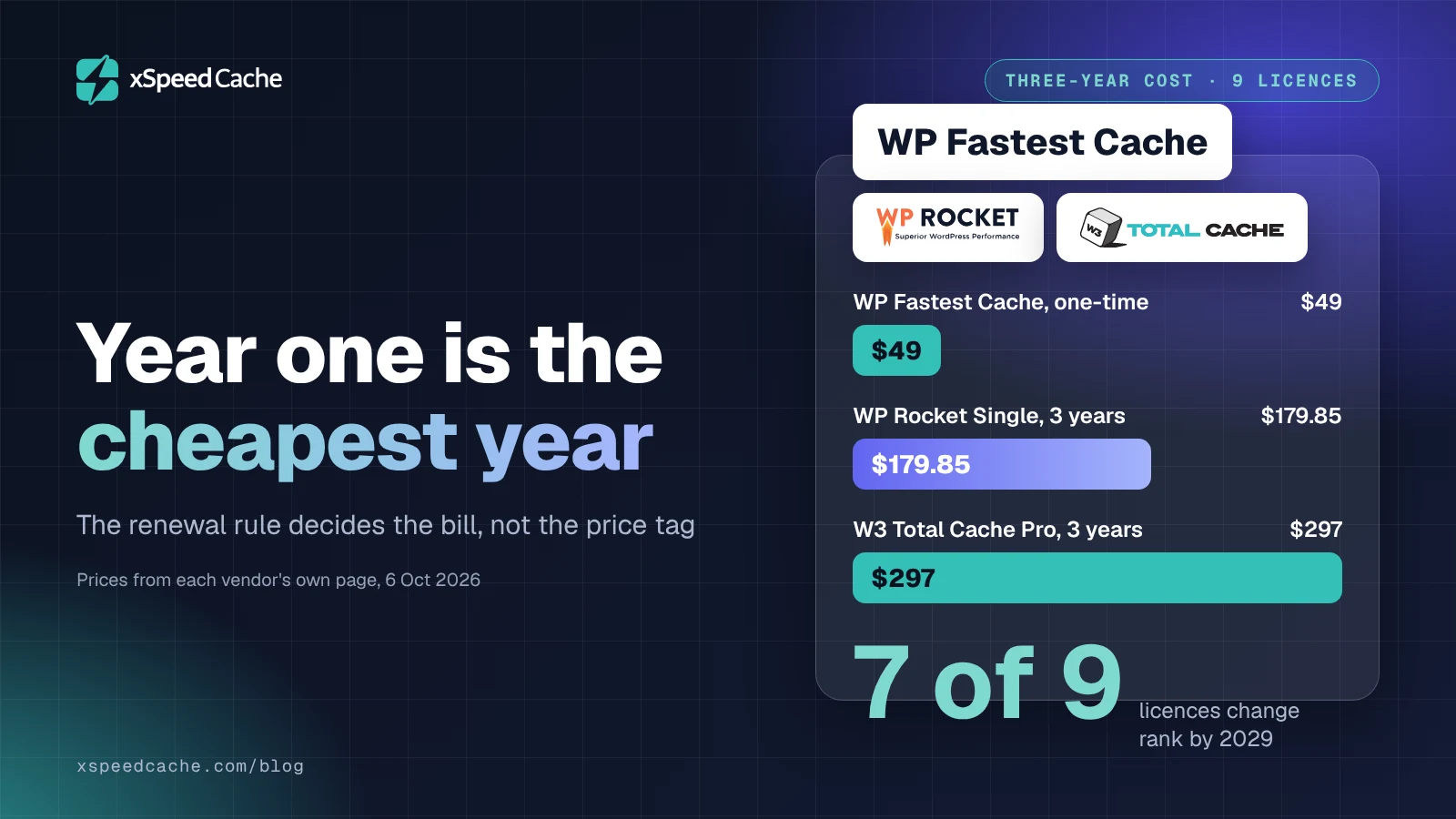
At one site with no network attached, $177 against $179.85, which is a rounding error. At 25 sites it is $837 for FlyingPress Unlimited against $899.85 for WP Rocket’s 50-site Multi licence. Our own Agency tier is $297 over the same three years, or $249 paid once, and we are one option among several here rather than the obvious answer.
Can I use it on client sites as a freelancer?
Yes. The terms permit client site usage where you maintain an ongoing consulting relationship with the client, and forbid resale, licence sharing and bundling it into a hosting stack.
Is there a free version I can test on a live site first?
Not of FlyingPress, which sells a 14-day trial instead. If a permanently free tier is what you need, our own free plugin page-caches on any standard host, and several free plugins do the core job at no cost with different limits.
Does the price include image optimization, or is that metered separately?
It is included in the licence. Image compression to AVIF, WebP or the original format is listed on the features page as part of the plugin, and the network additionally converts images at the edge if you run it.
Conclusion: Budget the Whole Invoice, Not the Licence
| Your goal | The pick | On what basis |
|---|---|---|
| One site, cheapest competent paid plugin | Perfmatters at $29.95, or our Personal tier at $29 | Both undercut every page-cache licence here at one site |
| One site, trial before any charge | FlyingPress Starter at $59 | 14 days of full access with no money moving |
| Edge delivery bought in one place | FlyingPress with FlyingCDN, at $179 a year for one site | Cloudflare Enterprise routing without a separate contract |
| 25 client sites, lowest annual cost | Our Agency tier at $99, or $249 once | $3.96 a site against $9.16 on FlyingPress Business |
| A plugin that still runs after you stop paying | WP Rocket, or any lifetime licence | FlyingPress’s terms end use at expiry, and WP Rocket’s do not |
FlyingPress publishes more of its contract than most of this market, and that is the reason this article could be written from primary sources alone. Its licence ladder is competitive, its trial is better than a refund window for a first purchase, and its delivery network is priced honestly for what it is. The thing to carry away is that the ladder is one of four numbers, and on every tier it is the smallest one once the network is on.
What to do this week:
- Run the free xSpeed Scan on the site you are deciding for, and read the first-byte and cache rows before you price anything.
- Fill in the four-line invoice for the two products on your shortlist, from their own terms pages rather than a roundup.
- Find the expiry sentence in each vendor’s terms. If it is missing, treat that as a cost.
- Diarise the renewal date the day you buy, because the refund window here is 24 hours wide.
- If you want the trial and the edge network in one bill, FlyingPress is the better buy of the two and we would rather say so. If you want a lifetime licence and a free tier to test on first, our pricing page lists both from $29 a year or $79 once with a 14-day money-back guarantee, and our migration guide imports settings from a competing plugin. Check your stack against our server compatibility notes first, and if you are weighing edge HTML caching instead, the APO comparison prices that route.
Tell us which line surprised you on your own invoice. The four-line method came out of pricing these products one at a time, and the service line is the one that keeps being larger than anybody expects.