Only 23% of the WordPress Origins We Scanned in 2026 Have Any Field Data at All
 M Asif Rahman 18 min read
Updated October 2026
Of 398 WordPress scan reports read in full on 26 October 2026, only 92 carry any Core Web Vitals field reading at all, which is 23.1%. Google’s own CrUX methodology documentation, retrieved the same day, says a site must be both publicly discoverable and “sufficiently popular” to appear, and that the popularity threshold is “not disclosed”.
The comparison you expect from a Core Web Vitals article is lab data against field data. The more useful question comes one step earlier: whether field data exists for your site in the first place. For three WordPress sites in four, it does not, and no amount of optimisation work changes that. This article reports the coverage rate across the xSpeed Scan archive, the three rungs a site can occupy, what does and does not predict which rung you are on, and what to measure when the answer is nothing.
TL;DR: What to Do When the Report Is Empty
| If you want… | Do this | Why |
|---|---|---|
| To know whether you have field data | Run one scan and look for a field block, or open PageSpeed Insights and look for the coloured bars above the lab section | It takes one request and settles the question |
| To know why it is empty | Check for a stray noindex first, then accept the traffic threshold | Those are the only two gates Google documents |
| To get into the dataset | Nothing you can do directly | Google states you cannot submit a page or an origin for inclusion |
| To measure your real users anyway | Install a real-user beacon and keep reading TTFB and lab metrics | They answer the same question without a traffic minimum |
| To judge a change you just shipped | Lab metrics plus server timing, not Search Console | A 28 day sliding window cannot show you yesterday |
The number that matters to most readers is the first one: 76.9% of the WordPress sites in this sample have no field reading on either form factor, so the Search Console Core Web Vitals report for those properties shows the “No data available” screen and will keep showing it.
The Method, and the Eight Things It Cannot Tell You
Publishing the method before the result is the only way a census like this is worth reading, so here it is in full, with its holes.
What was measured. The xSpeed Scan archive is a public corpus of speed reports. On 26 October 2026 it held 3,770 graded sites across 9,620 scans, according to its own /api/scan-stats endpoint. This study drew 24 of its 151 list pages, spread from the newest to the oldest, and read all 595 resulting reports through /api/scan/<id>. Of those, 398 were WordPress.
What counts as covered. A report counts as having field data if a Chrome UX Report reading appears anywhere in it: in the summary measured.field block, or on either the desktop or the mobile device record. That union matters, because the three disagree more often than you would guess, and Result 3 quantifies it.
| Property of the sample | Value |
|---|---|
| Reports read in full | 595 |
| WordPress reports | 398 |
| Non-WordPress reports | 197 |
| Archive list pages sampled | 24 of 151 |
| Scan dates covered | 30 Aug to 26 Oct 2026 |
| Rubric versions present | 5 (2026.08.1 to 2026.10.1) |
| Share of the WordPress cut running xSpeed Cache | 61.3% |
Eight things this cannot tell you, each of which would change a number above:
- The sample is sites somebody chose to scan. Nobody scans a site they feel good about, so this population skews toward sites whose owner suspected a problem. It is not a random sample of WordPress.
- It over-represents our own users. 244 of the 398 WordPress reports, 61.3%, are sites running xSpeed Cache. On the current rubric that share rises to 80.6%. Both figures are published here because both change how you should read the headline.
- There is no traffic measurement in the instrument. CrUX inclusion turns on visitor counts, and the scan archive records no visitor counts, so every cut below is a proxy for traffic rather than a reading of it.
- Coverage is a property of a moment. Google states that pages and origins are “automatically included or removed from the dataset if their eligibility changes over time”, so a site uncovered in August can be covered in November.
- A missing block could in principle be an instrument failure. It mostly is not: 8 of the 595 reports carried a PageSpeed error on at least one device, and excluding all of them from the WordPress cut moves coverage from 23.1% to 23.4%.
- The rubric changed during the window. Five rubric versions appear across the sample, and the
scopeandcategorylabels are emitted only from2026.10.1. Every ladder figure below is therefore computed on the current-rubric cut alone. - Scans are not evenly spread in time. The archive’s newest pages are denser than its oldest, so the sample is weighted toward October.
- One reading per site. Where a host appears more than once in the archive, this study reads the scan the list page returned and does not deduplicate by host.
Result 1: Three Quarters of WordPress Sites Are Invisible to the Field
Across the 398 WordPress reports, 92 carry a field reading and 306 do not.
| Cut | Reports | With a field reading | Share |
|---|---|---|---|
| WordPress | 398 | 92 | 23.1% |
| Not WordPress | 197 | 55 | 27.9% |
| All reports | 595 | 147 | 24.7% |
| WordPress, excluding any PageSpeed error | 393 | 92 | 23.4% |
| WordPress, current rubric only | 175 | 40 | 22.9% |
Four readings of the same corpus land within 1.8 points of each other, so the headline does not depend on which slice you take. It does not depend on WordPress either. Non-WordPress sites in the same archive sit at 27.9%, close enough that this is a story about small sites rather than about a content management system. WordPress happens to be where most small sites are.
Result 2: The Coverage Ladder Has Three Rungs
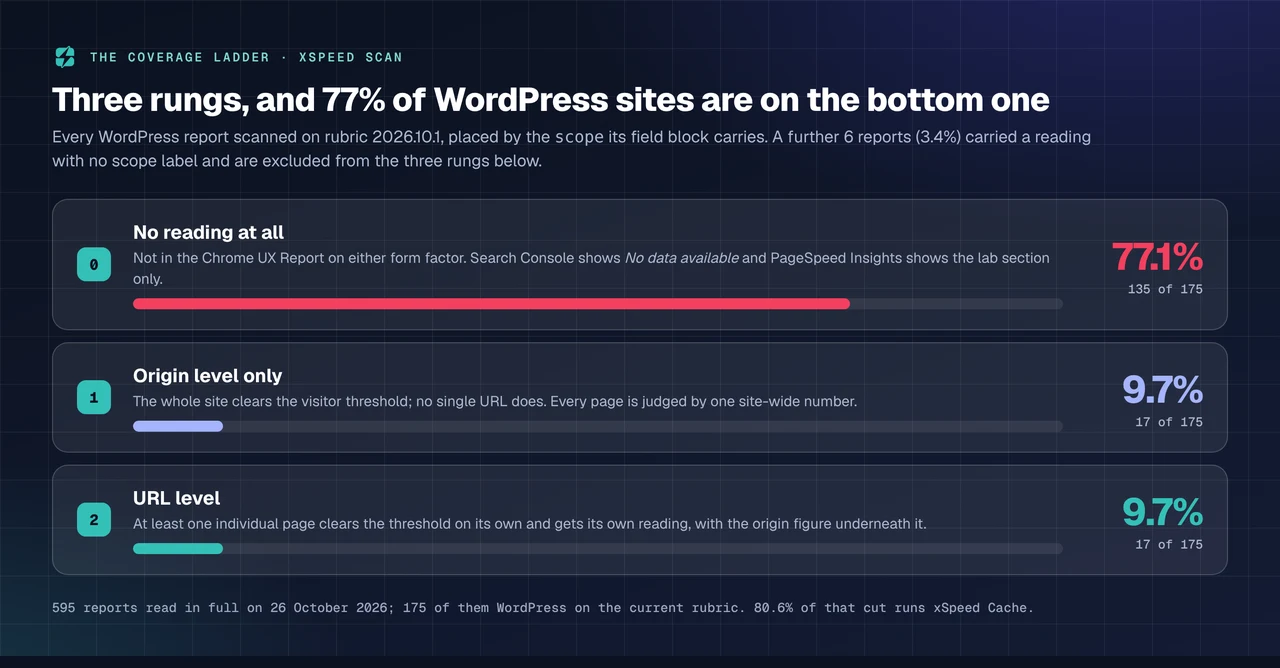
The reports on the current rubric carry a scope label on every field block, and that label turns a yes-or-no question into a ladder. Google Search Console documentation describes the same structure from the other side: if a URL “is part of a group that doesn’t have enough data to show, then Search Console will create the origin group”, which contains data for every URL beneath it.
| Rung | What it means | Reports | Share |
|---|---|---|---|
| 0. No reading | Absent from the dataset on both form factors | 135 | 77.1% |
| 1. Origin level only | The site clears the threshold, no single page does | 17 | 9.7% |
| 2. URL level | At least one page clears the threshold on its own | 17 | 9.7% |
| Covered, no scope label | A reading with no scope emitted | 6 | 3.4% |
Two consequences follow from rung 1, and they are the practical half of this study.
- On rung 1, every page you own is judged by one site-wide number. Your slowest template drags your fastest one down, and Search Console cannot tell you which template is the problem.
- Moving from rung 1 to rung 2 is not an optimisation task. Google states the minimum visitor count “is the same for pages and origins”, so a page reaches its own reading by getting the traffic a whole site needs.
Result 3: A Quarter of Covered Sites Are Covered on One Device Only
Of the 90 reports carrying a device-level field block, 67 have readings for both desktop and mobile, 17 for mobile alone, and 6 for desktop alone. One in four covered sites is therefore half covered.
| Devices with a field reading | Reports | Share of device-level coverage |
|---|---|---|
| Desktop and mobile | 67 | 74.4% |
| Mobile only | 17 | 18.9% |
| Desktop only | 6 | 6.7% |
This is the trap that produces the most confused support threads. Google’s own help page for the report says the “No data available” screen means “there is not enough data available in the CrUX report to provide meaningful information for the chosen device type (desktop or mobile)”, and the device selector is easy to miss. A site with mobile data and no desktop data is a site that can show a full report and an empty one depending on one tab.
Result 4: Nothing You Control Moves Coverage Much
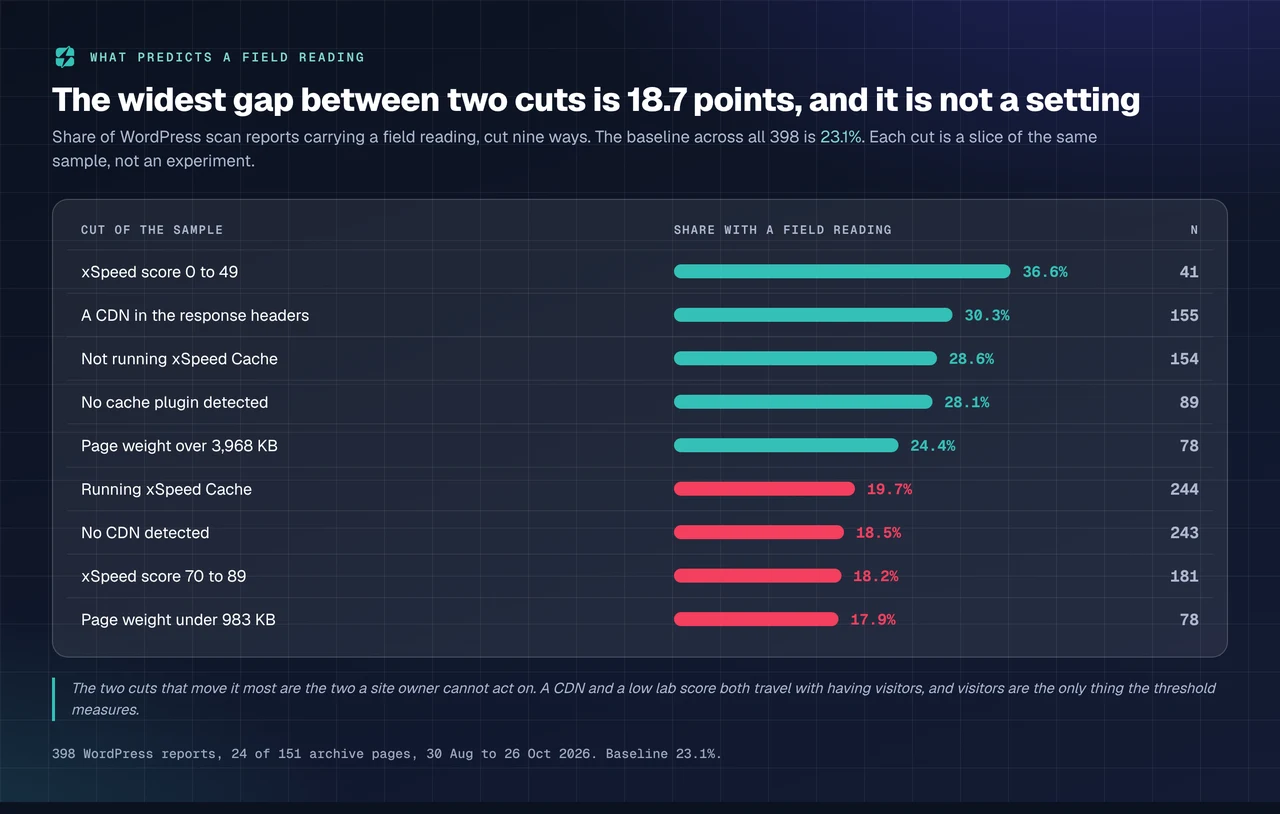
Nine cuts of the same 398 reports, each measured against the 23.1% baseline:
| Cut of the sample | n | With a field reading |
|---|---|---|
| xSpeed score 0 to 49 | 41 | 36.6% |
| A CDN in the response headers | 155 | 30.3% |
| Not running xSpeed Cache | 154 | 28.6% |
| No cache plugin detected | 89 | 28.1% |
| Page weight over 3,968 KB | 78 | 24.4% |
| Running xSpeed Cache | 244 | 19.7% |
| No CDN detected | 243 | 18.5% |
| xSpeed score 70 to 89 | 181 | 18.2% |
| Page weight under 983 KB | 78 | 17.9% |
The widest gap in the table is 18.7 points, between the worst-scoring sites and the lightest pages, and it is not a setting: a site with a CDN, a heavy page and a poor score is usually a site with visitors, and visitors are the only quantity the inclusion threshold measures.
Page weight is the cleanest negative result here. Four weight quartiles produce 17.9%, 21.8%, 26.9% and 24.4%, a 6.5 point spread with no trend. How heavy your pages are tells you nothing about whether Google is watching them.
Two Rows That Read Against Our Own Interest
Both of these belong in a study published by the company whose data it is.
Sites running xSpeed Cache are less likely to have field data than sites that are not, 19.7% against 28.6%. The honest reading is not that our plugin hides a site from Google. It is that our install base skews smaller and quieter than the rest of the archive, which is what you would expect of a plugin at the 10,000+ install bucket, verified against the wordpress.org Plugin API on 26 October 2026, against LiteSpeed Cache at 7,000,000+. Because 61.3% of this sample runs our plugin, the 23.1% headline probably understates coverage across WordPress at large.
Real-user monitoring is a paid feature in our plugin and a free one in a competitor’s. The 80-capability comparison records real-user monitoring as Pro in xSpeed Cache, Pro in WP Rocket and free in Hummingbird. If the conclusion of this article is that the uncovered majority needs its own beacon, then the cheapest route to one is not ours, and saying otherwise would make the recommendation worthless.
There is also a selection effect inside the covered group that is worth naming before anyone quotes it as a finding about speed. The covered WordPress sites have a median Lighthouse score of 76 and a median first byte of 341ms. The uncovered ones score 88 and 272ms. Sites with real traffic look worse on lab tests, because real traffic comes with real third-party scripts and real server load. Of the 44 covered reports carrying a category label, 21 read SLOW, 17 AVERAGE and 6 FAST.
Why the Dataset Works This Way, in Google’s Own Words
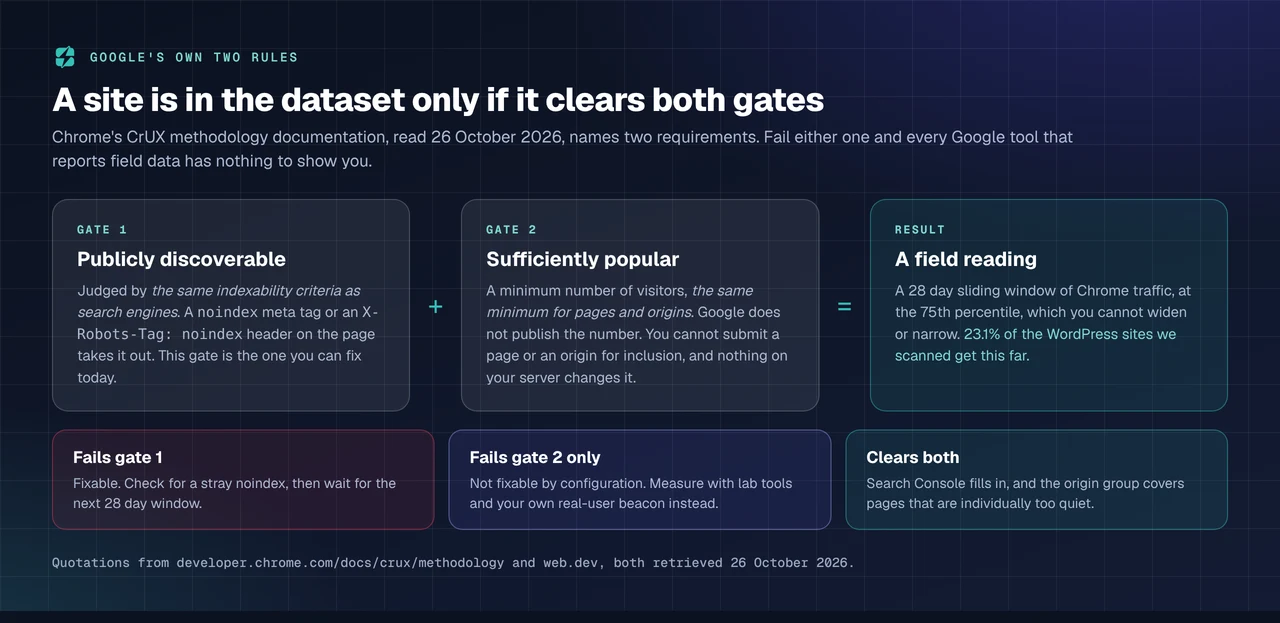
Chrome’s CrUX methodology documentation, retrieved on 26 October 2026, names exactly two requirements for an origin.
Gate one, publicly discoverable. Determined “using the same indexability criteria as search engines”. A page served with X-Robots-Tag: noindex, or carrying a noindex robots meta tag, is out. This is the gate worth checking, because it is a configuration mistake rather than a fact about your audience, and a staging flag left on in production produces exactly this symptom.
Gate two, sufficiently popular. Meaning “a minimum number of visitors”, where “an exact number is not disclosed” and “the minimum number is the same for pages and origins”. Google adds that “at this time, you cannot manually submit pages or origins for inclusion”.
Google’s own guide to the differences between CrUX and real-user monitoring is blunter than any third-party summary: the eligibility criteria mean that “in most cases, this will result in no data being available in CrUX”. That sentence and the 76.9% measured here are the same finding from two directions, and it is the reason an empty report is not a fault to escalate.
Two further properties of the dataset follow from the same page, and both outlive any percentage in this article:
- The window is fixed. CrUX reports “a 28 day sliding window of traffic, and it is not possible to change this timeframe”, so a fix shipped today cannot appear in full for four weeks.
- The browser is fixed too. CrUX “only measures in Chrome browsers”, so a site whose audience runs Safari on iPhones is under-measured even when it clears both gates.
The Coverage Check: Four Minutes, No Account
The framework this study hands over is a placement test. Run it once, write the answer down, and stop re-reading an empty Search Console tab.
- Scan the origin and look at the field block. A report with no field block on either device is rung 0. One carrying
scope: originis rung 1, and one carryingscope: urlis rung 2. - Check both device tabs in Search Console or PageSpeed Insights before concluding you are on rung 0, because 25.6% of the sites with a device-level reading in this sample carry it on one form factor only.
- Check for a
noindexon the page you tested, withcurl -sI https://example.com/ | grep -i robotsand a look at the rendered HTML. If one is there, you have found a fixable cause and the next 28 day window is your test. - Record the date. Eligibility changes over time in both directions, so a result without a date is worth nothing in three months.
Its limitations, stated with it: the test reports what the dataset says today rather than why, and on rung 0 it cannot tell “slightly below the threshold” from “nowhere near it”. Nothing available to a site owner can, because the number is not published.
Measuring a Site Google Will Not Measure
Three instruments answer the question CrUX cannot, and only one of them costs anything.
A real-user beacon of your own. Google publishes the web-vitals JavaScript library and describes it as “a small, production-ready wrapper around the underlying web APIs” that matches how the metrics are reported by Google’s own tools. It is Apache-2.0 licensed and at version 6.2.3, per the npm registry on 26 October 2026. It has no traffic minimum, it measures every browser rather than Chrome alone, and it gives you yesterday instead of a 28 day average. Our plugin’s own RUM beacon is a Pro feature with a sample rate and a logged-in exclusion, and it does the same job with no code to write; Hummingbird’s is free, as noted above.
Lab metrics, read correctly. On rung 0 the lab score stops being the number everyone tells you to ignore and becomes the only number you have. Our guide to reading a PageSpeed report explains which part of it is diagnostic and which part is not, and the lab-versus-field study across 353 WordPress hosts shows how far the two instruments drift apart on the sites where both exist.
Server response, which no threshold gates. First byte is measurable on any site at any traffic level, it is the half of page speed a cache actually moves, and our cache-hit study measured the lift at 481ms of first byte across the archive. The companion piece on reducing TTFB covers what to do with the reading.
For an agency, the per-site version of this is the slow part. The xSpeed Scan API used for this study is public and documented in the Scan MCP reference, so a list of client domains becomes a coverage column in a spreadsheet rather than forty browser tabs, and xSpeed Hub keeps the same reading per site across a fleet.
Run the free scan on your own site and see which rung you are on: xspeedcache.com/scan/
Common Mistakes People Make With an Empty Report
- Waiting it out. On rung 0 the report is not late, it is absent, and waiting is only correct if you expect your traffic to cross an undisclosed line.
- Reading the origin number as a page number. On rung 1 the figure covers every URL beneath the origin, including the ones you never optimised.
- Treating one device tab as the whole answer. A quarter of covered sites in this sample have a reading on one form factor only.
- Assuming a plugin or a host can fix it. Neither a cache plugin nor a CDN moved coverage by more than twelve points in this sample, and the direction of both is explained by traffic.
- Shipping a fix and checking tomorrow. The window is 28 days wide and sliding, so a partial improvement is all you will see for a month.
- Trusting a lab score as a field verdict. The two disagree often enough that a 4,116-word study was needed to describe how, and that is on the sites where both readings exist.
Frequently Asked Questions
My Search Console Core Web Vitals report says “No data available”. Have I set something up wrong?
Almost certainly not. Google’s help page gives two causes: a property that is new to Search Console, and not enough data in the CrUX report for the chosen device type. In this sample 76.9% of WordPress sites had no field reading at all, so the empty screen is the common case rather than the exception.
I run PageSpeed Insights and only get the lab section. Why does my friend’s site show coloured bars?
The coloured bars are the field section, and they appear only for origins and pages in the Chrome UX Report. Your friend’s site clears the visitor threshold and yours does not. Nothing about the two sites’ speed is implied by that difference.
Can I ask Google to include my site?
No. The CrUX methodology documentation states that “at this time, you cannot manually submit pages or origins for inclusion”, and that inclusion is recalculated automatically as eligibility changes.
I added a noindex tag months ago for a staging site and forgot to remove it. Could that be why I have no field data?
Yes, and it is the one cause on this list you can fix today. Public discoverability is the first of Google’s two requirements, judged by the same indexability criteria search engines use. Remove it, confirm the page is indexable, and give the next 28 day window time to fill.
My homepage has field data but my product pages do not. Is that a bug?
That is rung 1 of the ladder and it is working as designed. The origin cleared the threshold and the individual pages did not, so Search Console groups them under the origin. 9.7% of the current-rubric sites in this sample were in exactly that position.
I see mobile Core Web Vitals in Search Console but the desktop tab is empty. Which one is right?
Both. Coverage is calculated per form factor, and 18.9% of the covered sites in this sample had mobile data with no desktop data. The desktop tab is empty because desktop visitors alone did not clear the threshold.
Will installing a caching plugin get me into CrUX?
No. In this sample, sites with no cache plugin detected had slightly higher coverage, 28.1% against 21.7%, which reflects who scans what rather than any effect of caching. Inclusion is decided by visitors, not by your stack.
What should I measure instead?
A real-user beacon such as Google’s web-vitals library or your plugin’s built-in equivalent, plus lab metrics and first byte. Between them they cover every visitor rather than the Chrome subset, report in hours rather than 28 days, and have no popularity gate.
Does being outside CrUX hurt my rankings?
Page experience is one of many signals, and a site with no field data has no Core Web Vitals signal rather than a bad one. The practical answer is that sites small enough to be outside CrUX are rarely losing positions to a metric Google cannot compute for them.
How many sites did you measure, and can I reproduce this?
595 scan reports across 24 of the archive’s 151 list pages, 398 of them WordPress, read on 26 October 2026 through the public /api/scan-list and /api/scan/<id> endpoints. Every figure here comes from those two endpoints and from the Google documentation linked above.
My agency’s clients are all small. Is there any point tracking Core Web Vitals for them?
There is a point in tracking the metrics and little point in tracking them through CrUX. Measure them with a beacon on each site, and treat Search Console as a bonus that arrives if a client grows into it.
The numbers in this article will go stale. How fast?
Coverage is recalculated continuously and our archive grows daily, so treat 23.1% as a reading dated 26 October 2026. The ladder, the two gates and the 28 day window are properties of the dataset rather than of our sample, and those will outlast the percentage.
Conclusion: Measure the Site You Have
Three WordPress sites in four cannot be judged by Google’s field data, because Google never collected any. That is a fact about traffic thresholds, documented by Chrome and reproduced here across 398 reports, and it is not a defect in your site or a task on your backlog.
| If you are… | Your instrument | Your next move |
|---|---|---|
| On rung 0, no reading | Lab metrics, TTFB, your own beacon | Install a beacon, stop refreshing Search Console |
| On rung 1, origin only | Origin field data plus per-page lab runs | Find your worst template yourself |
| On rung 2, URL level | Field data per URL | Use it, and keep a beacon for the pages it misses |
| Running client sites | The scan API, one row per domain | Record each client’s rung with a date |
What to do this week: scan one site and write down its rung. Check both device tabs before you conclude anything. Grep your production HTML for a stray noindex, because that is the only cause on the list you can fix. Put a real-user beacon on the sites that matter, Google’s free library or any equivalent. Then, if you want the beacon, the per-URL hit and miss heatmap and the speed work in one place, xSpeed Cache Pro starts at $29 a year at the founding price with a 14-day money-back guarantee, and the free and Pro breakdown shows exactly where the line falls before you spend anything.
If you run this check across your own sites and get a coverage rate different from ours, we would like to see it. The endpoints are public and the method above is four steps long.