Critical CSS for WordPress in 2026: Two Core Hooks, and a Fold Too Big to Inline

Updated November 2026
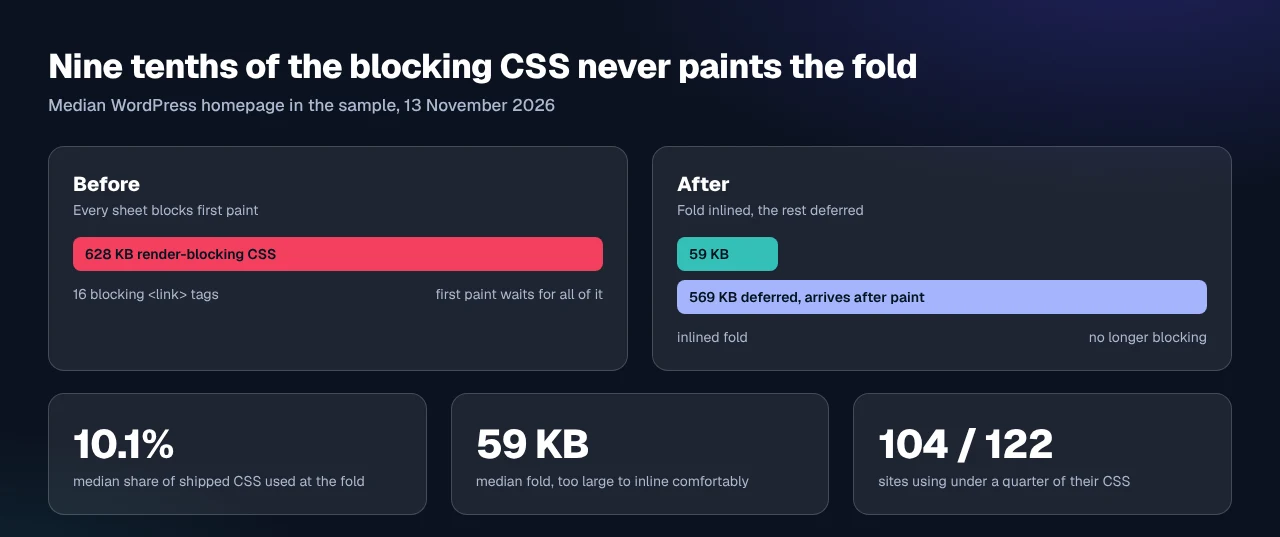
We measured 122 live WordPress homepages on 13 November 2026: the median one shipped 628 KB of external CSS and used 59 KB of it, 10.1%, to paint the first screen. Google’s own guide to deferring non-critical CSS, last updated 17 February 2019, says most sites should reach their targets without this technique at all. Nine tenths of the bytes holding up your first paint are not needed for it, and the tenth that is tends to be too large to inline comfortably.
The question people ask is which plugin generates critical CSS. The more useful question is how big your own fold is, because that number decides whether the job is worth doing.
Quick Summary: Three Questions Before You Inline Anything
Answer these in order. Two outcomes mean you stop.
| If your measurement says | Do this | Why |
|---|---|---|
| Under 3 blocking sheets, or under 100 KB of CSS | Nothing. Do images instead | One round trip is not your bottleneck |
| Your fold is under about 20 KB | Inline it, defer the rest | Small enough to pay for itself every view |
| Your fold is 50 KB or more | Prune the source, then inline | 50 KB on every response costs more than it saves |
| You cannot edit theme files | Use a plugin panel, ours or another | Both steps need a hook or a setting |
What We Measured: 122 Homepages and the Fold They Actually Paint
The method, so you can repeat it. We loaded all 142 WordPress homepages marked public in the first eight pages of our own scan archive, in headless Chrome at a 412 by 915 mobile viewport on 13 November 2026. Chrome’s rule-usage tracking recorded which rules painted the first screen, with no scrolling and no clicking, the definition a generator works to. 122 returned measurable external stylesheets, 83 of them running our plugin, so read the figures as a property of this sample.
| Measure, 122 WordPress homepages, 13 Nov 2026 | p25 | Median | p75 |
|---|---|---|---|
| External CSS shipped | 318 KB | 628 KB | 1,054 KB |
| Bytes used to paint the first screen | 33 KB | 59 KB | 119 KB |
| Share of shipped CSS used | 6.2% | 10.1% | 15.3% |
Blocking <link rel="stylesheet"> in <head> | 9 | 16 | 28 |
Two readings pull against each other. The waste is real: 104 of 122 sites used under a quarter of the CSS they blocked on, and 60 used under a tenth. The fold is not small, though.
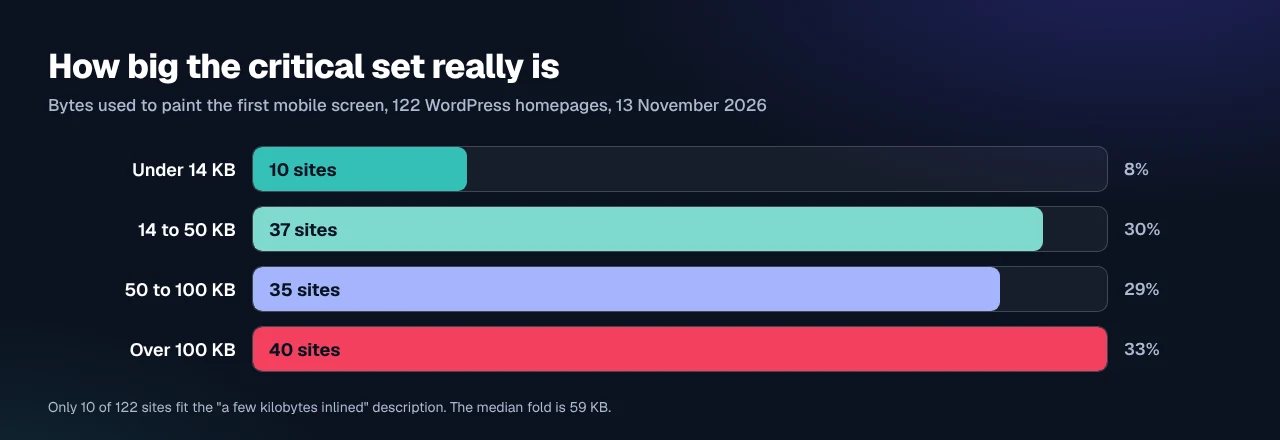
That is what the walkthroughs leave out. Inlined, those bytes ride on every HTML response and cannot be cached separately, so a careless job moves weight rather than removing it.
Core Gave Scripts a Strategy and Left Stylesheets on media=“all”
Nothing in WordPress catches a mistake on this half of the problem. The two enqueue functions have the same shape and diverge on the fifth argument, verified against the function reference on 13 November 2026:
| Function | Fifth parameter | Default | Can it make the asset non-blocking? |
|---|---|---|---|
wp_enqueue_script() | array|bool $args | array() | Yes, strategy takes defer or async |
wp_enqueue_style() | string $media | 'all' | No |
media="all" matches the screen, so the browser treats the sheet as render-blocking. There is no strategy argument for styles, no deferral concept in WP_Styles, and no notice when a theme enqueues twelve blocking sheets. Scripts got a safety net in 6.3. Stylesheets never did, which is why the script half is mostly reading core’s own receipt while the stylesheet half needs you to build something. The route below is two core hooks and no licence.
Step 1: Read Your Own Fold Instead of Trusting a Generator
Work one page at a time. A homepage, a post and a landing page paint different frames, so one blob for the site is wrong on two of them.
- Open the page in Chrome in a private window, at the width you care about. Phone first.
- Open DevTools, press
Ctrl+Shift+P(Cmd+Shift+Pon macOS), typecoverage, choose Show Coverage. - Click the reload icon inside the Coverage panel. Do not scroll and do not click anything.
- Set the filter to CSS and read the Unused Bytes column, plus the total at the bottom.
The green portion of each bar is your fold at that viewport, measured with the instrument we used.
For a number you can check yourself: blog.archive.org served 15 external stylesheets totalling 274 KB on 13 November 2026 and used 23.8 KB to paint the first mobile screen, with 9 blocking <link> tags and none deferred. Good candidate. A 150 KB fold says delete CSS instead, which is a different job. Record the number before changing anything.
Step 2: Inline the Set in wp_head, and Why wp_add_inline_style Will Not Do It
The obvious function is the wrong one. Per its own reference page, wp_add_inline_style() adds CSS to a registered stylesheet, and “styles will only be added if the stylesheet is already in the queue”. Your critical CSS must survive that sheet being deferred, so attaching it there defeats the purpose. Print it into the head directly:
add_action( 'wp_head', function () {
    if ( ! is_front_page() ) {
        return;
    }
    $file = get_stylesheet_directory() . '/critical/front-page.css';
    if ( is_readable( $file ) ) {
        echo '<style id="critical-css">' . file_get_contents( $file ) . '</style>';
    }
}, 1 );
Priority 1 puts the block above the enqueued sheets, where the cascade needs it. Keep the CSS in a real file under your child theme so version control sees it.
Paste only rules the Coverage panel showed as used, plus @font-face declarations and the custom properties they depend on. Those properties are the common omission: a rule resolving var(--brand) paints nothing if the :root block defining it was deferred.
Step 3: Make the Rest Non-Blocking With style_loader_tag
Core has had the filter for this since 2.6. style_loader_tag receives the finished <link> tag with its handle, href and media, so you can rewrite one sheet without touching the theme that enqueued it:
add_filter( 'style_loader_tag', function ( $tag, $handle, $href, $media ) {
    $defer = array( 'my-theme-main', 'my-plugin-widgets' );
    if ( is_admin() || ! in_array( $handle, $defer, true ) ) {
        return $tag;
    }
    $u = esc_url( $href );
    $m = esc_attr( $media ?: 'all' );
    return '<link rel="stylesheet" href="' . $u . '" media="print" onload="this.media=\''
        . $m . '\';this.onload=null"><noscript><link rel="stylesheet" href="'
        . $u . '" media="' . $m . '"></noscript>';
}, 10, 4 );
media="print" does not match a screen, so the browser fetches the file at low priority without blocking the paint, then onload promotes it. The <noscript> copy keeps the page styled for a reader with JavaScript off, and it is the line most snippets drop. Google’s guide documents the preload variant and warns the technique “may lead to bugs if not implemented properly”, which is fair: the switches interact, and turning them on together is how a theme ends up unstyled. Name the handles you defer; two is a safe start.
Confirming the Change, Starting With the Scan
Run the free xSpeed Scan on the page. It needs no account and no plugin, and it reports check A1, render-blocking resources, naming the files still blocking. Re-run it after and compare. If you would rather check by hand, reload with the Coverage panel open and confirm the inline block sits before every <link rel="stylesheet">.
Throttle to Slow 4G first. On a fast connection the swap finishes so quickly that a broken fold looks fine and ships.
| Symptom on first paint | What it means | The fix |
|---|---|---|
| Text or boxes restyle a moment after load | Fold too small | Add the missing rules, usually custom properties or a font face |
| First paint looks right, no measured gain | Fold too large | Prune it, or leave the sheets blocking |
| Renders unstyled for a beat, then snaps | Inline block missing or too low | Check the wp_head priority is 1 |
Read the honest ceiling too. Our study of which fix to do first puts page weight ahead of the critical path on most sites, and the after-paint share of LCP says which pile you are in.
Running This Across Client Sites You Did Not Build
Two core hooks per site stops being reasonable around the fifth one. xSpeed Cache is ours, built by WPDeveloper, a Startise company. Its Critical CSS tab measures the way this article does, by having a real browser render the page, and stores a build per template rather than one blob per site, per our critical CSS documentation. It also caps the stored fold, which is the problem the 59 KB median describes, and stands down where unused CSS removal already runs.
That tab is Pro, and steps 1 to 3 are the whole job at no cost, which is why they are here. The async swap is free on our Minify tab and the split is on Free vs Pro. LiteSpeed Cache and Autoptimize cover asset delivery honestly too, and WooCommerce stores need most care: a product template paints a different fold from the shop index.
Common Mistakes People Make With Critical CSS
- Generating the fold from a desktop viewport, then serving it to a mobile audience.
- Inlining a 150 KB fold and calling it done, when the problem was 1 MB of unused CSS.
- Omitting the
<noscript>fallback, leaving a JavaScript-free reader on an unstyled page.
Frequently Asked Questions
I turned on async CSS and my site flashed unstyled. What did I do wrong?
This is documented behaviour. Async CSS with no critical CSS leaves no styling in the head, so the browser paints raw markup. Add step 2’s inline block, or switch async off.
My critical CSS made no difference to my score. Why?
You are probably weight-bound, not critical-path bound. Compute LCP − FCP as a share of LCP; above roughly 45%, your problem is bytes, not blocking.
How big should my critical CSS be?
Under about 20 KB is comfortable. Our 122-site measurement found a 59 KB median fold, which is a sign to prune first, not a target to copy.
I pasted my critical CSS into wp_add_inline_style and it disappeared. What happened?
That function only runs if its stylesheet is still queued, so deferring the sheet took the inline CSS with it. Print it in wp_head instead.
Do I need a plugin for this at all?
No. Steps 1 to 3 use DevTools and two core hooks. A plugin automates measuring and per-template storage, earning its price across many sites.
Can I just inline the whole stylesheet?
Under about 50 KB of CSS, yes, and it is simpler. Past that you put uncacheable bytes on every page view, costing returning visitors.
Is critical CSS still worth doing in 2026?
Sometimes. Google’s own guide says most sites should hit their targets without it. It pays with several blocking sheets, a small fold and a late first paint.
My critical CSS went stale after a theme update and nobody noticed. How do I stop that?
Rebuild whenever the theme, the builder or a plugin changes. Automated builds fingerprint those; a hand-rolled file needs a line in your release checklist.
Which should I do first, remove unused CSS or build critical CSS?
Removal, every time. Deleting rules shrinks the blocking payload and the fold together, making the critical build smaller for free.
Does this work with a page builder?
Yes, and it matters more there. Sites in our sample with 20 or more blocking sheets had a median fold of 74 KB against 39 KB for those with four or fewer.
Conclusion: Measure the Fold Before You Inline It
Critical CSS is one of the few performance jobs where the technique is easy and the judgement is hard. Generation is a Coverage panel and two core hooks. The decision is whether your fold is small enough to carry on every response, and on most sites we measured it is not.
What to do this week:
- Open your homepage with the Coverage panel and write down the used-bytes figure.
- Run the free xSpeed Scan and read what check A1 names as still blocking.
- Delete rules before you inline any, then inline the fold at
wp_headpriority1, defer two handles and retest on Slow 4G. - For all of it in one panel across many sites, xSpeed Cache is ours and free on wordpress.org, with Critical CSS on Pro from $29 a year at the founding price, a lifetime licence and a 14-day money-back guarantee (Pricing).
If your fold comes back under 14 KB, you are in the 8% where this does what the guides promise.