The Cache Policy Audit Still Fails and the Failing Files Are Not Yours
 M Asif Rahman 7 min read
Updated November 2026
We scanned 219 WordPress sites on 7 November 2026 and the cache-policy audit took points off 150 of them. On 52 of those 150, every file the audit named was served by a host the site owner cannot set a response header on. According to Lighthouse’s reference for this audit, a file is flagged on three conditions: it is a font, image, media file, script or style sheet, it returned 200, 203 or 206, and it carries no explicit no-cache policy. Whose server sent it is not one of them.
So the failure people expect to clear with a header is, on a third of sites, not a header problem. This starts where enabling browser caching ends: the policy is set and the audit still fails.
Quick Summary: Whose Files Are Failing
| If the audit’s file list is… | Do this | Why |
|---|---|---|
| all on your own domain | Set the policy, then re-test | The header is yours to send |
| mixed origins | Set it and expect partial credit | The own-domain half clears |
| all on other hosts | Decide which scripts to remove | No header of yours reaches another origin |
The third row was 52 of 150 failures on 7 November 2026, and nothing on this blog covered it until now.
Read the File List First
The audit prints three columns, per Lighthouse’s documentation: the resource URL, its cache lifetime and its transfer size. The URL column is the whole diagnosis, and most people never read it, because the line above says to configure a cache.
Start with the free xSpeed Scan, which needs no account and reads the policy from outside your server, so you see what a browser receives, not what your config says. Check D4, efficient cache policy on static assets, and read the hostnames. If you would rather check by hand, open the same audit in PageSpeed Insights, or sort the DevTools Network panel by domain, which reading a PageSpeed report covers.
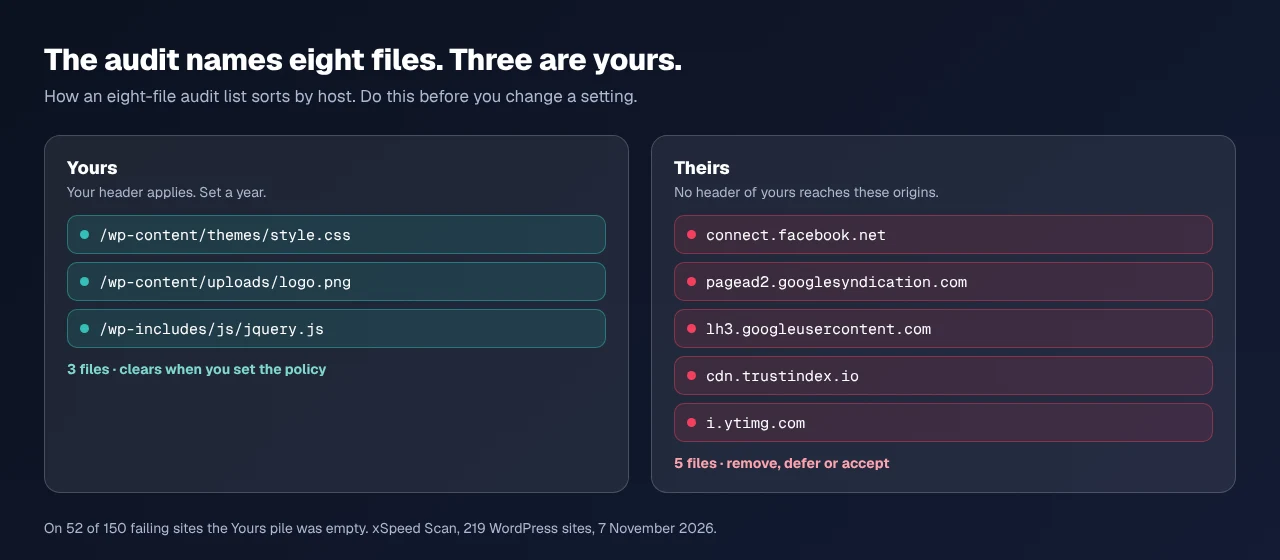
Sort the hostnames into two piles, yours and everybody else’s. That is the only split that changes what you do next.
What 219 Sites Showed
Drawn from pages 1 to 12 of our public scan archive on 7 November 2026, one report per host, rubric 2026.10.1. Our plugin runs on 145 of the 219, so the cut leans toward sites that already care about caching.
| Whose files the audit named | Sites | Share | Scored zero | Partial credit |
|---|---|---|---|---|
| own domain only | 66 | 44% | 37 | 29 |
| mixed origins | 32 | 21% | 15 | 17 |
| every named file elsewhere | 52 | 35% | 7 | 45 |
84 of 150 failures, 56%, cannot be fully cleared by editing your own server, and 52 cannot be touched at all. The status carries information too: where the failing files were the reader’s own, 37 of 66 scored zero, while where every file belonged to someone else, 45 of 52 kept partial credit. A zero usually means your own assets; partial credit usually means a script you pasted in.
Of those 52 sites, 41 ran a caching plugin, 34 of them ours. They did the work, and the audit still reports a problem that is not theirs to fix.
The Other Hosts Are Marketing Tags
Our scanner names the hosts when every failing file is cross-origin. Across those 52 reports it named 48 distinct hosts in 92 mentions.
| What the host is for | Mentions | Share | Examples |
|---|---|---|---|
| tracking, ads, analytics | 24 | 26% | pagead2.googlesyndication.com |
| social pixels and embeds | 21 | 23% | connect.facebook.net |
| widgets: reviews, chat, consent | 17 | 18% | cdn.trustindex.io |
| image and video embeds | 14 | 15% | lh3.googleusercontent.com |
| fonts and script libraries | 8 | 9% | kit.fontawesome.com |
| the site’s own other hostnames | 8 | 9% | staging subdomains |
connect.facebook.net alone appeared on 14 of the 52. Two thirds of these mentions are measurement and marketing, so two thirds of the third-party half is a question for whoever owns the tag manager. Only the fonts row, 9%, is the case self-hosting fixes.
Four Options, One of Them Nothing
- Self-host what you can. Fonts, icon kits and a library pulled from a public CDN can live on your domain, where your policy applies. That is the 9% above, and the only option with no trade-off.
- Remove what nobody uses. An abandoned chat widget, a pixel for a finished campaign, a second analytics tool nobody opens. Deleting it removes bytes, a request and a consent-banner line as well as the audit row. Usually the largest win, and a marketing decision rather than a caching one.
- Defer what has to stay. A tag that must load can load late. That does not clear the audit, because the file is still fetched with a short lifetime, but it moves the cost off the first paint, and page weight and LCP covers which bytes delay rendering.
- Accept the rest. A permanently amber row for Google’s ad script is the correct outcome. The audit is a diagnostic, not a target, and a score that will not move has cost more afternoons than any real defect.
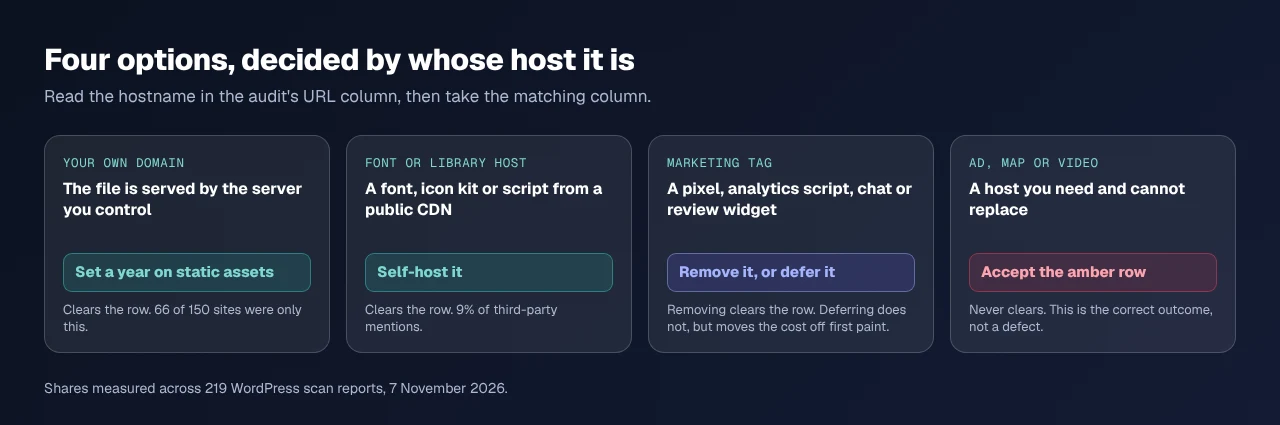
Our defaults, documented in browser cache settings, send one year on static assets and one hour on the HTML document, and the switch ships off. Those lifetimes apply to files we serve and reach no other origin. Neither does any other plugin’s equivalent.
Run the free scan on your own site: xspeedcache.com/scan/
Where Our Scanner Is Wrong
Our scan report carries a machine-readable fix object beside each failed check. On all 150 of these failures it reads {tier: free, feature: "Browser Cache"}, with a prompt telling an AI agent to enable browser-cache headers and re-run the audit. On the 52 sites where every named file is cross-origin, it cannot change the result.
The prose beside it is accurate. Verified on 7 November 2026, the remediation on those 52 reports reads: “Every asset with a short cache lifetime here is served by another host. Their Cache-Control is not yours to set.” The words are right and the button is wrong. The fix object hangs off the check, not the file list, so it cannot know. A limitation of our instrument, not of the reader.
Frequently Asked Questions
I set a one-year policy and the audit still lists eight files. Which header did I get wrong?
Possibly none. Read the URL column: if those files sit on another domain, your header never applied to them. Its audit reference does not mention origin at all.
My score did not move after I deleted a tracking script. Was that pointless?
No. This audit models repeat visits, so it rarely moves a first-load score. The bytes and the request are gone, which shows up in page weight.
Can a CDN or a reverse proxy set Cache-Control on somebody else’s file?
Only by serving the file yourself through it, which means self-hosting it under your domain. Proxying third-party scripts breaks the ones that check their own origin, and makes you responsible for updating them.
My host says a year-long policy is already set. Should I turn ours on as well?
Check first, then pick one. Two layers can emit two Cache-Control headers on one file, and the specification gives no say in which a browser honours.
Does any of this affect the page cache?
No. Browser cache instructs the visitor’s browser; page cache stores HTML on your server. The HTTP cache guide explains the difference.
What to Do This Week
- Run the audit and read the URL column before changing one setting.
- Sort the hostnames into yours and theirs, and count each pile.
- Ask whoever owns the marketing tags which of them still earns its place, and self-host the fonts.
- On more than a handful of sites, count the hosts once with xSpeed Hub; on a store start with WooCommerce stores.
- Set a year on your own assets with xSpeed Cache free or any equivalent, then stop chasing rows you do not own. Pro is $29 a year at the founding price with a 14-day money-back guarantee, and the capability comparison shows what free covers.