PageSpeed Says the Page Is Not Cached: Its Audit Only Reads Fonts, Images and Scripts

Updated September 2026
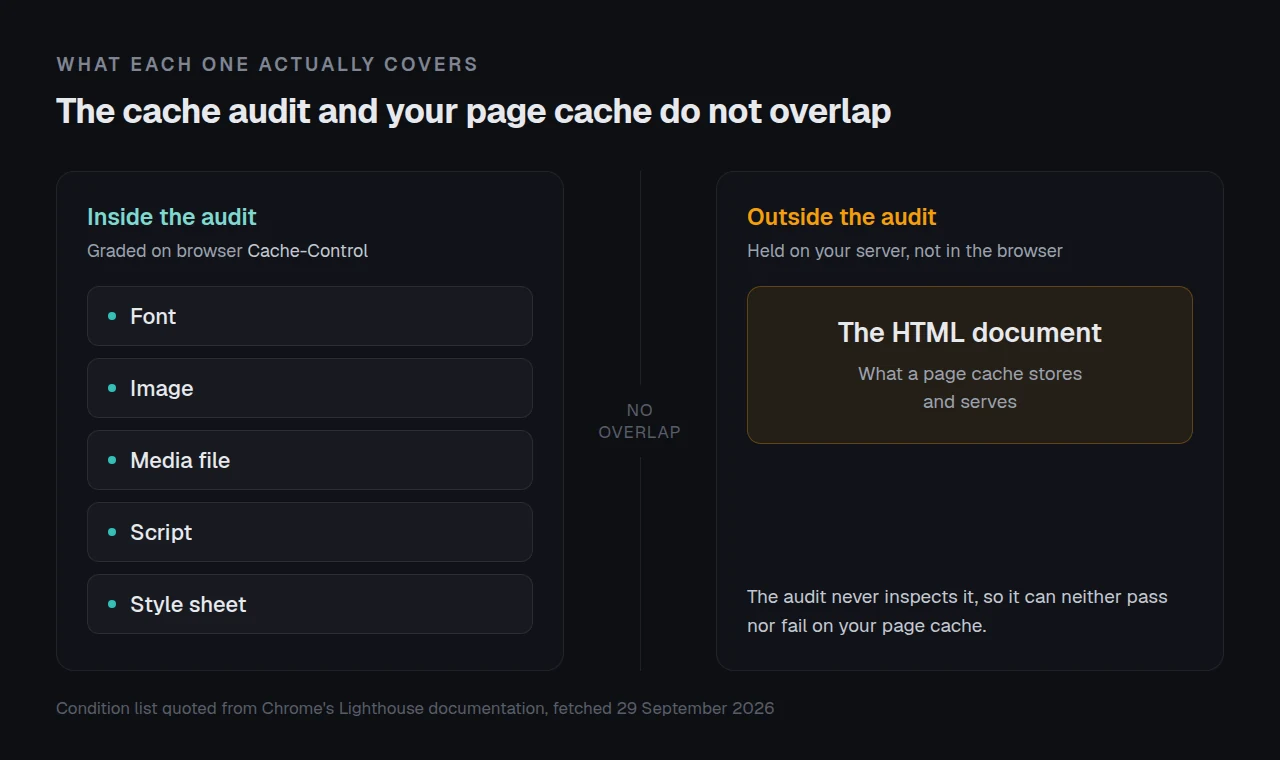
Google’s cache audit treats exactly five kinds of resource as cacheable, per Chrome’s Lighthouse documentation fetched on 29 September 2026: a font, an image, a media file, a script, or a style sheet. An HTML document is not on that list, and the audit carries no weight in a score that documentation describes as a weighted average of five metrics.
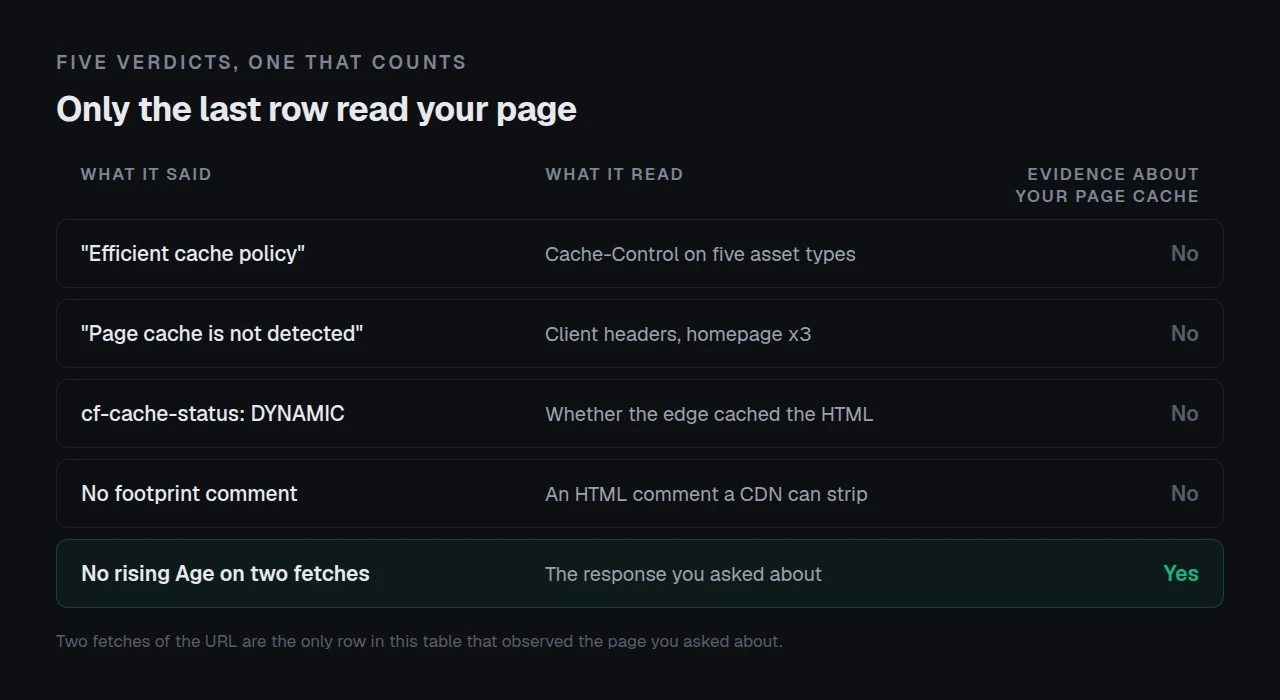
So the row that looks like a verdict on your page cache never inspected a cached page. The question worth asking is which of four things each tool was reading.
- Confirm it in two fetches
- What the cache audit inspects
- Why Site Health says “not detected”
- Three more tools
- When the tool is right
Quick Summary: What Each Tool Measured
| If the report said | What it measured | Do this |
|---|---|---|
| Serve static assets with an efficient cache policy | Cache-Control on fonts, images, media, scripts and style sheets | Set asset TTLs. Page caching is not involved |
| Page cache is not detected | Client caching headers on three requests to your homepage | Read the header on your URL |
cf-cache-status: DYNAMIC | Whether Cloudflare’s edge cached the HTML, which by default it does not | Check the origin |
| No footprint comment in the source | A comment a CDN strips and a filter removes | Read a header |
Confirm It in Two Fetches Before You Change Anything
Every verdict above is a label on something a tool read. Two requests give you the response itself.
Fetch the URL twice, ten seconds apart, and keep three things: time to first byte, Age, and whichever hit-marking header your stack emits.
curl -sS -o /dev/null -D - -w '\nttfb=%{time_starttransfer}\n' \
  -A 'Mozilla/5.0' 'https://example.com/the-page-you-care-about/'
An Age larger on the second fetch is positive proof a cache served it. Per RFC 9111 section 5.1, Age conveys “the sender’s estimate of the time since the response was generated or successfully validated at the origin server”, so a rising value on an unchanged body means a copy is held and reused.
Two limitations. Many page caches emit no Age header, which makes this inconclusive rather than negative. With a CDN in front, these fetches measure the nearest edge, not the origin. The header-by-header method is in how to check whether WordPress caching is working.
The Cache Audit Has Never Looked at an HTML Page
The audit is titled “Serve static assets with an efficient cache policy”, and the word doing the work is assets. Chrome states the condition: Lighthouse considers a resource cacheable if “the resource is a font, image, media file, script, or style sheet” and carries no explicit no-cache policy.
Your cached HTML page fails that test by design: it is not one of the five types, and a page cache tells browsers not to hold HTML for long.
| Compared | Asset cache policy audit | WordPress page cache |
|---|---|---|
| Inspects | Cache-Control on five asset types | The HTML document |
| Copy lives in | The visitor’s browser | Your server |
| Fixed by | Longer asset TTLs | Nothing, it works already |
The scoring half is covered in reading a PageSpeed report, which quotes Chrome’s line that only metrics feed the score. Asset TTLs are worth setting: they belong to browser cache settings, a separate module.
Site Health Answers About a Page You Did Not Ask About
WordPress states its method in the test description, verified against core source at tag 7.1.2 on 29 September 2026. A page cache is detected “by looking for an active page cache plugin as well as making three requests to the homepage and looking for one or more of the following HTTP client caching response headers”.
Three details follow, each producing a false negative on a working site.
- The homepage, three times. It requests
home_url('/')and nothing else, so a cache excluded on the front page but working elsewhere reads as absent. - The word HIT, literally. Six accepted headers pass one callback, matching the word HIT delimited by a space or comma. A stack writing
x-cache: hit from edgepasses; one writingcacheddoes not. - Client caching, in core’s own words. The accepted
cache-controlvalue must matchmax-age=[1-9], so a page cache sendingmax-age=0for HTML cannot satisfy it.
The callback, from core:
preg_match( '/(^| |,)HIT(,| |$)/i', $header_value )Three More Tools and What Each One Was Reading
| Tool | Its answer | What it actually read |
|---|---|---|
| PageSpeed Insights, lab | No cache evidence | A simulated Moto G4 load from “a Google datacenter” in North America, Europe or Asia, per Google’s documentation. A cold edge there returns a real MISS |
| Cloudflare | DYNAMIC | Per Cloudflare’s documentation the request “went to the origin web server without a cache lookup”. Edge HTML caching is off by default, and turning it on is a separate job |
| A footprint comment | Missing, so no cache | WP-Optimize’s readme warns that “Cloudflare will strip out the special HTML comment at the bottom of the source of a page”. WP Fastest Cache ships a filter removing it |
None of these answers is wrong. Each answers a narrower question than you asked.
Run the free scan and read its cache evidence row: xspeedcache.com/scan/
Running This Across Twenty Client Sites
One site is a two-minute check. Twenty sites, each with a different host, CDN posture and header, is a weekly chore.
We built xSpeed Hub for that, and it is ours, from the team behind this plugin. It reads cache state per site, so one false negative does not send you to twenty.
- 🔍 xSpeed Cache ships its own Site Health check, and version 1.3.5 on 22 September 2026 fixed a case where it disagreed with our dashboard, so “a check that cannot conclude says so instead of warning”.
- 💸 The free tier reads cache state on one site at no cost. Free vs Pro shows where the line falls.
When the Tool Is Telling You the Truth
No rising Age, no hit-marking header, and a time to first byte that does not fall on the second fetch: the tool was right and nothing is cached. Start with why a purge reports success and the page stays old, then common problems and troubleshooting for the rules that keep a URL uncached deliberately.
Frequently Asked Questions
I fixed the asset cache policy and my PageSpeed score did not move. Why?
That audit is a diagnostic and the score is a weighted average of five metrics. Longer asset TTLs help repeat visitors, which shows in field data, not a lab score.
My Site Health says the cache is detected but the response time is still slow. Is that a cache problem?
No. Core found cache evidence and a slow median, so look at the origin. Hosting is the other half and we recommend xCloud, which is ours: xCloud and this plugin’s team are both Startise companies.
Is cf-cache-status: DYNAMIC a misconfiguration I should fix?
Not by itself. It is the default for HTML and plenty of well-run sites never change it. It matters only if you want the edge serving pages.
I cannot find the cache comment in my page source any more. Did caching stop?
Probably not. A CDN can strip it and one plugin ships a filter removing it, so absence proves little. Read a response header.
Which header should I trust on a site running your plugin?
Read the response header on the URL you care about rather than a tool’s summary, then confirm on a second request. The plugin listing on wordpress.org records what each release changed.
The Fix, in Five Lines
None of the four verdicts above observed the page you asked about. Confirm with two fetches before changing anything.
What to do this week:
- Fetch the URL twice and record time to first byte,
Age, and your hit header. - Set asset TTLs if the audit flagged them, and stop reading that row as a page-cache verdict.
- Check the URL you care about, not the homepage a tool chose.
- Run the free scan and read its cache evidence row.
- Running more than five sites? xSpeed Cache is $29 a year, with a 14-day money-back guarantee.
Got a tool saying something stranger? The response headers settle it.