Returning Visitors See Last Month's Page and No Purge Can Reach It
 M Asif Rahman 7 min read

Updated November 2026
We read the HTML response headers of 258 live WordPress homepages on 21 November 2026. Five tell a visitor’s browser to keep the page for a month: four send public, max-age=2678400 and one sends max-age=2592000. Per RFC 9111 section 4.2, when a response is fresh “it can be used to satisfy subsequent requests without contacting the origin server”.
Every other guide to a stale page tells you to purge something. This copy cannot be purged. It sits on the visitor’s own disk, so the plugin, the edge and the purge button are all downstream of a request that never happens. This is the HTML document, not the assets a long lifetime suits.
Quick Summary: Which Reading Means Which Problem
The document’s Cache-Control | A returning visitor | What to do |
|---|---|---|
| Nothing at all | Guesses, often minutes | Send one hour |
no-store or max-age=0 | Asks every time | Nothing. Correct, slightly slower |
public, max-age=3600 | Asks within the hour | Nothing. This one works |
public, max-age=86400 up | Holds it a day or more | Lower it, read the bad news below |
public, max-age=2678400 | Holds it to late December | Lower it, wait out the copies issued |
What 258 WordPress Homepages Tell a Browser
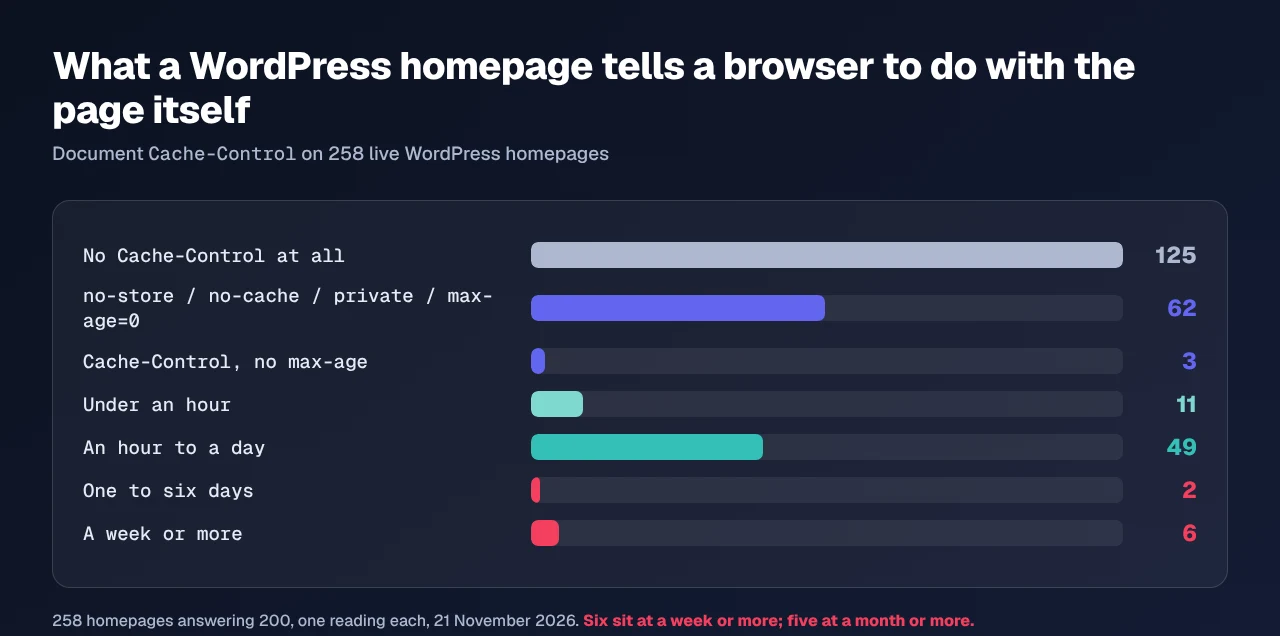
We took 276 WordPress hosts from our own public scan index and requested each homepage twice under a browser user agent. 258 answered 200.
| What the document sent | Sites | Share |
|---|---|---|
No Cache-Control | 125 | 48.4% |
no-store, no-cache, private, max-age=0 | 62 | 24.0% |
Cache-Control, no max-age | 3 | 1.2% |
| Under an hour | 11 | 4.3% |
| An hour to a day | 49 | 19.0% |
| One to six days | 2 | 0.8% |
| A week or more | 6 | 2.3% |
Sample: 258 homepages answering 200, one reading each, 21 November 2026. The cut over-samples us and the figure is published rather than left out: xSpeed Cache was detected on 147 of the 258. Five sites is a count, not a rate.
48 of the 49 sites in the one-hour band send exactly public, max-age=3600, and 46 of those run our plugin, whose shipped default it is.
The Purge Is Downstream of a Request That Never Happens
A purge empties a store you own. A visitor’s browser is not one of them.
One remote lever exists and it cannot help. The Clear-Site-Data header, per MDN’s reference, “sends a signal to the client that it should remove all browsing data of certain types (cookies, storage, cache)”. It travels in a response, so it needs the request this lifetime prevents.
Three things hide it:
- A reload always works. MDN’s caching guide records that a reload sends
Cache-Control: max-age=0with validators, so “intermediately stored responses are not reused”. - A new URL always works. RFC 9111 section 2 states the cache key is “composed from, at a minimum, the request method and target URI”, so a link carrying a tracking parameter arrives fresh. Campaign traffic looks healthy while direct traffic is a month behind.
- A shared cache holds it too.
publicplus a month licenses every cache in the path. 52 of the 258 answered the second request with anAgeheader, and four of the five month-long sites were already being served a stored copy, the oldest 68,310 seconds old.
Where a Month-Long Lifetime Comes From
Nobody decides to strand readers for a month. Both long values are whole hours, 720 and 744, so a settings field produced them, not a typo.
Apache’s mod_expires documentation gives ExpiresDefault "access plus 1 month" as its worked example, and records that the interval equals 30 days. ExpiresDefault applies to every content type, so a rule meant for stylesheets reaches the page document unless a type is named.
Our own plugin is the other candidate, and four of the five run it. Reading its Browser Cache source on 21 November 2026, it writes ExpiresByType text/html "access plus N seconds" from an html_ttl option defaulting to 3,600, the comment beside it giving the reason: “HTML: 1 hour (so post edits go live the same day even if a CDN has cached the document)”. A negative value is clamped back to that default. 2,678,400 is not, and nothing warns that the number is a month. Configuration cannot be read from outside, so what those five chose stays theirs. The missing ceiling is ours.
Read the Document’s Own Header in One Request
Start with the free scan, which needs no account and reads the site from outside: check D2 reports whether the page came from a cache. It does not grade this, and nor does any audit we know of, because the cache-policy check is named “Efficient cache policy on static assets” and a document is not one. That is how this sits on a homepage for weeks with nothing complaining, and why the audit says little about your pages.
Run the free scan on your own site: xspeedcache.com/scan/
By hand, one request answers it:
curl -sS -D - -o /dev/null -A "Mozilla/5.0" https://example.com/ \
| grep -iE '^(cache-control|expires|age):'| What comes back | What it means |
|---|---|
max-age under 3,600 | Working as intended |
max-age 86,400 or more | A returning visitor is a day behind |
An Age in the thousands | A shared cache holds a copy too |
An Expires weeks ahead | Divide the max-age beside it |
On the six long-lived hosts a HEAD returned the same headers, so either works. That is not true of a cache-status header, where a HEAD can report a bypass on a healthy site.
Stopping It Without Reaching Anybody’s Browser
- Set the document to an hour, keeping the year on fingerprinted assets, which is what the browser cache panel does.
- Name the content type. A rule keyed on a file extension never reaches
/about/; one keyed on nothing reaches everything. - Confirm from outside, with the scan or the command above, not the panel.
- Accept what cannot be repaired. Visitors already holding the copy stay a month behind. The fix prevents December, not November.
Across a fleet, xSpeed Hub reads every site in one connection, free on every tier per Free vs Pro. W3 Total Cache and WP Fastest Cache write these rules too. A store wants a short document lifetime regardless: a cached price is worse than a slow one.
Frequently Asked Questions
My visitors see an old page and my own browser shows the new one. Which of us is wrong?
Neither. Your reload sends max-age=0 and revalidates. Their click does not.
I purged the plugin, the CDN and my own browser, and a reader still reports the old page. What is left?
Their disk, the last of the six stores that hold a page and the only one you cannot clear. Ask them to open the page with any query string appended: a different entry, served fresh.
My host set this header, not me. Can I override it from WordPress?
Sometimes. A plugin writing .htaccess can replace an Apache rule, but a header added by a proxy ahead of the origin lands after WordPress has finished. Only the host can change that one.
Is a long lifetime on an HTML document ever right?
On a page that never changes and carries no session, price or date, yes. Set it there deliberately, never through a site-wide default.
How long until the old copies disappear?
Up to the full max-age from each visitor’s last fetch, so 31 days can mean 31 more.
Conclusion: Send an Hour, Not a Month
A page cache saves your server work. A lifetime in the browser removes the request, and your ability to fix anything.
What to do this week:
- Run the check above on your homepage, signed out.
- If the document’s
max-ageis above 3,600, lower it today and note the date. That is when recovery starts. - Read the
Ageline too: it says whether an edge cache holds the same copy. - The Browser Cache panel in xSpeed Cache is free and ships the hour as its default. Pro is $29 a year with a 14-day money-back guarantee, and the pricing page lists each tier.
Send an hour on the document, a year on the assets, and keep the right to change your mind.