xSpeed Cache September 2026 Release Recap
September was the busiest month in xSpeed Cache’s short history. Across the free plugin, xSpeed Cache Pro and xSpeed Hub, the team shipped 38 releases, merged 261 pull requests and resolved 107 issues. Some of that is headline work you will notice on day one, like Smart Delay, Turbo Render on every theme and passkey sign-in for Hub. A lot of it is quieter: fixes that stop a cache plugin from doing something surprising on your site.
This recap walks through all of it, product by product: what is new, what got better and what was fixed.
September 2026 by the numbers
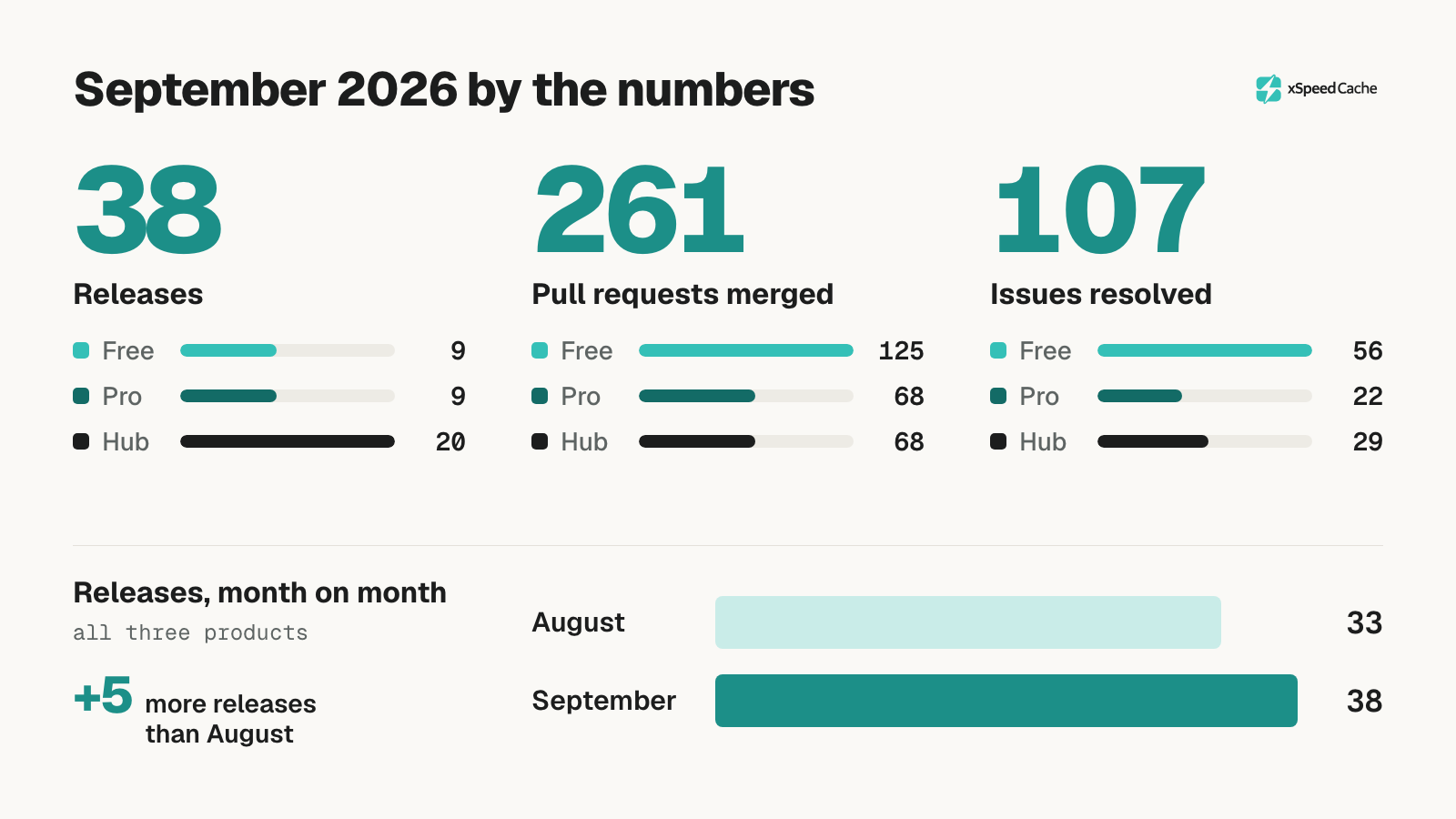
| Product | Releases | Versions | Pull requests merged | Issues resolved |
|---|---|---|---|---|
| xSpeed Cache (free) | 9 | 1.2.3 → 1.3.6 | 125 | 56 |
| xSpeed Cache Pro | 9 | 1.1.3 → 1.2.6 | 68 | 22 |
| xSpeed Hub | 20 | 1.2.3 → 1.4.2 | 68 | 29 |
| Total | 38 | 261 | 107 |
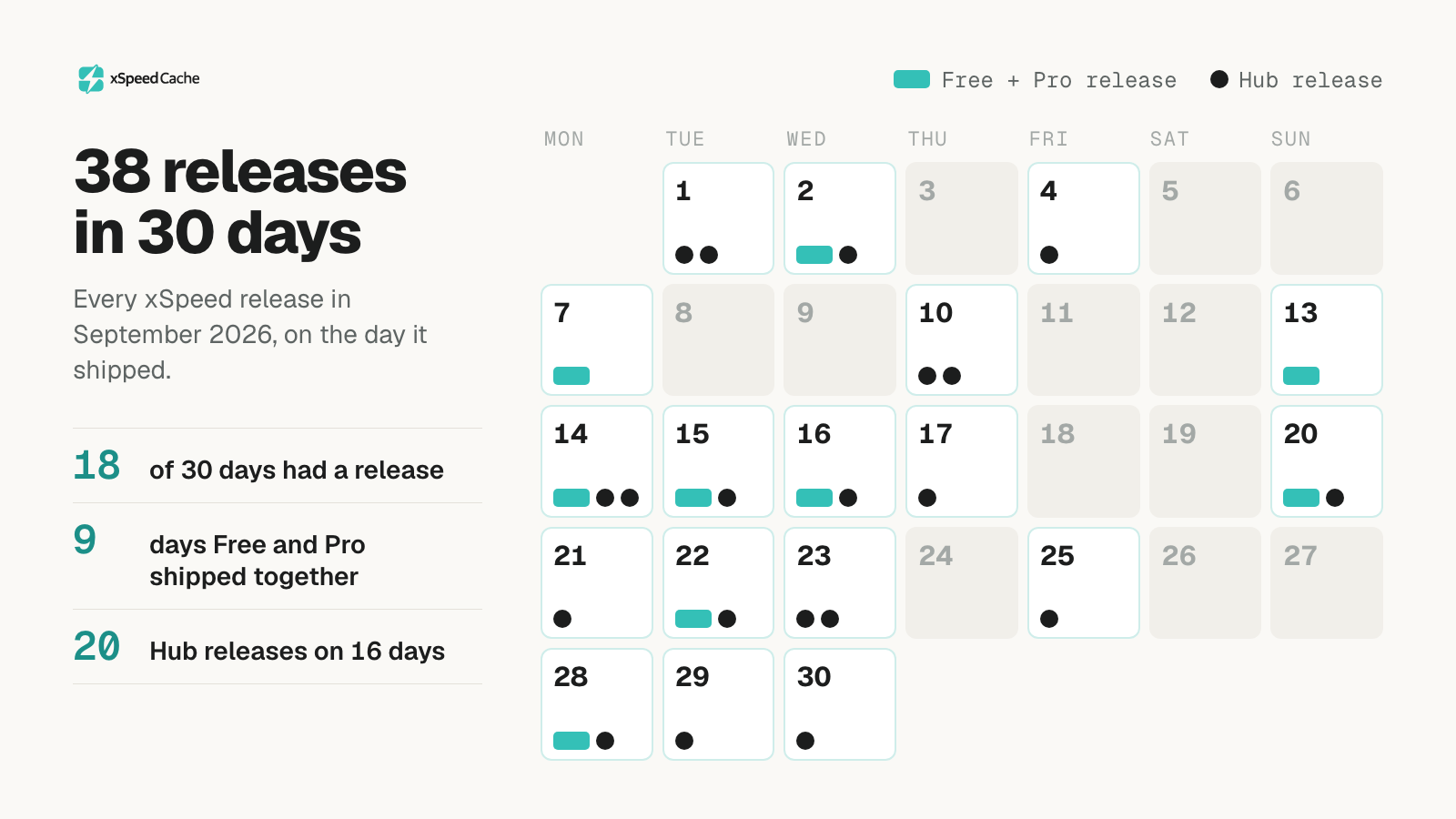
The free plugin and Pro shipped together on nine release days, so the two never drifted out of step. Hub, which is hosted, released more often: 20 times across 16 days. Altogether, something shipped on 18 of September’s 30 days.
The highlights
If you only read one section, read this one.
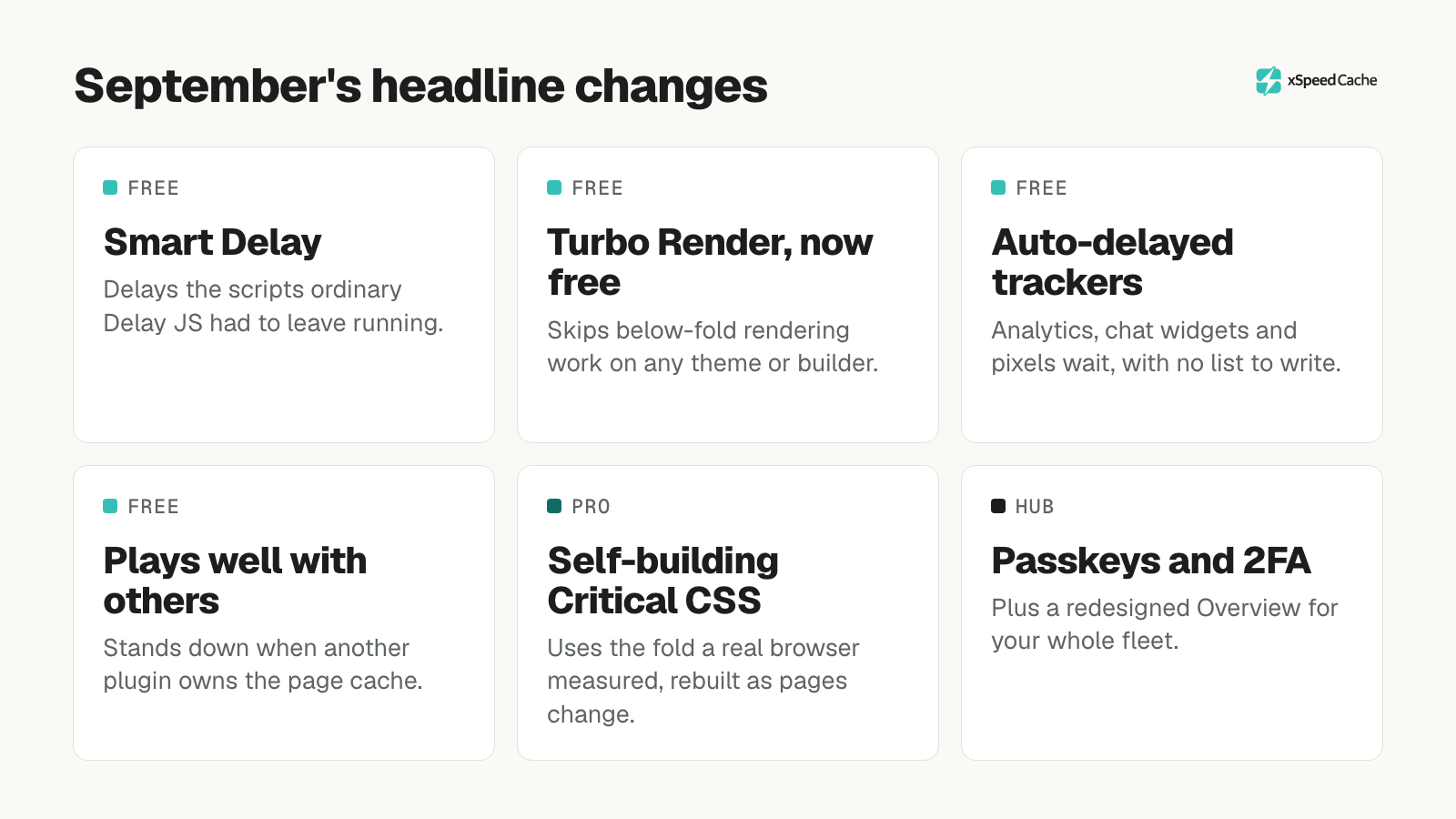
- Smart Delay postpones the scripts that ordinary Delay JS had to leave running, then replays them in page order on the first interaction.
- Turbo Render is now free and works on any theme. It recognises Divi, Bricks, Oxygen and Beaver Builder sections, and falls back to the page’s own structure everywhere else.
- Known third-party scripts are delayed automatically. Analytics, chat widgets and tracking pixels no longer need to be listed by hand.
- xSpeed Cache now plays well with other cache plugins. It detects which plugin owns the page cache and stands down instead of competing with it.
- Critical CSS in Pro builds itself, using the fold a real browser measured instead of an estimate.
- xSpeed Hub supports passkeys and two-factor authentication, plus a redesigned Overview that shows your whole fleet at a glance.
What’s new in xSpeed Cache (free)
Caching and purging
- Purge a single page from the admin bar, the post list or the editor. The purge confirms what it actually removed.
- Purge All tells you what happened. The button and the notice now report Cleared, Already empty, Partly cleared or Purge failed, and name the files and size removed.
- Purges reach other caches too. Purge All is forwarded to LiteSpeed Cache and to the host’s nginx FastCGI cache when they are present, so one click clears every layer that matters.
- Smarter purging when you publish. Publishing or updating a post also purges the pages that list it. On nginx hosts, publishing no longer clears the server’s entire cache, only the pages the post touches.
- LiteSpeed servers get the static fast path, serving cached pages before PHP starts. nginx and Apache sites already had this; LiteSpeed sites can now opt in.
- A new
wp xspeed purgecommand clears every cache in one call, andwp xspeed cache nginx-configprints the nginx server-block config for provisioning scripts.
Living alongside other cache plugins
This was one of the most important changes of the month. xSpeed Cache now recognises which plugin owns the page cache before switching anything on. Installed beside WP Rocket, WP Super Cache or LiteSpeed Cache, it comes up with its features held off and the other plugin’s files untouched.
Switching page caching on is also now all-or-nothing. The drop-in, the wp-config.php line, the rewrite rules and the settings are written as one step and rolled back together if any part fails. A half-finished attempt can no longer leave a site in a broken state.
When another plugin is in the way, the dashboard names it instead of silently flipping the toggle back off. And if a removed plugin left an abandoned page-cache drop-in behind, xSpeed Cache can take it over with one consenting click.
Optimization
- Smart Delay is the biggest optimization addition this month. Delay JS used to skip any script that inline code depended on, which on page-builder sites was most of them. Smart Delay postpones those scripts anyway, parks their inline snippets alongside them and replays everything in page order on the first interaction. It is off by default, and your exclusion list and consent-banner protection still take priority.
- Delayed scripts replay the way a real page loads, with the document’s ready state moving through its normal stages and each script’s load handlers firing in turn.
- Turbo Render (previously called Render Skip) moved from Pro to the free plugin. Below-the-fold sections skip layout and paint work until they scroll into view. A new Excluded classes setting keeps sections with intentionally overlapping designs rendering immediately, and sections holding an iframe are left alone.
- Third-party scripts are delayed automatically, including the inline install snippets vendors ask you to paste into the header.
- Fonts get out of the way. Font stylesheets are deferred out of the render path, and a render-blocking Google Fonts request is rewritten to use
swap. - Disable Emojis joins Bloat Control, removing the WordPress emoji script and styles everywhere. Off by default.
- Block-editor stylesheets are stripped from anonymous visitors’ pages that do not use any blocks.
Media and resource hints
- Better LCP detection. Hero images painted from CSS backgrounds and video poster images are now detected and preloaded, and the LCP preload no longer picks a brand logo over the real hero image.
- A manual preload list covers the images no detector can see.
- Lazy-load inline background images. Each one loads just before its element scrolls into view. Off by default.
- Click-to-load for JavaScript-injected videos. YouTube and Vimeo players a theme or plugin injects after page load now get the same lightweight facade as regular embeds.
Settings, hosting and the dashboard
- Pin settings from
wp-config.php. Hosts and agencies can lock any module setting with a constant. The dashboard shows the field as read-only, names the constant and lets an admin take the setting back. - Object cache configuration from
wp-config.php. Redis credentials and Memcached servers are read from it, and cache keys are always namespaced per site, so two sites sharing a Redis or Memcached database can no longer read or purge each other’s entries. - Limit Post Revisions keeps only as many revisions per post as you choose. A
WP_POST_REVISIONSvalue inwp-config.phpstill wins, and the panel shows it. - xSpeed Scan runs inside the plugin, grading your site with a score ring on the Overview.
- A cleaner dashboard. The master cache switch sits in the top bar on every screen, the sidebar collapses to a rail, Pro features are marked with a single lock, and the Overview counts only the features that are genuinely on.
- xSpeed’s MCP server shares a site with other MCP plugins, so an AI assistant can connect to xSpeed Cache and another MCP plugin on the same site.
What’s new in xSpeed Cache Pro
Critical CSS that builds itself
Critical CSS was rebuilt this month. It now builds automatically when pages change, with no button to press, and it uses the fold a real browser actually measured rather than counting opening tags.
- A fold measured in a real browser now allows full stylesheet deferral the same day, instead of waiting for enough visitor reports to confirm it.
- Critical CSS is stored per page template, so pages no longer share one fold.
- The fold keeps only the font weights and styles it actually uses, so large folds stay within the size limit instead of being cut short.
- A page whose Critical CSS is being rebuilt keeps serving its previous copy rather than going unoptimized.
- Licensed installs generate in the cloud first, and say so if the cloud render fails rather than quietly falling back to a local build.
Unused CSS and the rendering service
- Critical CSS and Unused CSS now work independently. Either feature works on its own, instead of one waiting on the other.
- Pages are measured in a real browser before pruning, so hover, press and focus states survive.
- Scheduled CSS builds render through xSpeed Hub’s job queue, so your site submits a page and collects the result later instead of holding a request open.
- Unused CSS payloads are stored on disk with only metadata in the database, keeping your options table lean.
SmartPredict speculative loading
A new SmartPredict tab configures the speculative loading that WordPress 6.8 and later prints. You can choose prefetch or prerender, decide when loading starts (on click, on hover or eagerly), and list paths that should never or always be prefetched, such as /cart/*. These settings work with SmartPredict tracking off and need no traffic history.
Smaller and lighter
Pro’s front-end scripts are now minified at build time, cutting what a visitor downloads on an uncached page view from 29.9 KB to 8.7 KB, about 71% less.
What’s new in xSpeed Hub
Hub shipped 20 times in September. Because it is hosted, every change below is already live in your account.
A fleet overview worth opening
- A redesigned Overview with a 7, 30 or 90-day score trend beside your fleet score and a count of good, needs-work and poor sites.
- New fleet cards for cache numbers, Core Web Vitals from each site’s latest speed test, which caching features each site runs and which sites are reachable.
- Fleet-wide actions. Warm caches starts the preloader on every reachable site, and Purge all can now clear one part of the cache, such as the page cache or the CSS and JS files, on every site at once.
- Summaries on every page. Sites shows how many need attention, Activity shows the last seven days and its failures, Automation shows what Autopilot changed this week, and Plan names the sites running an older xSpeed Cache version.
- A redesigned workspace. Every module has its own page, a site has its own sidebar and search, and settings save when you press Save to site.
Account security
- Passkeys and two-factor authentication for your Hub account.
- See where you are signed in, and confirm it is you before risky changes.
- Email and password sign-in, alongside magic links.
- Every AI write action checks your role on that specific site, and secrets passed to AI tools are kept out of the activity log.
Optimization from the Hub
- Generate Critical CSS from the Hub.
optimize_sitecan drive a site toward a target score when an AI assistant runs it through Hub.- Full scan reports open inside the Hub and match the public xSpeed Scan report exactly.
- Sites that block anonymous REST requests can now be attached and controlled.
- A site whose connection token changed reconnects by itself.
Fixes worth knowing about
Some of September’s fixes addressed problems serious enough to call out:
- Enabling the cache no longer risks corrupting
wp-config.php, and a refusal is no longer reported as success. - Combine CSS no longer leaves a site unstyled when Critical CSS is on. Deferred stylesheets were being mistaken for print-only ones and merged into a print-only bundle.
- Page-builder editors work again. Minification now stands down on Beaver Builder, Elementor, Divi, Brizy and Oxygen editing screens.
- Consent banners are never delayed. Cookie Notice, Moove, Termly, Usercentrics, Iubenda, OneTrust, Borlabs, Real Cookie Banner, SureCookie, Complianz and NotificationX banners always load, so visitors are offered the choice before they leave. A script you name yourself in the Delay JS list is still delayed.
- Every Pro AI feature works again. The saved API key was being sent to the provider still encrypted, so all four providers rejected it. Every OpenAI model works again too.
- Pro no longer keeps a WebP or AVIF that came out larger than the original, and the LCP preload is no longer rewritten to an image size the page never requests.
- Cache warming works on sites with 7G/8G-style firewall rules, which had been blocking the preloader.
- nginx sites with a correct configuration are no longer told to paste in a snippet they already have.
- Purging Critical or Unused CSS takes effect immediately, instead of waiting for cached pages to expire.
Privacy and transparency
- A new Privacy & usage data panel lets you view and withdraw usage-analytics consent at any time, with a matching
wp xspeed privacycommand. - The setup wizard’s analytics consent now defaults to off and is only ever an explicit opt-in.
- Uninstalling removes all usage-tracking state and every leftover option.
- The full changelog now ships with the plugin in
changelog.txt, because WordPress.org truncates changelogs over 5,000 words.
How to update
xSpeed Cache and xSpeed Cache Pro: go to Dashboard → Updates or Plugins in WordPress and update both. September ended on xSpeed Cache 1.3.6 and xSpeed Cache Pro 1.2.6; installing the latest version gets you everything above.
xSpeed Hub: nothing to do. Hub is hosted, so every change is already live in your account.
Most new optimizations, including Smart Delay, Disable Emojis and background-image lazy loading, are off by default. Updating will not change how your site behaves until you switch them on.
Frequently asked questions
Will updating change how my site behaves?
Not on its own. New optimizations such as Smart Delay, Disable Emojis and inline background-image lazy loading ship switched off. The fixes apply automatically, and they make existing features behave more predictably.
Is Turbo Render free now?
Yes. Turbo Render, previously called Render Skip, moved from xSpeed Cache Pro to the free plugin in September, and it now works on any theme or page builder rather than only Elementor.
I already run another cache plugin. Is it safe to install xSpeed Cache?
Yes. xSpeed Cache now detects which plugin owns the page cache and stands down, leaving the other plugin’s files untouched. The dashboard names the plugin that is in the way, so you can decide what to do.
Do I need an API key to connect Claude or another AI assistant?
No. Connecting an AI assistant uses the MCP server, which is free and needs no key. The AI Provider API key in Pro powers specific Pro AI features only.
What is SmartPredict speculative loading?
It configures the speculative loading tag that WordPress 6.8 and later prints, so the next page a visitor is likely to open can be prefetched or prerendered. It is part of xSpeed Cache Pro.
Get started with xSpeed Cache
New to xSpeed Cache? Every improvement above is waiting for you. Our step-by-step guide takes you from install to a fully cached, optimized site in a few minutes.