Video: How I Made My Slow WordPress Site Faster Without Touching Code by GigaPress on YouTube.
What means the most to us is how quickly you started sharing your thoughts and giving us insights on how we can grow. In less than 3 weeks, xSpeed Cache earned many reviews on WordPress.org, ***every one of them five stars***. A few lines from those reviews: *"After testing for a few weeks, we recently moved around 100 sites over to XSpeed and have had phenomenal results, easy setup, easy to monitor and very easy to find and setup custom config rules within the system."* ([***noticestry***](https://wordpress.org/support/topic/xspeed-for-the-win/), *WordPress.org review*) *"Great plugin that does most of what other plugins can do. I fully replaced my FlyingPress subscription with XSpeed and achieved the same fast speeds."* ([***lintlov***](https://wordpress.org/support/topic/flyingpress-replaced/), *WordPress.org review*) *"I already use the WPDeveloper Bundle and have always liked their plugins, so I decided to give xSpeed Cache a try. So far, I really like how easy it is to set up and use. It keeps things simple while helping improve my website speed. Overall, it’s been a nice addition to my WordPress setup."* ([***SEO Coder***](https://wordpress.org/support/topic/happy-with-xspeed-cache/), *WordPress.org review*) *"… the key differentiator for us is in their support which is always amazing."* ([***darrenbowyer***](https://wordpress.org/support/topic/another-great-wpdev-product/), *WordPress.org review*) Your feature requests also go straight onto our roadmap. [**One reviewer**](https://wordpress.org/support/topic/flyingpress-replaced/) asked for more page cache rules and Cloudflare tiered cache options, and that kind of feedback shapes what we build next. Please keep it coming - we will continue building for you. 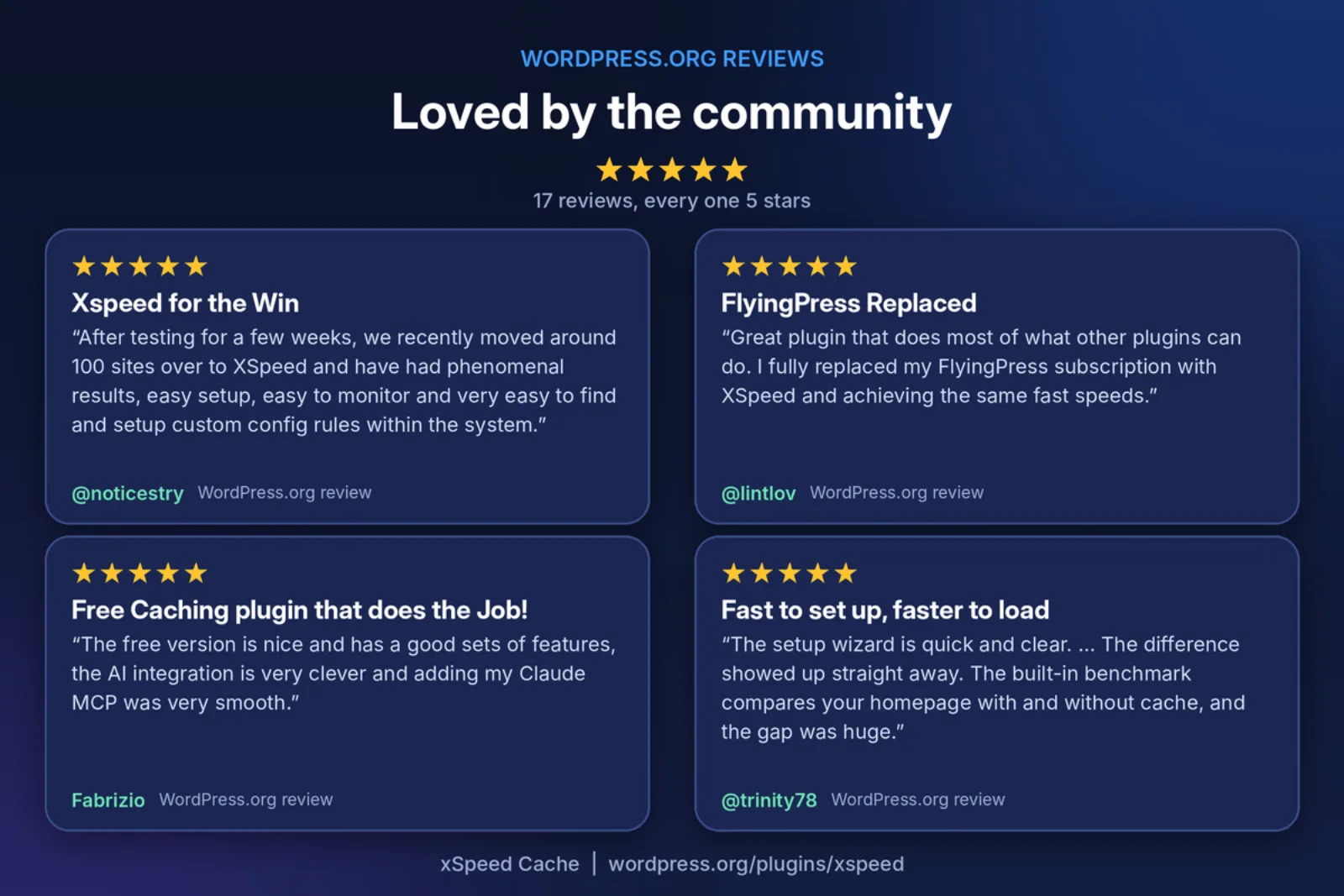 ## The Journey So Far: From Idea to 10,000+ Websites xSpeed Cache started from one stubborn belief: **"WordPress is slow" should be a myth and no one should have to be a performance engineer to speed up their websites in this day and age.** That’s when we set out to make speed simple for everyone. We wanted to build a plugin you could install, switch on and forget about, and one your AI assistant could take over whenever you wanted to go further. Here is how the journey has gone so far: - **August 2026: xSpeed Cache arrives on WordPress.org.** Early users helped us shape the static cache engine, the setup wizard, and the AI connection through a run of 1.x releases. - **22 September 2026: the official launch.** We introduced xSpeed Cache to the world and announced the latest addition to our portfolio with our community at [**WPDeveloper**](https://wpdeveloper.com/xspeed-cache-wordpress-caching-plugin/) and [**xCloud**](https://xcloud.host/introducing-xspeed-cache/). Within days, the community and WordPress newsletters such as The WP Weekly, The WP Week, Ahoi.dev and WPfounders were talking about an AI-native cache plugin. - **Launch week till now; 16 September to 1 October 2026: five releases in sixteen days.** Versions 1.3.3 through 1.3.7 added Smart Delay for scripts, a LiteSpeed static fast path, Turbo Render for any theme or page builder, stronger consent-banner protection, safer multisite REST caching and smoother xSpeed Hub reconnection. - **October 2026: 10,000+ active installations.** Here we are, celebrating with you. The pace of releases is our promise to you. We read every support thread and every review, and we ship fixes fast. 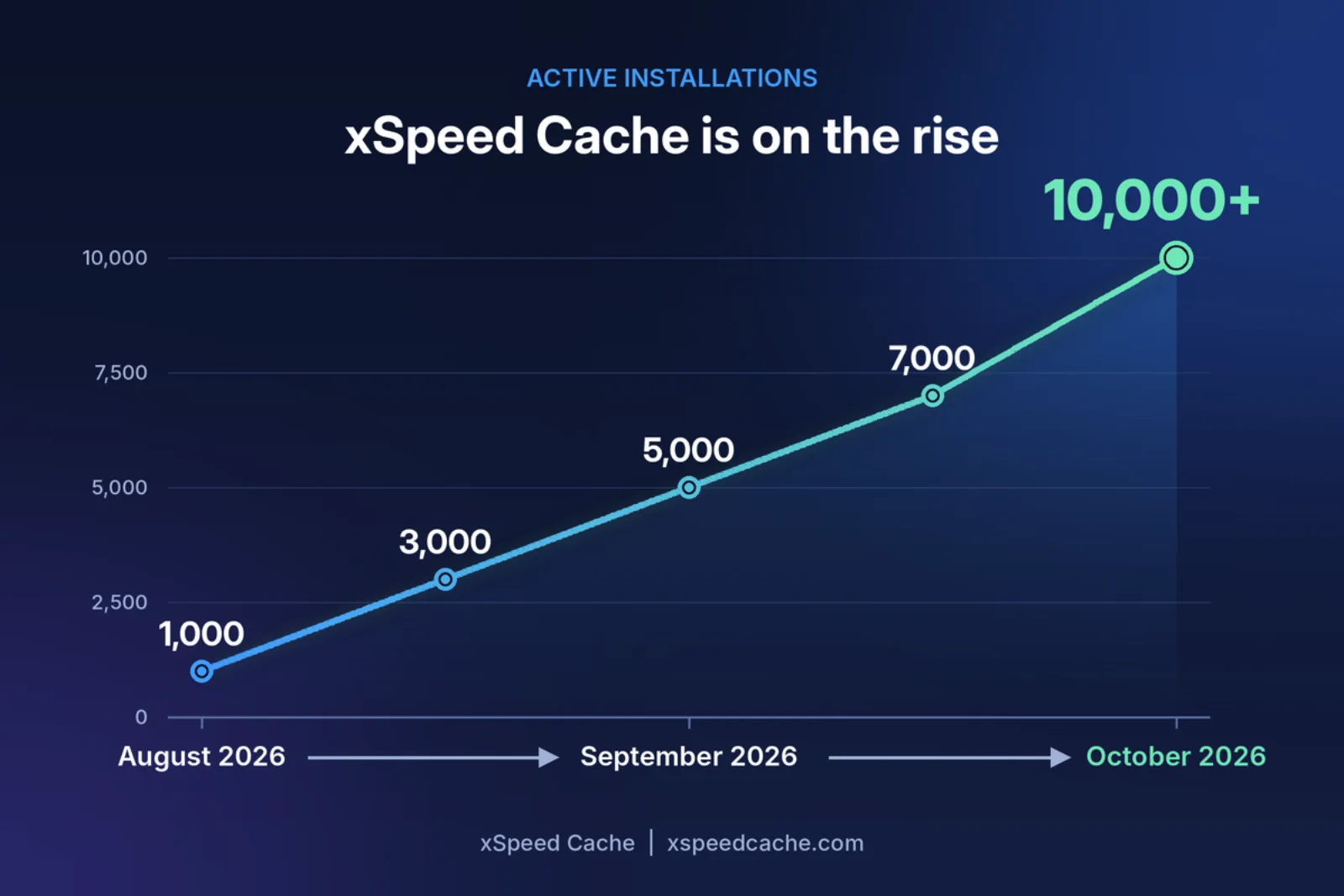 ## New to xSpeed Cache? Here Is a Complete Breakdown If you are new here, welcome! xSpeed Cache is an all-in-one WordPress performance plugin from WPDeveloper, the team trusted by over 6 million WordPress users worldwide. Here is what it brings to your site.Video: Introducing xSpeed Cache on YouTube.
### Static Page Caching That Skips PHP Entirely When xSpeed Cache caches a page, it serves it straight from the server as a static file, before WordPress or PHP loads. A cache hit lands in **5 to 15ms, compared with about 200ms or more for a typical PHP-served cache**. ### Your AI Assistant, Your Performance Engineer Every xSpeed Cache install includes a [**built-in MCP server**](https://xspeedcache.com/docs/mcp-server/). Connect Claude, ChatGPT or any MCP client, and you can simply ask, "This site scores 45. Make it fast." Your assistant can benchmark the site, tune settings, purge and warm the cache and re-test, all on command. 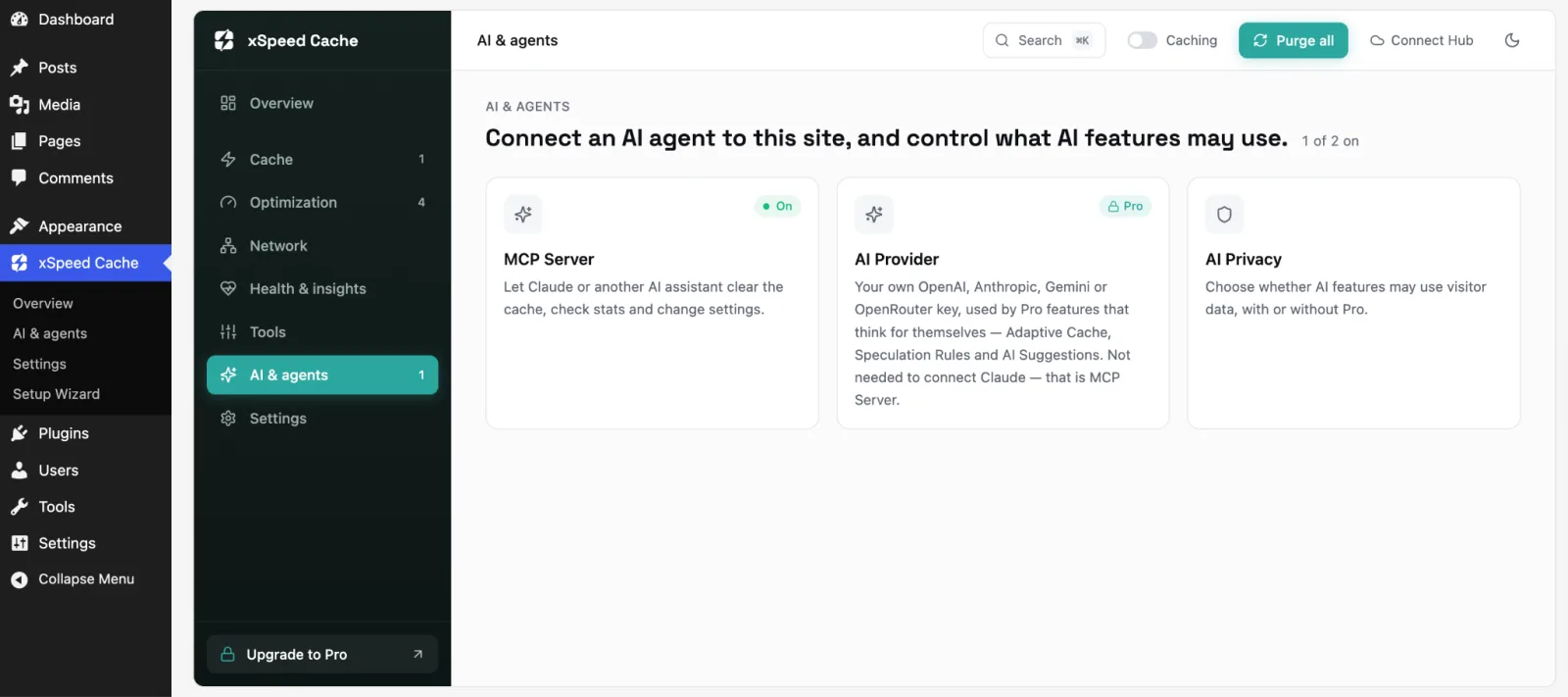 ### xSpeed Hub: One AI Connection for Your Whole Portfolio If you look after more than one site, this part is for you. [**xSpeed Hub**](https://xspeedcache.com/xspeed-hub/) **is free and works with any host.** Connect each site once, connect your AI once and a single conversation reaches every site you manage. Type "purge cache on acme," and it happens on the right site. The Hub also gives you a centralized fleet dashboard, daily monitoring with Slack or email alerts, team roles and scoped per-site credentials. It is the kind of setup that makes moving 100 sites, like one of our reviewers did, feel manageable.  ### Everything Else a Fast Site Needs, Built In Page caching and the AI connection are only the start, because the rest of the performance stack is already built into the same plugin, so you do not need a separate tool for each job. - **Object caching with Redis or Memcached**, so logged-in views, carts and dashboards answer database queries from memory - **CDN support** for any pull-zone provider, plus a built-in Cloudflare connection that keeps both caches in sync - **WooCommerce-safe defaults**, so /cart, /checkout and logged-in customers are never cached - **One-click migration** of your settings from WP Rocket, W3 Total Cache, WP Super Cache or LiteSpeed Cache There is more built in than these highlights, and the [**features page**](https://xspeedcache.com/features/) lists all of it. For the complete tour, [**read the full introduction**](https://wpdeveloper.com/xspeed-cache-wordpress-caching-plugin/). The [**MCP server docs**](https://xspeedcache.com/docs/mcp-server/) and the [**xSpeed Hub overview**](https://xspeedcache.com/xspeed-hub/) go deeper on the AI connection and explain exactly what you need to do to make WordPress speed and caching as easy as possible. 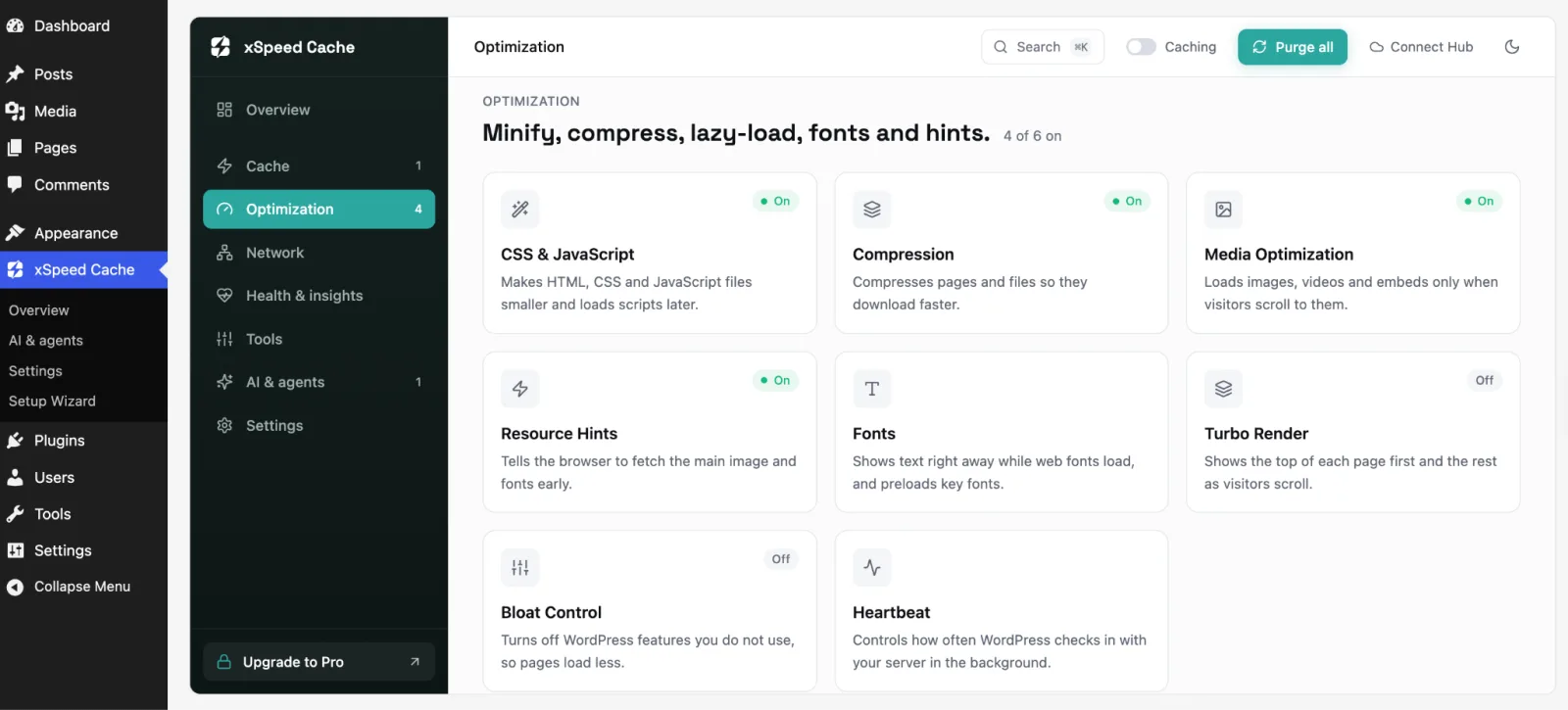 ## Meet xSpeed Scan: Check Any Website's Speed, Free Many of you have already put [**xSpeed Scan**](https://xspeedcache.com/scan/) to work, checking sites and getting the exact fix for every failing check. If you have not tried it yet, it is our free standalone speed test, with no plugin and no signup. Paste your site URL, and within ~40 seconds, you get a Google Lighthouse run plus our own server-side probes, graded **0 to 100 across four dimensions**: Core Web Vitals, server response and caching, asset optimization and platform readiness. Every failing check comes with the exact fix, and you get a shareable report. If your site runs xSpeed Cache with MCP connected, your AI assistant can work through the whole report and re-verify your score for you. 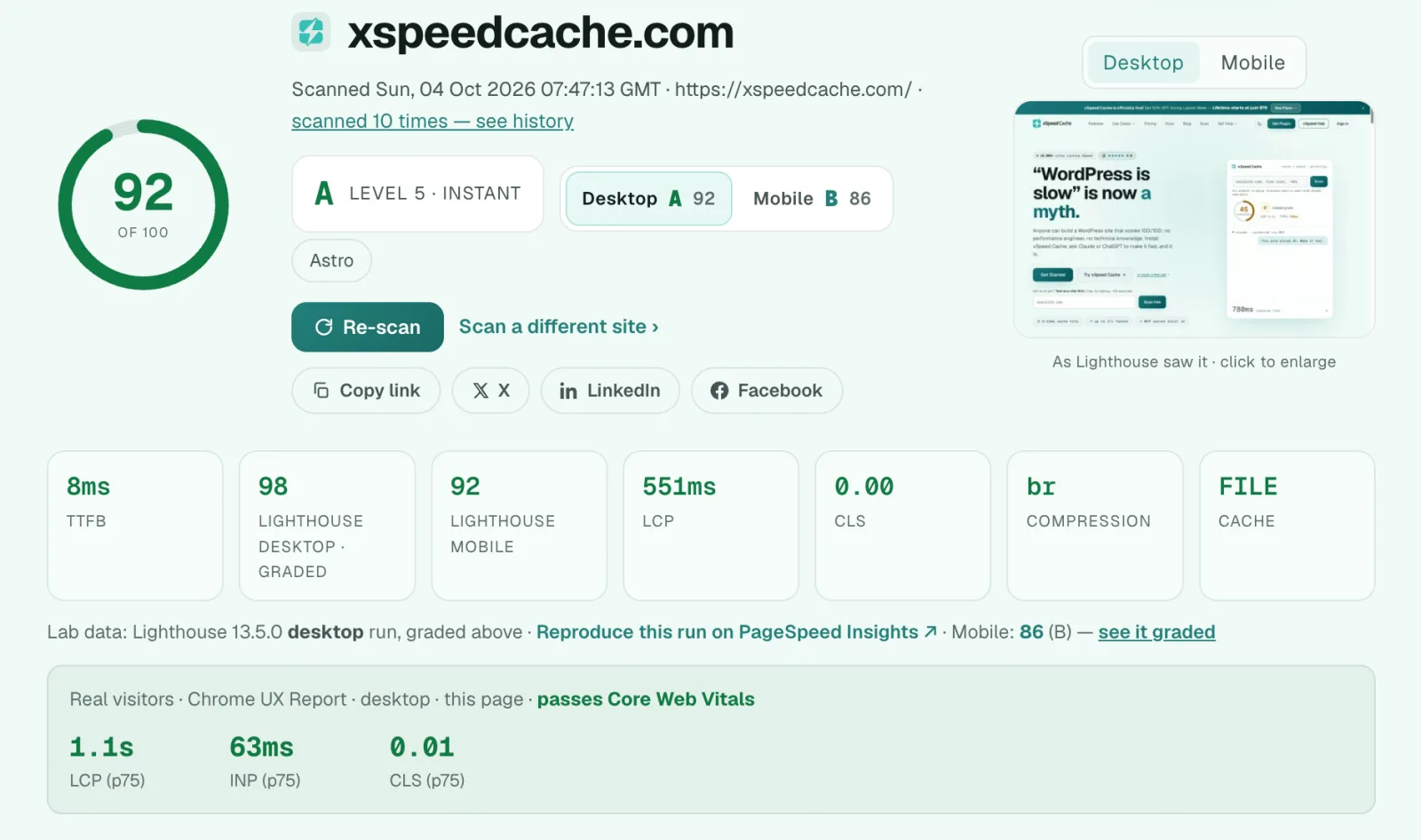 ## Free Forever, Go Pro When You Want More The free plugin is not a trial. Page, object and browser caching, minification, GZIP, lazy loading, database cleanup, the full MCP server and xSpeed Hub all ship free. **xSpeed Cache Pro** adds an intelligence layer on top: - AI recommendations with one-click fixes, and an AI-powered site audit graded by severity - Self-healing cache, plus automatic resolution of plugin conflicts - Critical CSS and Remove Unused CSS - WebP and AVIF image conversion, and Brotli compression - Adaptive Cache (AI-tuned cache lifetimes) and predictive cache warming - Real-user monitoring and a composite Performance Score - Bring your own AI key from OpenAI, Anthropic, Google Gemini or OpenRouter You can [compare Free vs Pro](https://xspeedcache.com/pricing/) before deciding. And to celebrate, Pro is still 50% off for your first 6 months, starting at $29. There are also exclusive lifetime deals, so you can pay once instead of renewing every year, which makes this the best time to [**upgrade to Pro**](https://xspeedcache.com/pricing/). ## What Is Next for xSpeed Cache? Reaching 10,000+ websites is only the beginning. Here is where we are heading: - **More of what you ask for.** You asked for [**more page cache rules and Cloudflare tiered cache options**](https://wordpress.org/support/topic/flyingpress-replaced/), and they are on our list. Community feedback will keep setting our priorities. - **A steady release rhythm.** Expect the same fast pace of improvements and fixes you have seen since launch. - **A smarter AI layer.** We will keep extending the MCP toolset and xSpeed Hub so your assistant can do more of the performance work for you. We will share specifics as they ship. The best place to follow along is the [changelog](https://xspeedcache.com/changelog/). Have an idea or a request of your own? Tell us in the [**support forum**](https://wordpress.org/support/plugin/xspeed/) and we will take a look. ## Get Started With xSpeed Cache Today Ready to join 10,000+ faster WordPress websites? Getting started takes about two minutes. Our [documentation](https://xspeedcache.com/docs/) walks you through every feature. ## Thank You for Being Part of the Journey Ten thousand websites. Five releases in sixteen days. Five stars on every review. These numbers are a beginning, and you made them possible. With gratitude, the xSpeed Cache team at WPDeveloper [Download xSpeed Cache Free](https://wordpress.org/plugins/xspeed/) If xSpeed Cache has made your site faster, please [leave us a review on WordPress.org](https://wordpress.org/support/plugin/xspeed/reviews/#new-post). It really helps. Join our [Facebook Community](https://www.facebook.com/groups/wpdeveloper.net/) and share your before-and-after xSpeed Scan score with #xSpeedCache.