# Removing Unused CSS From WordPress in 2026: Lighthouse Skips Every Sheet Under 10 KiB

> Lighthouse skips any stylesheet with 10,240 bytes or less of unused CSS, and Google's own guide says 2,048. How to find, remove and defer CSS on WordPress.

- Published: 2026-09-28
- Updated: 2026-10-04
- Author: xSpeed Cache Team
- Tags: CSS, Performance, Tutorial, Optimization, WordPress, check:A1, fix:unused-css
- Canonical: https://xspeedcache.com/blog/remove-unused-css-wordpress/

---

Updated September 2026

Lighthouse 13.5.0 ignores any stylesheet carrying 10,240 bytes or less of unused CSS, read from the shipped source of its own [`unused-css-rules` audit](https://raw.githubusercontent.com/GoogleChrome/lighthouse/main/core/audits/byte-efficiency/unused-css-rules.js) on 28 September 2026. Google's own guide to deferring non-critical CSS puts the figure at 2,048 bytes, five times lower. The guide most people follow names a threshold the tool does not use, and the tool counts compressed transfer bytes, per stylesheet, not per page.

The question people ask is which setting removes unused CSS. The more useful question is which of three measurements you are reading, because only one says anything is safe to delete.

## Quick Summary: Three Jobs That Get Called the Same Thing

Pick the job first. Two of these reduce no bytes at all.

| If you want to | Do this | Why |
|---|---|---|
| Make first paint happen sooner | Defer every non-critical sheet | CSS in `<head>` blocks rendering until parsed |
| Cut bytes over the wire | Stop enqueuing sheets the page never uses | A deferred sheet still downloads |
| Satisfy the Lighthouse audit | Look only above 10,240 transfer bytes | Smaller sheets are never listed, whatever their unused share |

## Three Measurements Are Called Unused CSS and Only One Is Actionable

| Source | What it counts | Threshold | Blind to |
|---|---|---|---|
| Lighthouse `unused-css-rules` | Unused share of a sheet, on its compressed size | Above 10,240 bytes | Sheets that transfer small |
| Chrome DevTools Coverage | Bytes no rule used while recording | None | States the recording missed |
| Reading the stylesheet | Rules no template can match | None | Nothing. It does not scale |

Lighthouse's `computed/unused-css.js` derives `percentUnused` from the uncompressed file, then applies that share to the compressed transfer size: `wastedBytes` is `Math.round( percentUnused * compressedSize )`. Only sheets where `wastedBytes` clears the threshold survive, and the comment above that constant says why: "Allow 10KiB of unused CSS to permit `:hover` and other styles not used on a non-interactive load."

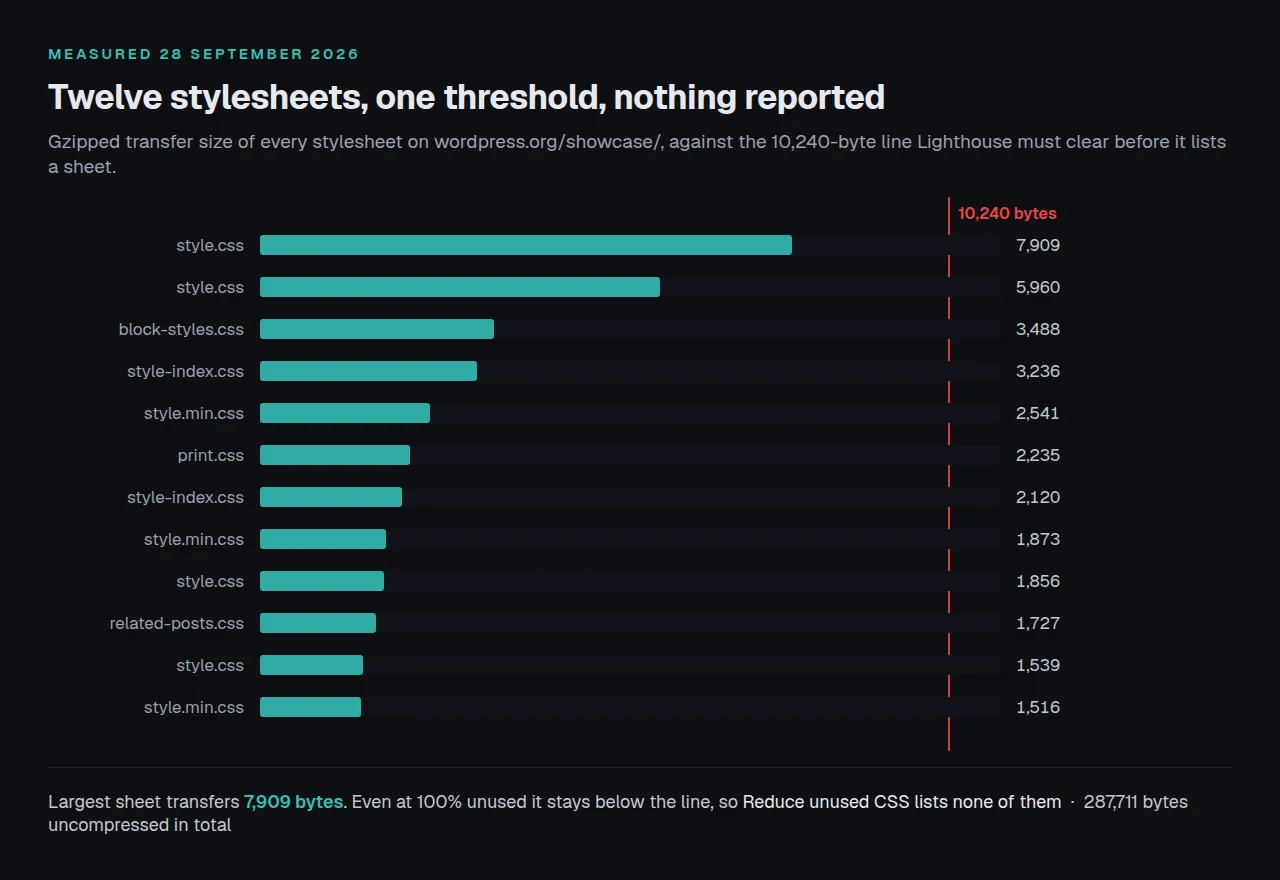
Check what those two do together. The [WordPress showcase site](https://wordpress.org/showcase/) loads twelve stylesheets: measured on 28 September 2026 they total 287,711 bytes uncompressed, 36,000 gzipped, and the largest transfers 7,909 bytes. Because 7,909 is below 10,240, **not one of the twelve can ever appear in Reduce unused CSS**, even if every rule went unused. Eleven carry `media="all"`, so eleven block first paint.

The audit is per sheet and measured after compression, so splitting CSS into more files quiets it without making the page faster.
![Twelve stylesheets by gzipped size, all under the 10,240-byte Lighthouse threshold](https://xspeedcache.com/images/blog/unused-css-threshold-twelve-sheets.webp)

## Step 1: Record Twice, Because One Page Load Is Not the Used Set

Chrome DevTools carries the only free per-rule measurement. Open the Command Menu, type `coverage`, run Show Coverage, then click reload in the panel. Per [Chrome's own documentation](https://developer.chrome.com/docs/devtools/coverage) it "captures the code needed to load the page, and continues the recording while you interact with the page."

That last clause is the method, and most walkthroughs drop it. Google's defer guide says to reload and read the report, green for critical and red for the rest. Read that way, every hover style and validation message comes back red, because a reload never opens a menu.

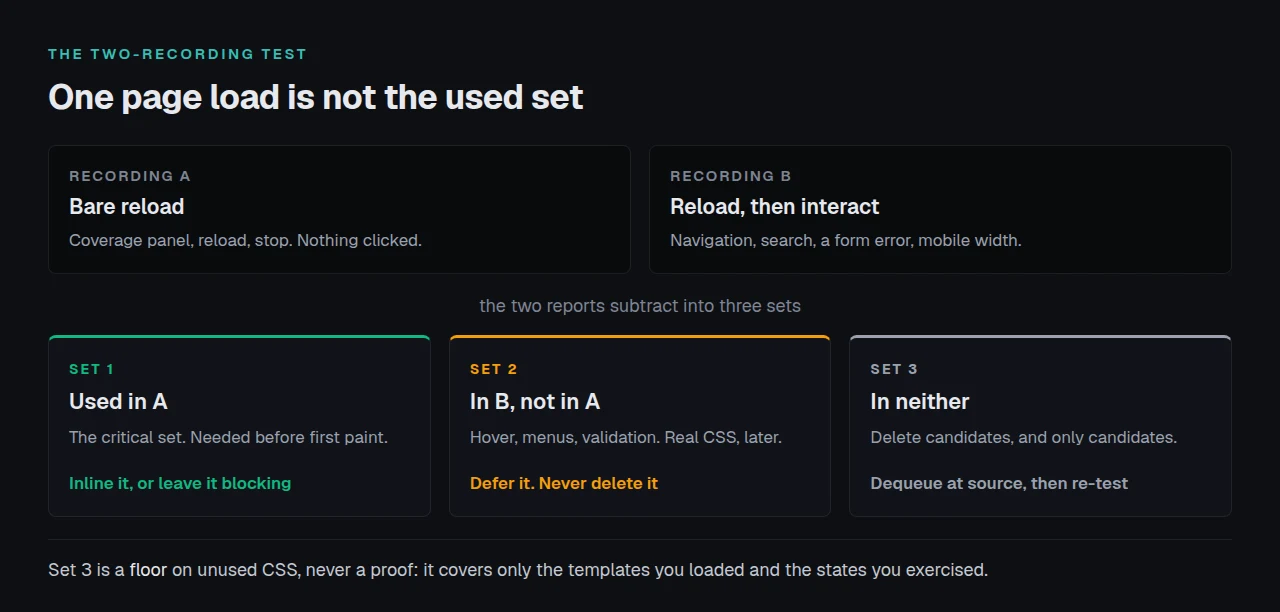
**The two-recording test.** Record once on a bare reload. Record again, then click the navigation, open the search, submit a form with an error, and narrow to mobile. Three sets fall out:

- 🟢 **Used on load.** The critical set. It stays render-blocking, or gets inlined.
- 🟡 **Used only after interaction.** Deferrable. Deferring is safe, deleting is not.
- ⚪ **Used in neither.** Delete candidates, and only candidates.

**What the test cannot tell you.** That third set is a floor, never a proof. It covers the templates you loaded and the states you exercised, so a rule firing only on a 404 page or a checkout error stays there while carrying weight. Chrome's own caution: finding unused code is easy, and refactoring so each page carries only what it needs "can be difficult."
![Two coverage recordings subtract into three sets of CSS rules](https://xspeedcache.com/images/blog/two-recording-coverage-test.webp)

## Step 2: Stop Enqueuing a Sheet Rather Than Pruning It

No plugin removes unused CSS at source, ours included. Every plugin offering it rewrites finished HTML, long after `wp_enqueue_scripts` settled what to load. This step is code, and the only one that stops a download rather than moving it.

Two functions look interchangeable and are not. [`wp_dequeue_style()`](https://developer.wordpress.org/reference/functions/wp_dequeue_style/) takes a handle out of the print queue; [`wp_deregister_style()`](https://developer.wordpress.org/reference/functions/wp_deregister_style/) removes the registration itself.

```php
add_action( 'wp_enqueue_scripts', function () {
	if ( ! is_page( 'contact' ) ) {
		wp_dequeue_style( 'contact-form-7' );
		// Deregister only when nothing else depends on this handle.
		wp_deregister_style( 'contact-form-7' );
	}
}, 100 );
```

Why the code calls both is in core. Read from `wp-includes/class-wp-dependencies.php` in the shipped 7.1.2 tag on 28 September 2026, [`WP_Dependencies::all_deps()`](https://developer.wordpress.org/reference/classes/wp_dependencies/all_deps/) walks each handle's declared dependencies and appends every one to `$this->to_do`. So dequeuing a handle another sheet declares as a dependency does nothing: core puts it back when it resolves that dependent. Deregistering works, and takes the dependents with it. `all_deps()` sets `$keep_going = false` under the comment "Item requires dependencies that don't exist", and since WordPress 6.9.1 core calls `_doing_it_wrong()` reporting a handle "enqueued with dependencies that are not registered". A theme sheet naming that handle as a parent quietly stops loading, and the notice is the only evidence.

## Step 3: Defer the Rest Without a Flash of Unstyled Page

Whatever survives step 2 still blocks rendering. [Google's own guide](https://web.dev/articles/defer-non-critical-css) gives the pattern, warning that it "may lead to bugs if not implemented properly." Its markup preloads the sheet and promotes it on load:

```html
<link rel="preload" href="styles.css" as="style" onload="this.onload=null;this.rel='stylesheet'">
<noscript><link rel="stylesheet" href="styles.css"></noscript>
```

The other shipped shape swaps the media attribute. xSpeed Cache is ours, built by WPDeveloper, a Startise company, and its Load CSS asynchronously setting emits `media="print"` with `onload="this.media='all'"`, parks the real media in `data-xs-async` and writes a `<noscript>` fallback after each deferred sheet, per `includes/class-css-combine-buffer.php` read on 28 September 2026. Neither is the standard way to load CSS, and both need that fallback.

**Order is not cosmetic, and two switches can cancel each other.** Our own issue #330 is recorded in that file's comments: the combiner read the literal `media` attribute, filed every deferred sheet into a print-only group, and combining silently stopped. The page went "from 5 stylesheets to 22" while `get_settings` still returned `combine_css: true`. Turn them on one at a time.

| Order | Switch | What breaks when it goes wrong |
|---|---|---|
| 1 | Minify CSS | Nothing visual. Check the file count |
| 2 | Combine CSS | Cascade order, if a sheet relied on it |
| 3 | Load CSS asynchronously | First paint unstyled until the swap |
| 4 | Critical CSS | The fold is right, the rest arrives late |

When it breaks, the bisect is in [the theme looks unstyled and minify is the only thing you changed](https://xspeedcache.com/blog/layout-breaks-after-minification/), and our [minification doc](https://xspeedcache.com/docs/minify/) maps the boxes to those rows.

## Confirming the Page Got Faster, Not Just Tidier

Start with the [free xSpeed Scan](https://xspeedcache.com/scan/). It needs no account, and the row to read is check A1, no render-blocking resources, which names the blocking files and their cost to first paint. Run it before and after. On 28 September 2026 it graded that showcase page 45 out of 100, A1 failing on eight files and roughly 900 ms of first paint, while A2, minified CSS and JavaScript, passed. Minified and still blocking is the ordinary state of a WordPress page.

**Two limits, said out loud.** The scan has no unused-CSS check, so the byte count still comes from the Coverage panel. And a smaller stylesheet count is no result on its own: CSS owns less of LCP than people expect, which [the first byte is fast and the page still is not](https://xspeedcache.com/blog/good-ttfb-slow-page/) breaks down.

To check by hand, compare transfer sizes then first paint:

```bash
curl -s -H 'Accept-Encoding: gzip' -o /dev/null \
  -w '%{size_download}\n' https://example.com/style.css
```

## Doing This Across Fifty Pages Instead of One

Critical CSS is per template, and a hand-written `<style>` block in `header.php` is per site. Past a few templates the work is keeping that set true as the design moves.

Read from [Free vs Pro](https://xspeedcache.com/free-vs-pro/) on 28 September 2026, the xSpeed Cache split is: Minify CSS, Combine CSS and Load CSS asynchronously are free; Enable Critical CSS, Defer remaining stylesheets, Enable Unused CSS, Learn from real visitors and Never prune these selectors are Pro. That "learn from real visitors" row answers step 1's problem, because a lab load never opens your menu and a month of real sessions does. The [feature list](https://xspeedcache.com/features/) has the rest.

**Alternatives, named fairly.** WP Rocket's Remove Unused CSS runs on its own servers, which by its documentation means a wait before anything applies, measured in [four metered limits against one flat licence](https://xspeedcache.com/blog/nitropack-vs-wp-rocket/). Perfmatters is the specialist and caches nothing, so it sits beside a cache plugin, counted in [only one feature does not overlap](https://xspeedcache.com/blog/perfmatters-vs-caching-plugin/). Both are reasonable buys, neither needed above.

Run the free scan on your own site before buying anything: [xspeedcache.com/scan/](https://xspeedcache.com/scan/)

## Common Mistakes People Make With Unused CSS

- 📉 **Treating a clean Reduce unused CSS row as proof.** A page can carry 281 KB of CSS and never trip it.
- 🧩 **Splitting one large sheet into six.** Every sheet drops under the threshold, the bytes are identical, and there are five more requests.
- 🔁 **Flipping minify, combine and async together.** When the layout breaks there are four suspects.
- 🖨️ **Dropping the `<noscript>` fallback.** A visitor without JavaScript gets an unstyled page.

## Frequently Asked Questions

### I removed unused CSS and my PageSpeed score did not move. What happened?

You deferred bytes rather than deleting them, and the blocking wait was not the bottleneck. [Reading a PageSpeed report](https://xspeedcache.com/blog/read-pagespeed-report-wordpress/) shows how little of the score first paint owns.

### How much unused CSS is normal on a WordPress site?

High. A theme plus ten plugins ships styles for every template and state, and one page uses a fraction of them.

### I dequeued a stylesheet and it is still loading. Why?

Another enqueued handle declares it as a dependency, so `all_deps()` re-queues it. Deregister it too, or dequeue the dependent.

### My layout broke after I turned on asynchronous CSS. What do I undo first?

That switch, then reload. If the page comes back, the deferral is the cause, and the [troubleshooting doc](https://xspeedcache.com/docs/common-problems-and-troubleshooting/) has the order.

### Does removing unused CSS help Core Web Vitals?

It helps First Contentful Paint directly, and LCP only where blocking CSS held the largest element back. [Page weight against mobile LCP](https://xspeedcache.com/blog/page-weight-vs-lcp-wordpress/) has the threshold.

### Can I safely delete rules from my theme's stylesheet?

In a child theme, yes. In the parent, the next update overwrites the file. Keep a backup.

### I see Reduce unused CSS on one page and not another. Is that a bug?

No. The audit is per stylesheet and per page, and lists one only above 10,240 transfer bytes.

### Do I need a plugin for any of this?

No. The panel, the dequeue code, the deferral markup and the verification are free. Autoptimize, LiteSpeed Cache and xSpeed Cache each automate the repetition at no cost.

### My critical CSS is right on the homepage and wrong on product pages. Why?

One critical set was generated for one template, and an archive and a product page have different folds. Our [WooCommerce notes](https://xspeedcache.com/use-cases/woocommerce/) cover which need their own.

### Is combining stylesheets still worth it on HTTP/2?

Less than it was, because request cost fell. It still helps where a sheet sits behind a slow third-party host, and our [capability comparison](https://xspeedcache.com/comparison/) shows which plugins do it.

## Conclusion: Delete, Defer, or Leave It Alone

| Your goal | Start with | Why |
|---|---|---|
| Fastest first paint on one page | Inline the critical set, defer the rest | Removes the blocking wait |
| Lowest bytes on a plugin-heavy site | Conditional dequeues in code | The only step that stops a download |
| A quiet Lighthouse report | Read the threshold first | The audit skips sheets under 10,240 transfer bytes |
| Staying right across twenty templates | An automated critical-CSS pass | Hand-written critical CSS goes stale |

**What to do this week:**

1. Run the Coverage panel twice on your slowest template: a bare reload, then a pass clicking through.
2. Write down which sheets were used in neither recording.
3. Dequeue the two worst offenders conditionally and confirm first paint moved.
4. Turn on minify, then combine, then asynchronous CSS, one reload apart.
5. If the critical set goes stale faster than you can maintain it, xSpeed Cache Pro automates it from [$29 a year](https://xspeedcache.com/pricing/), with a 14-day guarantee.

When the test calls a rule unused and your site needed it, write down the state it fires in. No tool hands you that list.
