# Meet xSpeed Cache: A Smarter Way to Make WordPress Faster with AI-Native Features
> xSpeed Cache is an AI-native WordPress speed plugin with smart caching, CSS optimization, real-user monitoring, CDN tools, and AI-powered recommendations.
- Published: 2026-09-22
- Author: xSpeed Cache Team
- Tags: xSpeed Cache, AI, Caching, Performance, MCP, WordPress
- Canonical: https://xspeedcache.com/blog/meet-xspeed-cache/
---
We are excited to introduce [xSpeed Cache](https://xspeedcache.com/), an AI-native caching and performance plugin built to change the way WordPress websites are optimized, monitored, and managed. Created for the modern web, xSpeed Cache brings intelligent caching, performance insights, front-end optimization, CDN integrations, and AI-assisted recommendations together in one powerful performance engine.
A fast website is an essential part of creating a great digital experience. It helps visitors explore your content, interact with your website, and take meaningful actions with greater confidence. As WordPress sites grow, performance optimization naturally becomes an ongoing process of testing plugins, adjusting settings, clearing caches, and reviewing performance reports.
xSpeed Cache brings all of these activities into **a more connected workflow**. You can begin with a strong performance baseline, use familiar caching and optimization tools, and then take advantage of intelligent recommendations and analytics to understand where your website can improve next. Whether you manage one website or multiple WordPress installations, xSpeed Cache is designed to make performance optimization more accessible, efficient, and future-ready.
## TL;DR
| Topic | Takeaway |
| --- | --- |
| **xSpeed Cache** | xSpeed Cache is an **AI-native caching and performance plugin** for WordPress that combines caching, optimization, monitoring, and AI-assisted workflows. |
| **Core capabilities** | It includes tools such as **Object Cache with Redis/Memcached**, CDN and Cloudflare integrations, CSS optimization, JavaScript controls, and image performance features. |
| **AI-powered features** | Its advanced capabilities include an **AI-Powered Performance Hub, MCP integration, AI Recommendations, Self-Healing Cache, and multi-site control**. |
| **Performance monitoring** | Site owners can monitor performance through **per-URL cache hit/miss insights, Real User Monitoring, Core Web Vitals, and external performance scores**. |
| **Who it is for** | xSpeed Cache is built for business owners, publishers, ecommerce websites, membership platforms, agencies, freelancers, and technical WordPress teams. |
## Why Another Caching Plugin for WordPress
WordPress has never been more flexible. With the right themes, plugins and integrations, you can build almost any kind of website. But that flexibility can also create performance challenges. A site may gradually collect layers of caching tools, optimization plugins, scripts and third-party services, each solving one problem while introducing another.
So why consider another caching plugin? Because modern [WordPress performance](https://wpdeveloper.com/wordpress-site-performance-strategies/) requires more than simply storing a static version of a page. It requires a connected approach that can understand your site, identify bottlenecks, optimize different performance layers and help you verify whether a change actually improves the visitor experience.
### 1. Too Many Performance Tools
Many WordPress websites rely on multiple plugins for page caching, image optimization, database cleanup, CSS optimization, CDN integration and performance monitoring. While each tool may be useful on its own, combining several plugins can lead to overlapping features, duplicated settings, and additional code running on the site.
This often makes the performance stack harder to manage. Instead of having one clear system, site owners must remember which plugin controls each setting and how those settings interact. A unified performance plugin can reduce that complexity by bringing essential optimization tools into one connected environment.
### 2. Plugin Conflicts
WordPress plugins do not always work independently. Two plugins may try to minify the same files, alter cache behavior, defer identical scripts, or purge stored content at different times. The result can be broken layouts, missing styles, JavaScript errors, or pages that appear different for different visitors.
These conflicts are especially difficult to diagnose because the problem may not appear immediately after a setting is changed. A performance solution should therefore do more than provide optimization controls. It should help administrators understand changes, identify potential conflicts and maintain a safer path for testing and recovery.
### 3. Manual Tuning Takes Time
Performance settings are not identical for every website. A blog, online store, membership website, portfolio and news publication may all need different cache rules, exclusions, preload schedules and asset-loading strategies.
Manually tuning these settings can be time-consuming, particularly for small businesses and teams without a dedicated developer. Even experienced professionals can spend hours checking configurations, running tests, purging caches and repeating the same process after every major update. A more intelligent system can make that work more efficient by helping prioritize actions and simplifying routine performance tasks.
### 4. Standard Performance Scores
A [score from a performance testing tool](https://wpdeveloper.com/how-to-improve-your-google-pagespeed-score/) can tell you that a page needs improvement, but it does not always tell you which part of the WordPress stack is responsible. A low score might be connected to caching, CSS, JavaScript, images, server response time, network delivery, or a combination of several factors.
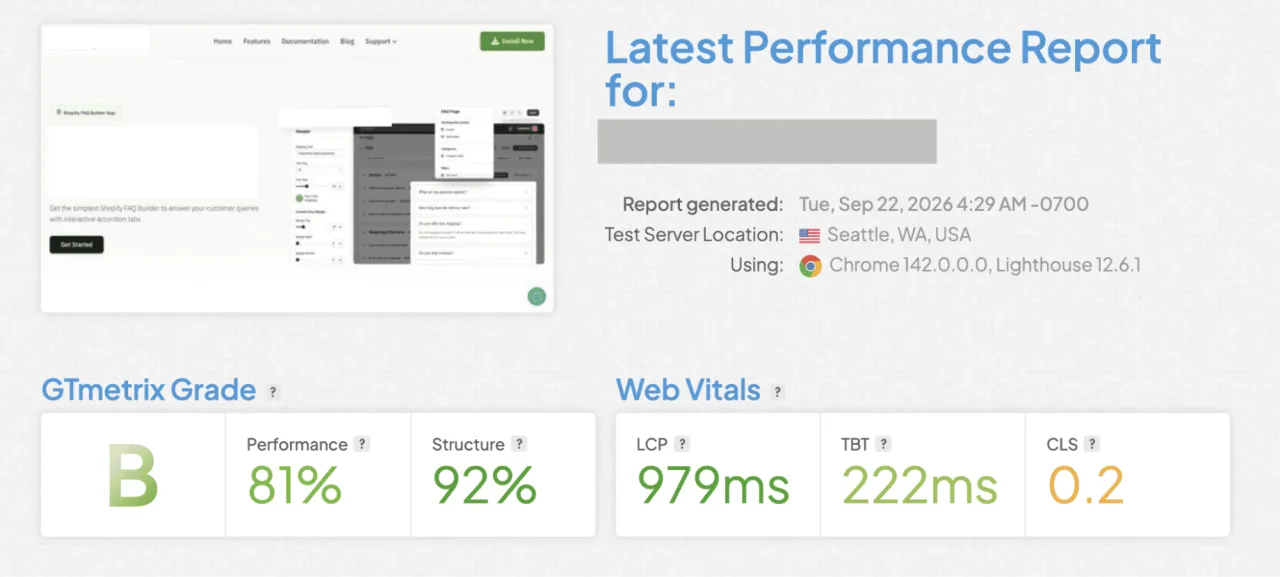
Site owners also need more context than a single homepage score. Important landing pages, product pages, blog posts, and dynamic URLs may perform differently. Understanding performance requires a combination of external testing, cache insights, page-level data, and information about what real users experience.
### 5. Aggressive Optimization
Speed improvements should never come at the cost of usability. Removing CSS that appears unnecessary can affect a menu, form, checkout flow, or responsive layout. Delaying [JavaScript](https://wpdeveloper.com/how-to-minify-css-wordpress/) may improve initial loading while interfering with an essential interaction. Caching personalized content incorrectly can create a serious user experience or privacy issue.
This is why WordPress optimization needs balance. Website owners need the ability to improve delivery while keeping exclusions, testing, monitoring, and control available. The right caching plugin should make performance safer to manage, not encourage users to switch on every setting without understanding the consequences.
## Introducing xSpeed Cache: AI-native Caching Plugin for WordPress
[xSpeed Cache](https://wordpress.org/plugins/xspeed/) is an AI-native caching and performance plugin built for modern WordPress websites. It combines the essential tools needed to improve website speed with an intelligent layer that can help users understand, manage, and continuously optimize their sites.
The plugin comes from [WPDeveloper](https://wpdeveloper.com/), a WordPress product company whose ecosystem serves more than **6 million users across 180+ countries worldwide**. That experience includes widely used products such as [Essential Addons for Elementor](https://essential-addons.com/), [NotificationX](https://notificationx.com/), [BetterDocs](https://betterdocs.co/), and more, giving WPDeveloper a broad understanding of the needs of WordPress users, website creators, agencies, and online businesses.
*Video: [Introducing xSpeed Cache](https://www.youtube.com/watch?v=fYVy77GJDE4) on YouTube.*
With xSpeed Cache, the goal is not simply to add another cache button to the WordPress dashboard. It is to create a more complete performance workflow, one that can help establish a healthy baseline, connect with AI assistants, surface recommendations, and make it easier to understand how different performance decisions affect the site.
Whether you manage one business website or a portfolio of WordPress installations, xSpeed Cache is designed to make optimization more accessible without removing control from the site owner. You can begin with core caching and optimization features, then explore advanced intelligence and monitoring as your performance requirements grow.
## See What Makes xSpeed Cache Different
At its foundation, xSpeed Cache brings together the core features expected from a modern WordPress performance plugin, including page caching, mobile caching, browser caching, compression, asset optimization, lazy loading, JavaScript controls and object caching with Redis or Memcached. It also connects with services such as CDNs and Cloudflare to support a broader approach to content delivery.
What makes xSpeed Cache different is the way these tools are connected to intelligence and visibility. Its AI-Powered Performance Hub and [MCP integration](https://xspeedcache.com/blog/introducing-xspeed-cache-mcp-let-ai-manage-your-sites-performance/) are designed to let users work with AI assistants such as Claude or ChatGPT, while AI Recommendations, Self-Healing Cache, and multi-site control support a more guided management process.
The platform also gives site owners a closer look at performance through per-URL cache hit and miss insights, Real User Monitoring, Critical CSS, Remove Unused CSS, and external performance scoring. These capabilities provide a glimpse into a performance system that is not only focused on caching pages, but also on understanding how WordPress websites behave in the real world.
In the following sections, let's explore each of these features in more detail and show how xSpeed Cache can help create a faster, more reliable, and easier-to-manage WordPress website.
## AI-Powered Performance Hub for Smarter WordPress Performance Management
Many optimization tools provide a collection of settings but leave you to decide what matters most. The AI-Powered Performance Hub is designed to make performance management more guided by bringing site health, recommendations, optimization, and verification into one workflow.
The Hub helps you understand the current condition of a WordPress website and identify the next actions worth considering. Instead of moving between different dashboards, testing tools, server notes, and configuration screens, you can use a more connected performance view within your site.
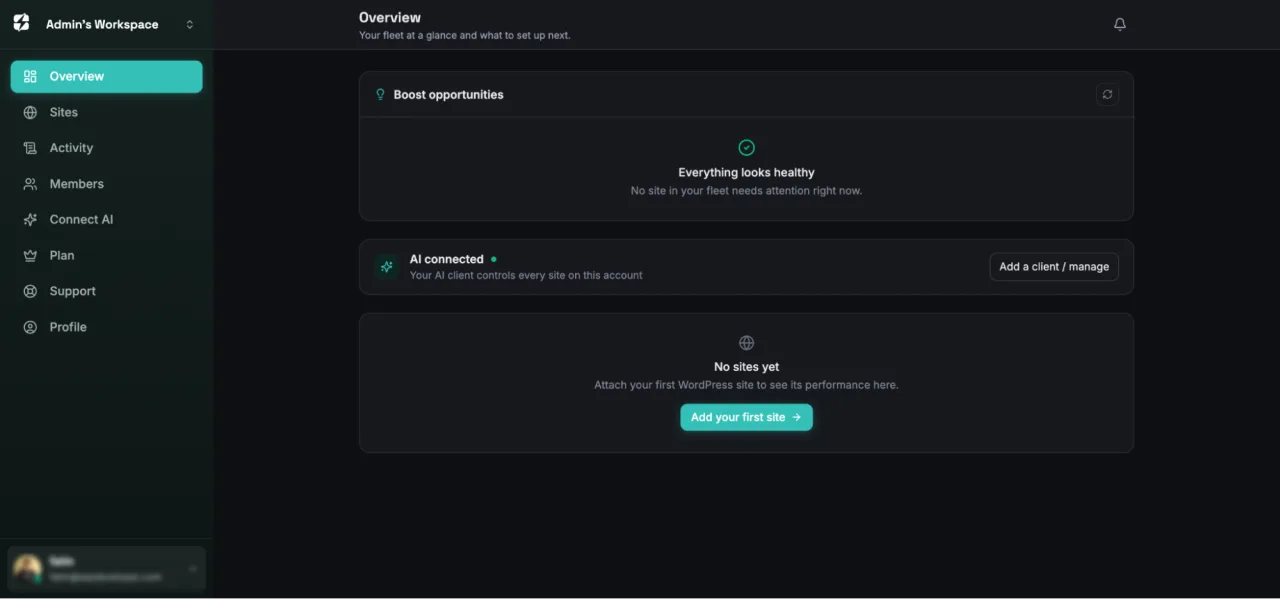
This makes the Hub especially useful for diagnosing and improving an individual WordPress installation. It can help you review the site's performance condition, understand potential areas for improvement, and work through optimization tasks in a more organized way.
The goal is not to replace site owners or developers with automation. It is to make performance data easier to interpret and optimization decisions easier to manage. You can use the recommendations as a starting point, apply appropriate changes, and verify whether those changes improve the site.
## MCP Support for AI-Powered Website Control and Optimization
MCP stands for Model Context Protocol. Unlike the Performance Hub, which focuses on guiding optimization within a site, MCP provides a way for external AI clients and agents to communicate with connected xSpeed Cache tools.
xSpeed Cache can connect an MCP client with [AI assistants](https://wpdeveloper.com/how-to-use-mcp-with-wordpress/) such as Claude or ChatGPT. Within the permissions selected by the site owner, these assistants can help inspect performance settings, make supported changes, and check the results. This creates a conversational way to manage WordPress performance remotely.
*Video: [xSpeed Cache MCP: manage WordPress performance with AI](https://www.youtube.com/watch?v=LlIb3XuQ-mo) on YouTube.*
For example, you can identify a performance issue, ask an AI assistant what should change, apply an approved action, and test the result. These controls help keep AI-assisted optimization visible, structured and manageable.
Multi-Site Control extends this capability to agencies, freelancers, publishers, and organizations managing several WordPress websites or a WordPress Multisite network. Rather than treating every website as an isolated project, teams can use a more repeatable remote management process while keeping each site's rules, exclusions, and technical context in view.
## Object Cache with Redis/Memcached for Faster Database Data Access
Page caching stores generated responses for repeat visitors, but WordPress may still perform many database and application tasks behind the scenes. Object caching addresses that layer by keeping frequently used data available for reuse instead of requiring the same work on every request.
xSpeed Cache supports [Object Cache with Redis/Memcached](https://xspeedcache.com/docs/object-cache/), two widely used in-memory caching backends. This can be valuable for dynamic sites, stores, membership platforms, dashboards and content-heavy installations where database activity contributes to response time.
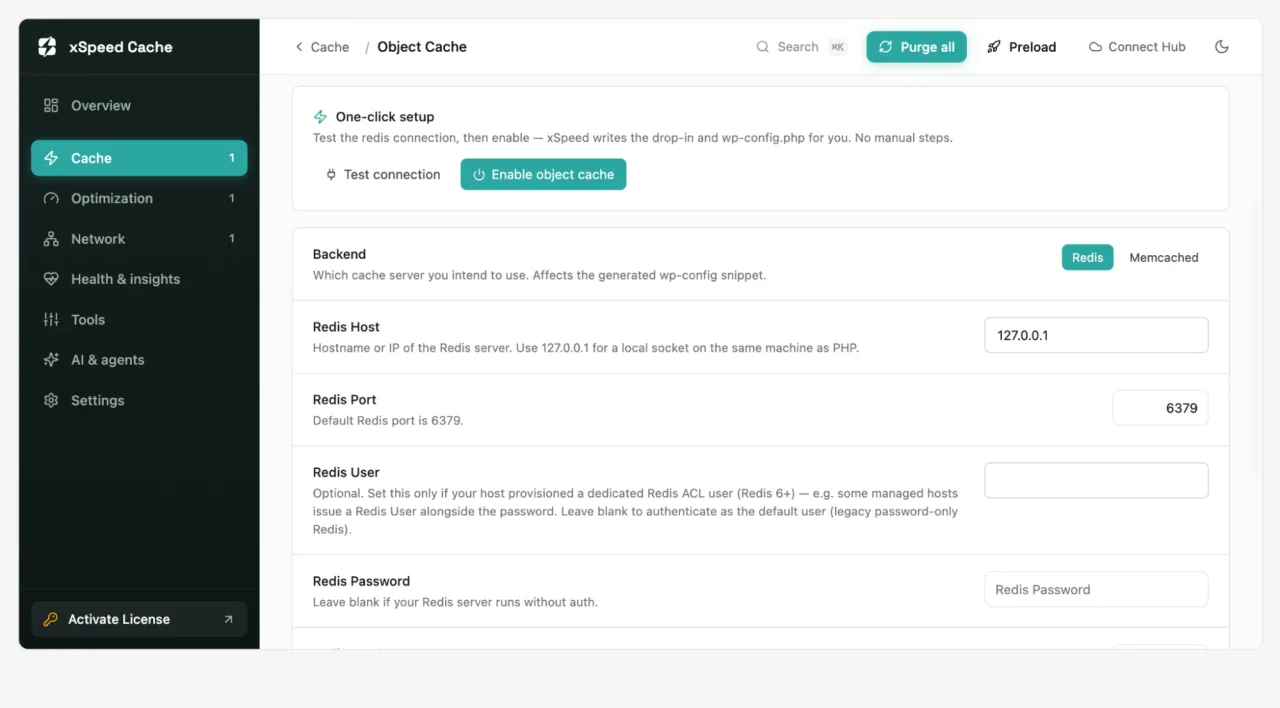
The advantage is a layered architecture: page cache handles repeatable public responses, while object cache helps WordPress reuse application data. Browser caching, compression, and asset optimization can reduce work further on the visitor's device and across the network.
Object caching needs appropriate rules for cache keys, persistent connections, exclusions, personalized content, and logged-in areas.
## AI Recommendations & Self-Healing Cache for Automated Performance Improvements
The next round of speed improvements is harder when a site includes plugins, custom templates, dynamic widgets, and third-party scripts.
[AI Recommendations](https://xspeedcache.com/docs/performance-recommendations/) help turn that complexity into a more practical decision process. Rather than presenting a long list of possibilities with no priority, the recommendations engine can help identify useful next actions based on the site's condition and observed performance. The best recommendation is not merely technical; it should be understandable, testable and connected to a measurable outcome.
Self-Healing Cache extends that idea into ongoing maintenance. Cache systems must respond when content is published, updated, commented on, or affected by a plugin interaction. xSpeed Cache lists Self-Healing Cache among its intelligent Pro capabilities, along with tools intended to auto-resolve plugin conflicts and verify changes. The purpose is to reduce manual intervention when the cache needs to adapt.
Automation should remain traceable, tested, and reversible. AI can accelerate investigation, while site owners retain control of access, consent, providers, and configuration. xSpeed Cache documents [AI privacy and GDPR options](https://xspeedcache.com/docs/ai-privacy/), including consent controls.
## Per-URL Cache Hit/Miss Heatmap & Real User Monitoring for Deeper Insights
A site-wide cache hit ratio can hide the pages that matter most. Your homepage may perform well while a product URL, campaign landing page, or frequently shared article repeatedly misses cache. The [Per-URL Cache Hit/Miss Heatmap](https://xspeedcache.com/docs/hits-and-misses/) brings that detail into view by showing where caching works and where opportunities remain.
This page-level perspective makes troubleshooting more targeted. You can investigate frequently missed URLs, review exclusions, assess cache lifetimes and decide whether preloading or cache warming is appropriate.
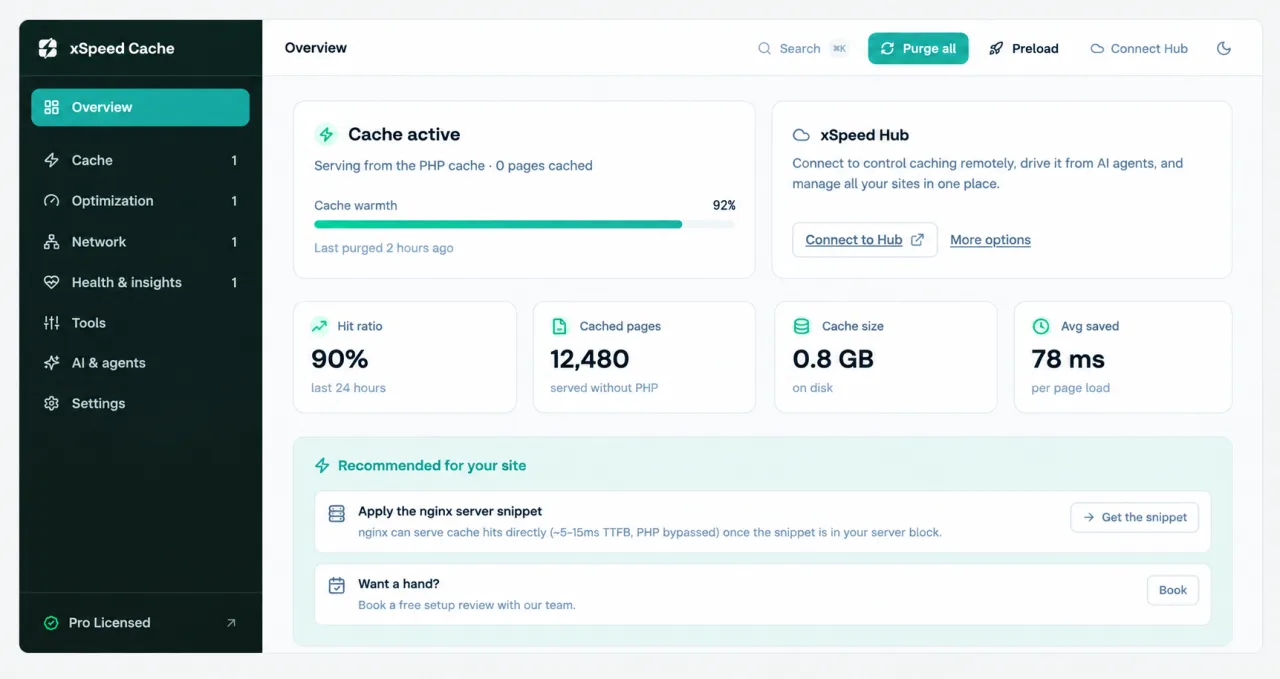
Real User Monitoring adds a second essential perspective. Lab tools test pages under controlled conditions. RUM reflects what actual visitors experience across devices, connections, locations and browsing contexts. xSpeed Cache connects this view with visitor analytics and [Core Web Vitals](https://wpdeveloper.com/guide-core-web-vitals-how-to-measure-them/), helping you understand whether an optimization improves the experience beyond a single test run.
Together, the heatmap and RUM create a useful feedback loop. The heatmap explains cache behavior at the URL level; RUM shows how the delivered experience feels to people. This is particularly useful for sites with varied templates, international traffic, logged-in areas, or frequently changing content.
## Critical CSS & Remove Unused CSS for Faster Page Rendering
CSS controls a page's visual structure, but themes and plugins can load rules that aren't needed for the initial view, or aren't needed on a particular URL at all. Extra CSS can mean more bytes, more browser processing and a longer path to a usable screen.
Critical CSS focuses on the styles needed to render above-the-fold content early. By prioritizing those rules, the browser can start presenting the main structure while handling less urgent resources separately. Remove Unused CSS takes the complementary approach of reducing styles that a page does not require.
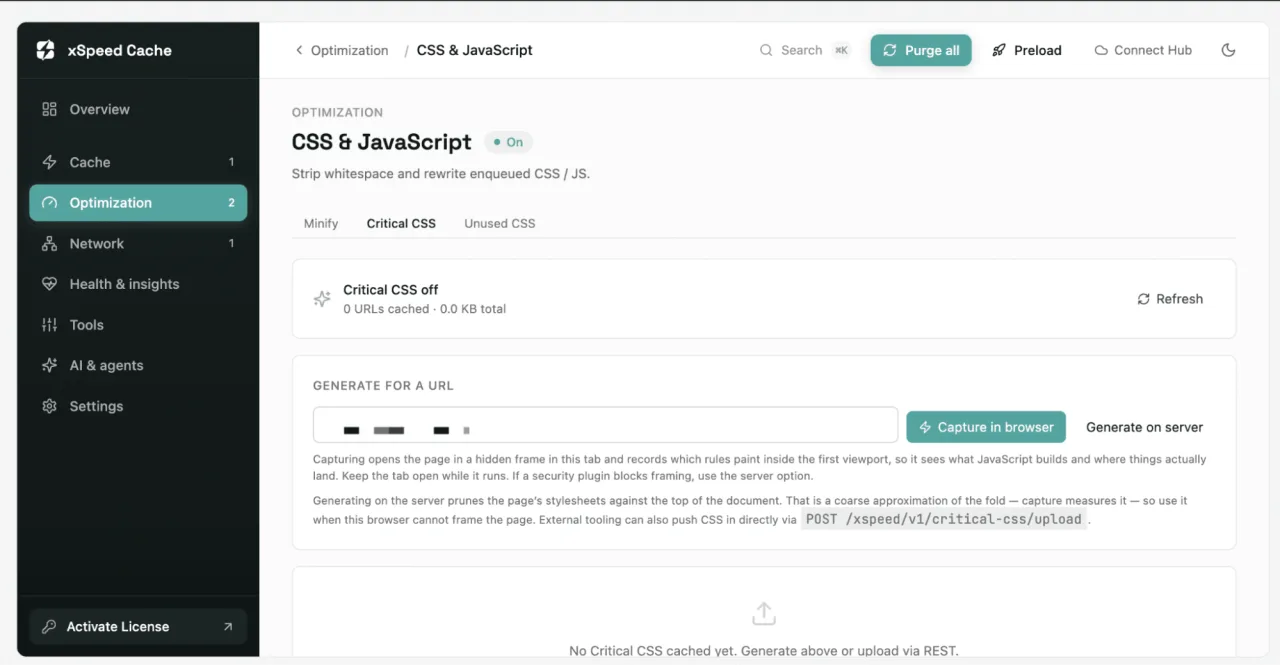
These features need testing because CSS affects responsive layouts, interactive states, menus, forms and third-party components. [xSpeed Cache's CSS tools](https://xspeedcache.com/docs/critical-css/) are best used as controlled optimization: apply the improvement, test important templates, and maintain exclusions for special cases.
For sites with large plugin stacks, these tools turn "the front end feels heavy" into a concrete optimization path. Alongside minification, asynchronous CSS, deferred JavaScript, and lazy loading, they create a cleaner sequence of work.
## CDN, Cloudflare & External Performance Scoring for Complete Performance Visibility
Origin caching is only one part of delivery. A CDN can distribute static assets closer to visitors, while Cloudflare can provide another network and caching layer when configured for the site. xSpeed Cache includes CDN URL rewriting and Cloudflare integration, including automatic purge behavior connected to xSpeed purges. This helps reduce the risk of visitors receiving an old asset after content or settings change.
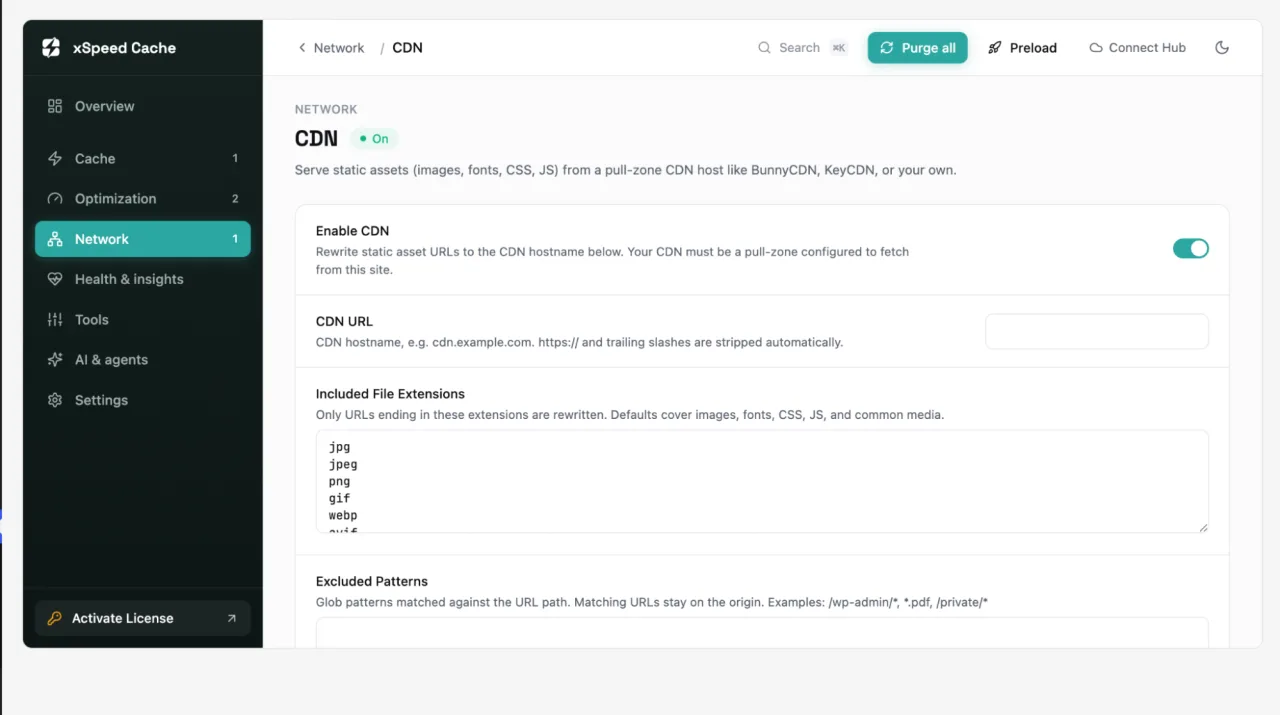
Coordination is important because the origin cache, browser cache, CDN and Cloudflare edge cache each have their own lifetime and invalidation behavior. An integrated workflow makes it easier to understand what should be purged, which file types should be rewritten and which patterns should be excluded. Cloudflare APO is also listed among the Pro capabilities.
External Performance Scoring adds independent measurement. xSpeed Cache can bring in external scores such as [PageSpeed](https://pagespeed.web.dev/) and GTmetrix alongside its own composite Performance Score and health information. Scores are directional signals, not the entire definition of quality. A page that scores well in a lab can still frustrate real visitors, while a score change should be interpreted alongside cache behavior and RUM data.
Together, network configuration and measurement help teams connect technical changes with outcomes.
## More Performance Capabilities Built into xSpeed Cache
Beyond its headline caching and AI capabilities, xSpeed Cache includes several additional tools designed to help WordPress site owners improve efficiency, maintain cleaner configurations, and manage performance from multiple angles. These features are especially useful when you want to fine-tune your site after the initial optimization work is complete.
### Brotli Compression for Smaller, Faster-Loading Assets
xSpeed Cache supports Brotli compression as an advanced alternative to GZIP. Compression reduces the size of text-based resources such as HTML, CSS, and JavaScript before they are transferred to visitors.
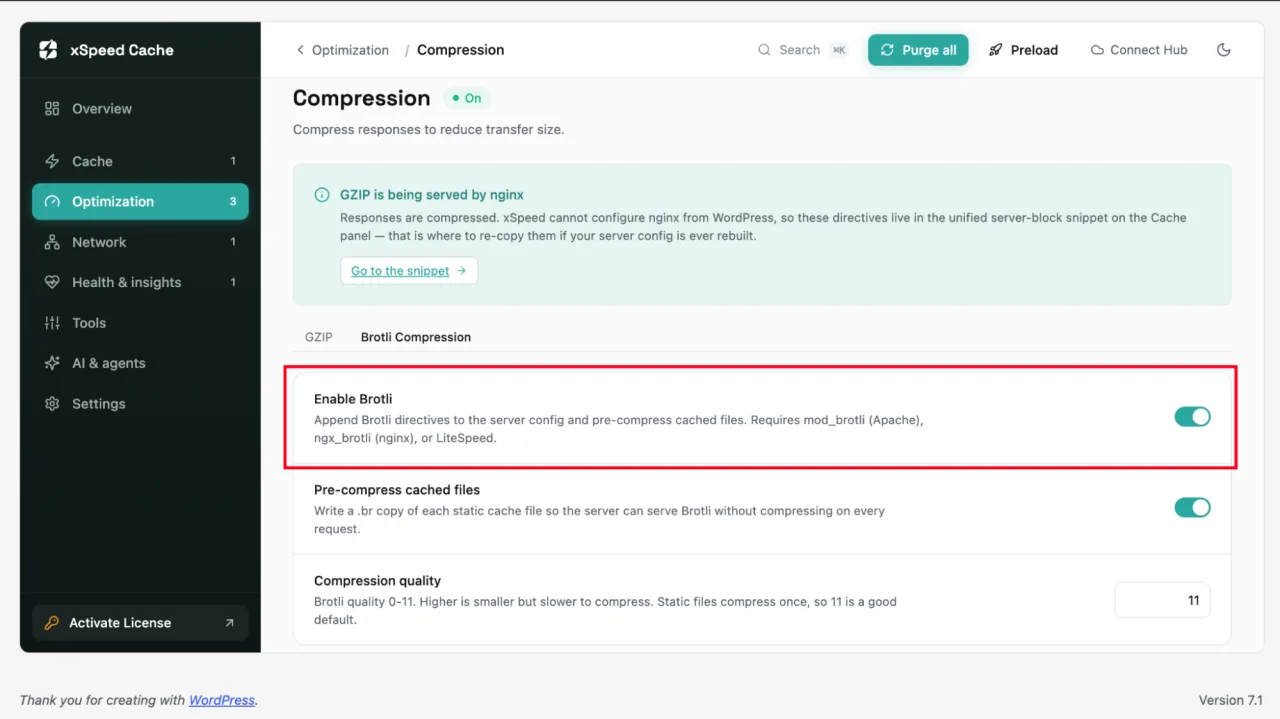
Smaller files can help reduce transfer time and improve the efficiency of content delivery, particularly for visitors on slower connections. Brotli compression works alongside caching, CDN delivery, and front-end optimization to reduce the amount of data browsers need to download.
### SmartPredict Navigation for More Responsive Internal Browsing
Not every performance improvement has to wait until a visitor requests a page. SmartPredict uses predictive prefetching to anticipate where a visitor may navigate next and prepare relevant resources in advance.
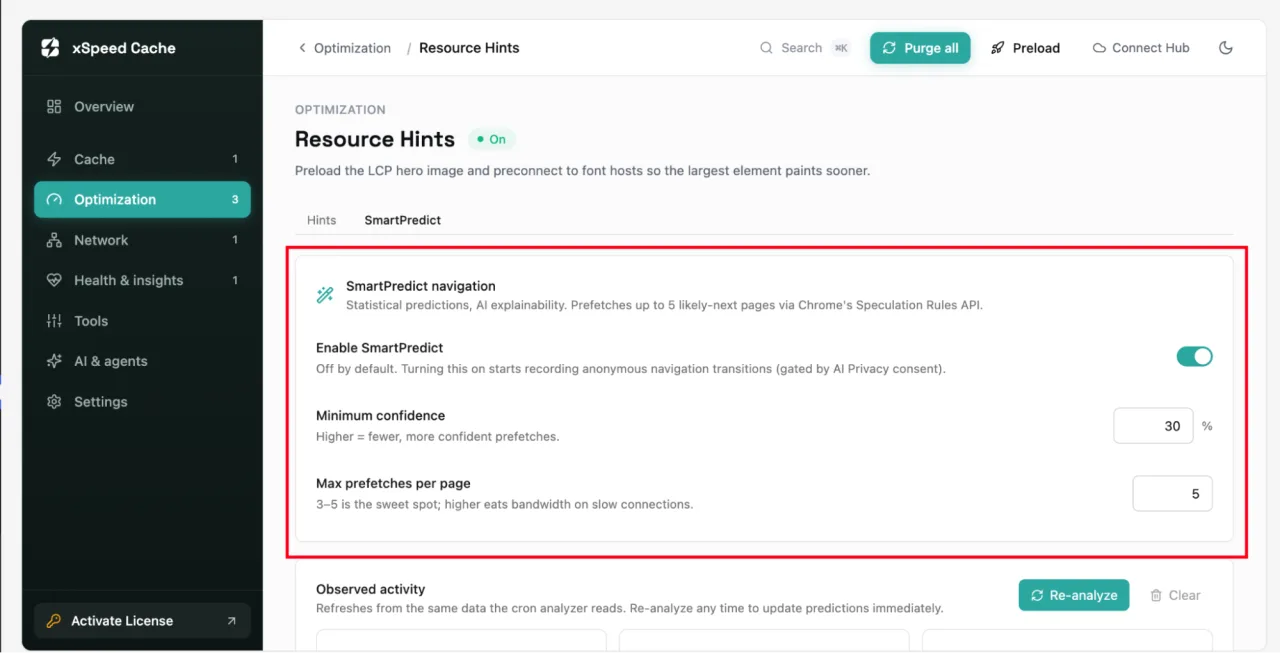
This can make internal navigation feel more responsive by reducing the delay between one page view and the next. Because prefetching can also create additional requests, predictive loading should be applied thoughtfully. SmartPredict gives site owners an intelligent way to explore this approach without manually adding prefetch rules to individual pages.
### Smart Image AI for More Efficient Image Optimization
Images often represent a significant portion of a page's total weight. xSpeed Cache includes Smart Image AI among its advanced optimization capabilities, complementing support for modern image formats such as WebP and AVIF.
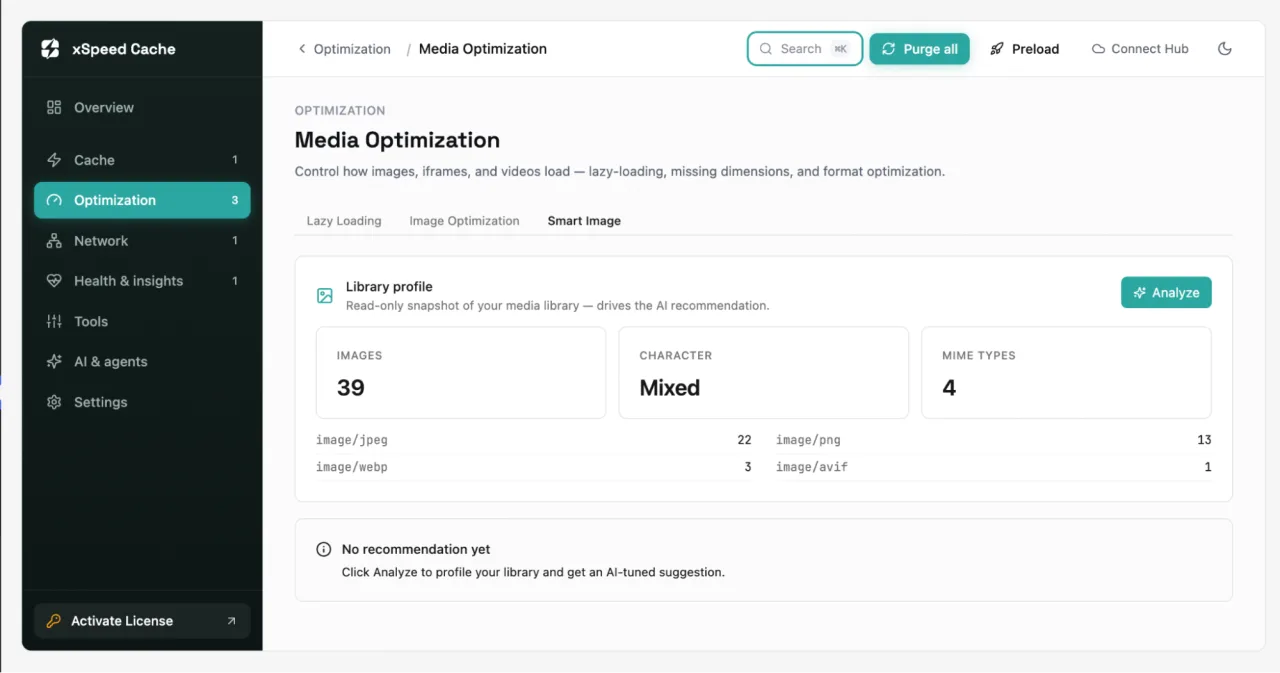
The purpose is to make image optimization more manageable while helping site owners consider file size, format, and delivery as part of the wider performance picture. This can be particularly useful for publishers, online stores, portfolios, and businesses that rely heavily on visual content.
### Database Cleaning And Optimization for Healthier WordPress Websites
A WordPress database can accumulate revisions, spam comments, transients, and other data that is no longer needed. xSpeed Cache includes tools to scan and clean database bloat, optimize database tables, and schedule automatic cleanup.
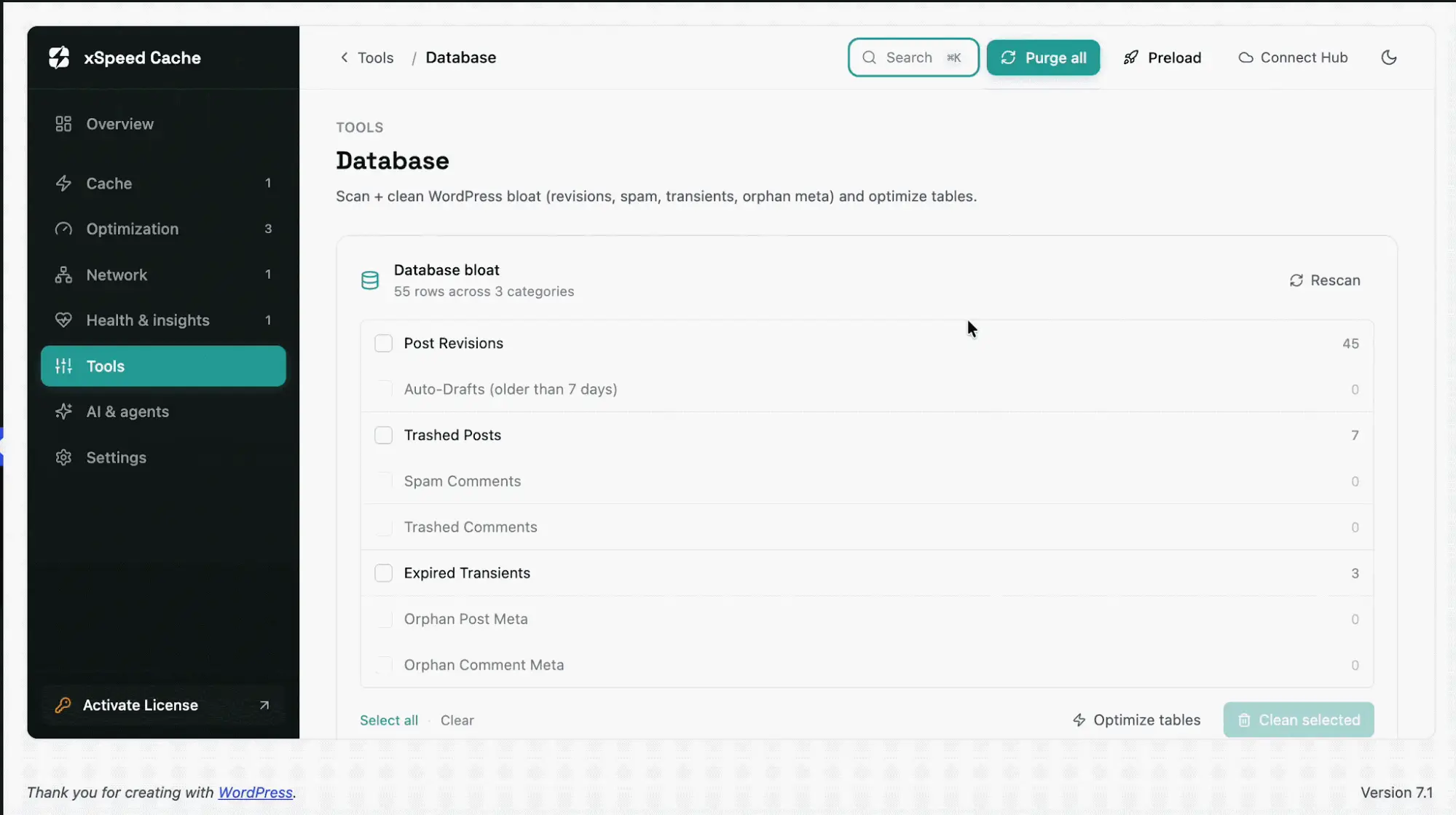
Keeping database maintenance within the same performance toolkit can make routine housekeeping easier. Instead of relying on a separate plugin for every maintenance task, administrators can review and manage selected cleanup activities alongside their caching and optimization settings.
### WordPress Bloat Control for a Leaner Site Configuration
WordPress includes several features that may not be necessary for every website. Depending on the project, site owners may want to disable items such as oEmbed, RSS feeds, XML-RPC, Dashicons, or jQuery Migrate.
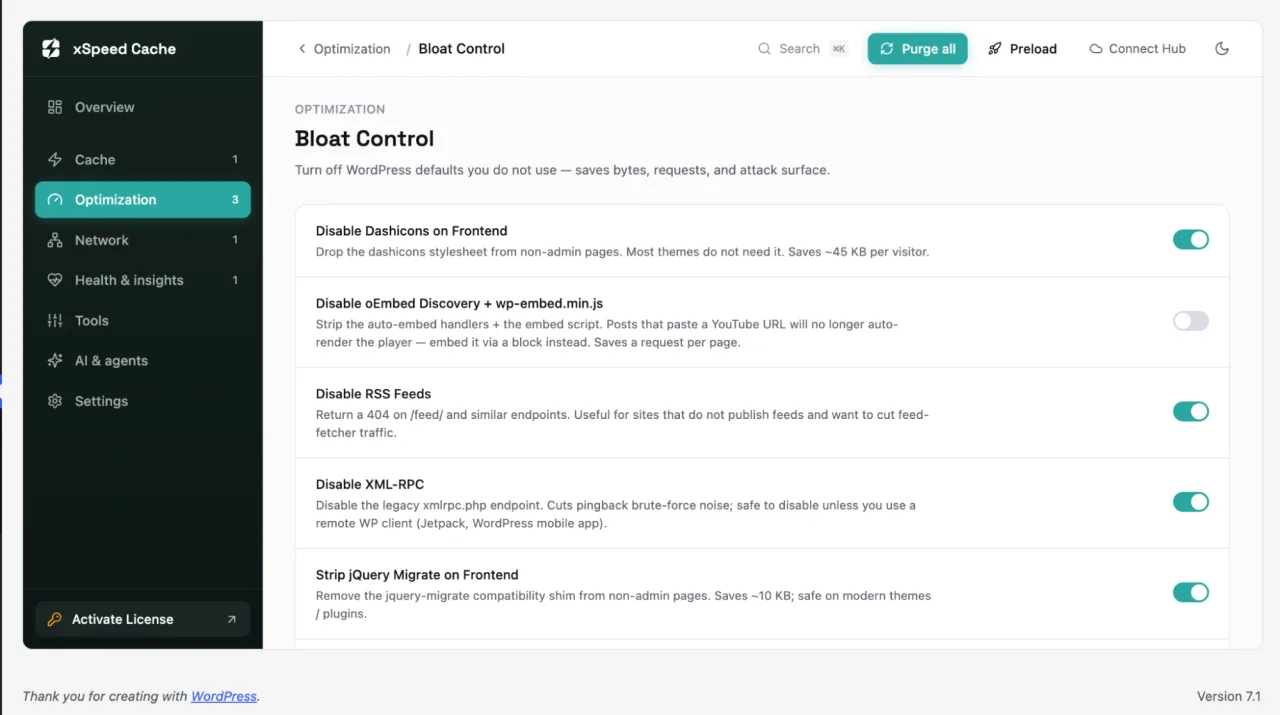
xSpeed Cache provides [Bloat Control](https://xspeedcache.com/docs/bloat-control/) options that help administrators reduce unnecessary functionality where appropriate. It also includes controls for managing the WordPress Heartbeat API across the dashboard, editor, and front end. These settings can help teams make more deliberate decisions about which WordPress features their site actually needs.
### One-Click And Shareable Cache Profiles for Consistent Site Management
Every website has different requirements, and agencies often need to apply consistent configurations across multiple projects. xSpeed Cache includes one-click cache profiles and shareable configuration options to simplify this process.
These tools can help teams save time when setting up similar sites, migrating configurations, or creating a repeatable optimization workflow. Instead of rebuilding every cache rule manually, administrators can use a more structured approach to configuration management.
### xSpeed Scan for Faster Diagnosis
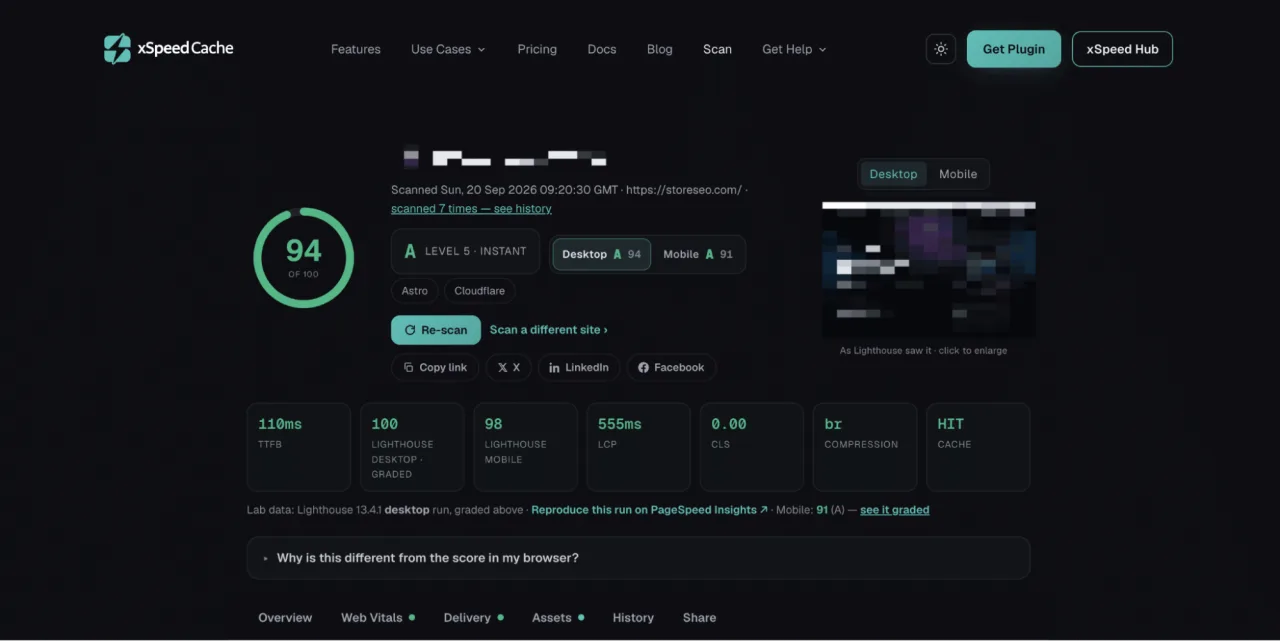
Before changing performance settings, it helps to understand what is actually slowing a website down. [xSpeed Scan](https://xspeedcache.com/scan/) provides a free speed test that combines Google Lighthouse with server-side probes. It grades a site from 0 to 100 and reports on areas such as Core Web Vitals, server response and caching, asset optimization, and platform readiness.
Rather than stopping at a score, xSpeed Scan maps failing checks to potential fixes and can provide copy-and-paste AI prompts for addressing individual issues. If a site is connected to the xSpeed Cache MCP server, the report can also support an AI-assisted workflow for applying and re-verifying improvements.
**[Scan your site free with xSpeed Scan →](https://xspeedcache.com/scan/)**
These additional tools give xSpeed Cache a broader role in WordPress performance management. From compression and predictive loading to database maintenance, configuration profiles, and diagnostic scanning, they help site owners continue improving after the basic cache settings are in place.
## Who Is xSpeed Cache For?
xSpeed Cache is built for WordPress users who want a faster, more manageable website without piecing together several disconnected tools. Its features are designed to support different website types and workflows, from simple business websites to large WordPress portfolios managed by [agencies and enterprises](https://xspeedcache.com/use-cases/).
### Small Business Owners
For small business owners, website performance can feel highly technical and time-consuming. xSpeed Cache provides a setup wizard and core caching features that help create a strong starting point without requiring advanced server knowledge.
As the website grows, business owners can also use performance recommendations, external scoring, monitoring, and optimization tools to understand whether their site is delivering a smooth experience to visitors.
### Bloggers, Publishers And Content Websites
Blogs, magazines, news websites, and content-rich platforms often have a large number of URLs with different levels of traffic and caching behavior. Features such as preloading, predictive cache warming, per-URL cache insights, lazy loading, and CSS optimization can help publishers manage performance across an expanding content library.
Real User Monitoring and PageSpeed tracking can also help publishers see how visitors experience their content across different devices and network conditions.
### Ecommerce And Membership Websites
Online stores and membership websites need to balance speed with dynamic and personalized content. Product pages, carts, checkout areas, account pages, and logged-in experiences may require different cache rules from public pages.
xSpeed Cache supports layered caching with object caching, exclusions, and advanced optimization controls, allowing teams to improve public-facing performance while handling dynamic areas more carefully. This makes it a useful option for websites where performance and personalization need to work together.
### Agencies And Freelancers
Agencies and freelancers often manage multiple client websites, each with different hosting environments, plugins, themes, and performance requirements. xSpeed Cache's multi-site tools, shareable configuration options, AI-assisted workflows, and client-focused capabilities can help make recurring optimization more consistent.
The ability to manage several site activations, use a multi-site dashboard, and access white-label and client-management features on higher plans can also support agencies that want to deliver performance services under their own brand.
### Developers And Technical WordPress Teams
Developers and technical teams may want deeper control over caching rules, database optimization, CDN and Cloudflare connections, WP-CLI commands, monitoring, and diagnostic information.
xSpeed Cache supports common WordPress environments, including Apache, nginx, LiteSpeed, and IIS. Its AI and MCP features can add another layer of control, while access scopes, activity logs, verification, and rollback options help teams maintain oversight of automated changes.
### Organizations Managing WordPress at Scale
Organizations with several websites or a WordPress Multisite network need more than a plugin that improves one page at a time. They need consistent configurations, centralized visibility, scalable site management, and support options that match the complexity of their operations.
xSpeed Cache offers plans for different site counts, from individual websites to unlimited site activations. The available plans differ by site capacity, support level, and management features, helping users select an option that matches their current workflow and future plans.
**[Learn more use cases →](https://xspeedcache.com/use-cases/)**
Whether you are optimizing a single business website, improving an ecommerce store, or managing performance across client sites, xSpeed Cache provides a way to start with core caching and expand into AI-powered optimization, monitoring, and multi-site management as your needs grow.
## Choose the Right xSpeed Cache Plan
Whether you are managing a single WordPress website, supporting client sites, or overseeing a larger website portfolio, xSpeed Cache offers plans designed to match different performance and management needs. You can start with the capabilities that fit your current workflow and expand as your website or organization grows.
Every plan is built around the xSpeed Cache performance engine, with options that vary according to site capacity, support, and management requirements. Review the available plans to find the right fit for your website, team, or agency.
**[Explore xSpeed Cache pricing →](https://xspeedcache.com/pricing/)**
## A Smarter Starting Point for WordPress Performance
Better performance should not require endless trial and error. It requires the right layers, useful evidence, and a workflow that helps you improve without losing control. xSpeed Cache brings those pieces together: AI-Powered Performance Hub + MCP with multi-site control, Object Cache with Redis/Memcached, AI Recommendations + Self-Healing Cache, Per-URL Cache Hit/Miss Heatmap + Real User Monitoring, Critical CSS + Remove Unused CSS, and CDN, Cloudflare & External Performance Scoring.
Start with a healthy baseline, understand your site's real behavior, and improve one meaningful layer at a time. Explore xSpeed Cache for WordPress and discover how an AI-ready performance toolkit can change the way you manage speed.
**[Get started with xSpeed Cache →](https://xspeedcache.com/)**
## Frequently Asked Questions
### Is xSpeed Cache difficult to set up?
xSpeed Cache includes a setup wizard designed to help you establish a healthy performance baseline quickly. Core caching works before any AI connection is required, so you can begin with essential features such as page caching, object caching, browser caching, GZIP compression, minification, lazy loading, and database cleanup. The MCP server and the xSpeed Hub connection are included in the free version too, whenever you are ready for them.
### Can I migrate from another caching plugin?
Yes. xSpeed Cache includes a [migration tool](https://xspeedcache.com/docs/migration/) for importing configurations from other cache plugins. This can help reduce the manual work involved when switching performance tools, although you should still review cache exclusions, dynamic content rules, and optimization settings after migration.
### What is the difference between the free version and Pro?
The core xSpeed Cache engine is available for free and includes essential caching, optimization, database, MCP, and xSpeed Hub capabilities. Pro adds advanced features such as Critical CSS, Remove Unused CSS, AI recommendations, adaptive cache, predictive warming, Self-Healing Cache, Real User Monitoring, PageSpeed tracking, and per-URL cache insights.
### How does xSpeed Cache handle AI access and privacy?
xSpeed Cache provides read and write access scopes for connected AI tools, along with an AI tool catalog, activity logs, and change verification. Its feature set also includes AI privacy controls such as a consent gate and customizable consent banner text, helping site owners decide how AI-assisted performance management should operate on their websites.
### How do xSpeed Cache plans and renewals work?
xSpeed Cache offers annual plans as well as lifetime options. Annual plans include a year of updates and support, while lifetime plans are presented as a one-time payment with no yearly renewal. Site limits vary by plan, and paid plans include a 14-day money-back guarantee. You can compare the available site capacities, support levels, and management features on the [xSpeed Cache pricing page](https://xspeedcache.com/pricing/).