# Enabling Browser Caching in WordPress in 2026: Send Nothing and the Browser Guesses 10%
> WordPress sets no Cache-Control on an ordinary page view, so the browser invents a lifetime. The Apache and nginx rules that replace the guess, and how to confirm them.
- Published: 2026-10-02
- Updated: 2026-10-04
- Author: xSpeed Cache Team
- Tags: Browser Cache, Caching, Tutorial, Performance, WordPress, fix:browser-cache, platform:wordpress
- Canonical: https://xspeedcache.com/blog/enable-browser-caching-wordpress/
---
Updated October 2026
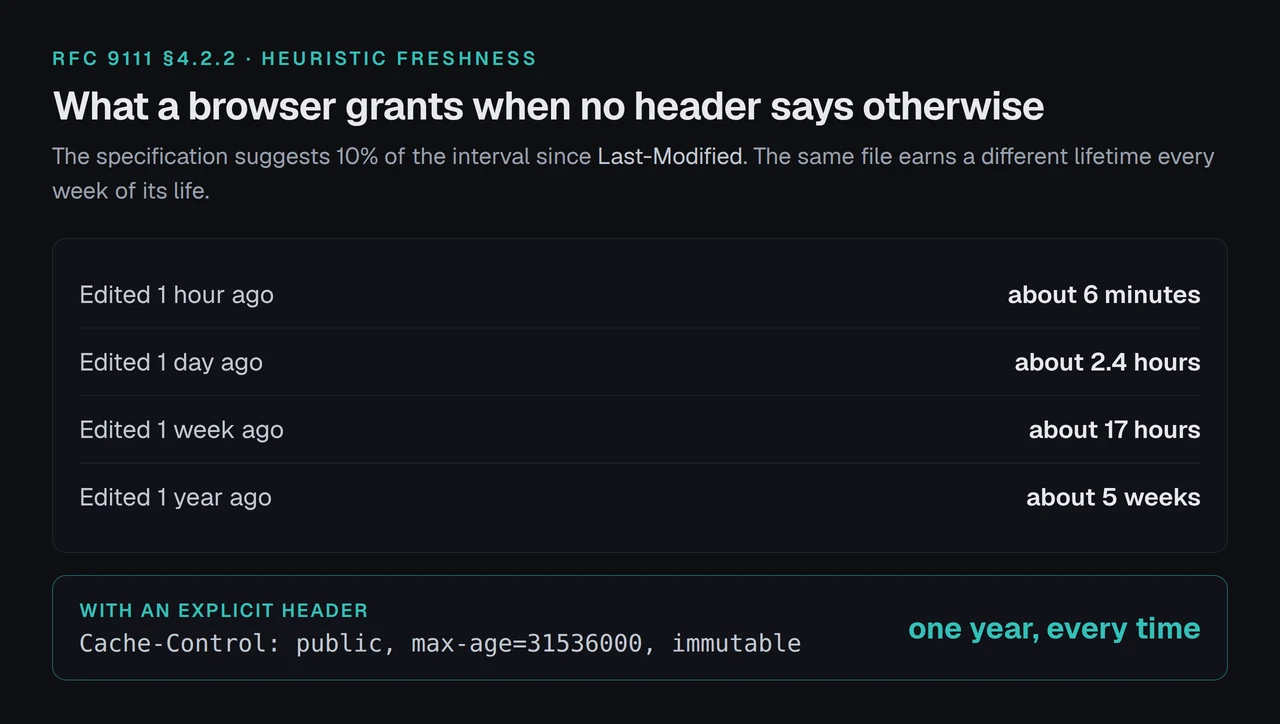
WordPress sends no caching instruction on an ordinary page view. `WP::send_headers()`, [read from core trunk](https://core.svn.wordpress.org/trunk/wp-includes/class-wp.php) on 2 October 2026, sets `Cache-Control` and `Expires` in exactly two branches: when somebody is logged in, and inside the 10-minute comment-moderation window. Every other request gets neither. [RFC 9111](https://httpwg.org/specs/rfc9111.html) then permits a browser to invent an expiry, and the fraction the specification suggests is 10% of the time since the file was last modified.
So the question is not whether to cache in the browser. It is what your rule is keyed on, because that decides whether it ever fires on a WordPress URL.
- [What to set, by server](#quick-summary-what-to-set-and-where)
- [Apache and LiteSpeed](#apache-and-litespeed-two-modules-one-job)
- [nginx](#nginx-nothing-happens-until-you-paste-it)
- [Confirming it reached a browser](#confirming-the-header-reached-a-browser)
## Quick Summary: What to Set, and Where
| If you want… | Do this | Why |
|:---|:---|:---|
| Assets cached for a year | `Cache-Control: public, max-age=31536000, immutable` | Fingerprinted filenames change when the file changes, so the URL genuinely never does |
| The page document cached briefly | One hour, by MIME type | You cannot purge somebody else's browser, so a long HTML lifetime strands readers |
| It to work on your server | `mod_expires` plus `mod_headers` on Apache, `expires off;` then one `add_header` on nginx | Neither server does the whole job with a single directive |
## What a Browser Does When Nothing Tells It Anything
RFC 9111 §4.2.2 states that a cache "MAY assign a heuristic expiration time when an explicit time is not specified", and that where a `Last-Modified` header exists, caches "are encouraged to use a heuristic expiration value that is no more than some fraction of the interval since that time. A typical setting of this fraction might be 10%."
Ten per cent of an interval is not a policy. A stylesheet last edited a year ago earns about five weeks; the same file edited an hour ago earns six minutes.
`immutable` is the part worth understanding. [RFC 8246](https://www.rfc-editor.org/rfc/rfc8246.txt) §2 says clients "SHOULD NOT issue a conditional request during the response's freshness lifetime (e.g., upon a reload)". Without it a reload still asks your server, gets a 304, and pays a round trip for an answer it already had.
## Apache and LiteSpeed: Two Modules, One Job
Apache needs both modules, and the reason is specific. `mod_expires` [documentation states](https://httpd.apache.org/docs/2.4/mod/mod_expires.html) that it controls "the Expires HTTP header and the max-age directive of the Cache-Control HTTP header", and it has no way to emit `immutable`. So `mod_headers` writes the fuller header alongside it.
```apache
ExpiresActive On
ExpiresByType text/html "access plus 3600 seconds"
ExpiresByType text/css "access plus 31536000 seconds"
ExpiresByType application/javascript "access plus 31536000 seconds"
ExpiresByType font/woff2 "access plus 31536000 seconds"
Header set Cache-Control "public, max-age=31536000, immutable"
```
Note which line catches what. `ExpiresByType` is keyed on MIME type, so the `text/html` rule reaches `/about/`. The `FilesMatch` block is keyed on a filename, so it never reaches that URL.
## nginx: Nothing Happens Until You Paste It
No plugin can write nginx configuration. A panel can store the setting and print the block; applying it is yours.
```nginx
location ~* \.(css|js|jpg|png|gif|webp|avif|svg|ico|woff2|woff|ttf)$ {
expires off;
add_header Cache-Control "public, max-age=31536000, immutable";
}
```
Three things in four lines, each load-bearing:
- **`expires off;` comes first.** nginx's own `expires` directive emits its own `Cache-Control`, and `add_header` appends rather than replaces, so pairing them puts two `Cache-Control` fields on every matched file. RFC 9111 §4.2.1 says that where a directive appears more than once, "either the first occurrence should be used or the response should be considered stale", so a duplicate can cost you the caching you just configured.
- **`off`, not simply omitting the directive.** `expires` is inherited from `server {}`, so a host template that sets one upstream recreates the duplicate inside your block.
- **No `always`.** [nginx documentation](https://nginx.org/en/docs/http/ngx_http_headers_module.html) records that `add_header` applies only where the status is 200, 201, 204, 206, 301, 302, 303, 304, 307 or 308, and that `always` adds the field "regardless of the response code". A year-long `immutable` on a 404 is the worst outcome available here: minified asset URLs are deterministic, so a file that briefly 404s after a purge returns at a URL the client has already cached as missing, for a year, with nothing scheduled to revalidate it.
A fourth trap is not in the block at all, and is missed constantly. `add_header` directives "are inherited from the previous configuration level if and only if there are no add_header directives defined on the current level". Paste this block into a server that sets security headers globally and those headers silently stop reaching your static files.
## The Keyed-On-What Test
Four questions, in this order. Each one has killed a rule that looked right in the file.
| Question | Catches a WordPress permalink? | Catches `/style.css`? |
|:---|:---:|:---:|
| Keyed on MIME type (`ExpiresByType`) | ✅ | ✅ |
| Keyed on a filename (`FilesMatch`) | ❌ | ✅ |
| Keyed on the request URI (nginx `location`) | ❌ | ✅ |
1. **Keyed on what?** nginx matches a `location` against "a normalized URI", per its core documentation, and a permalink such as `/about/` has no extension. So an HTML lifetime arrives on Apache, where `mod_expires` works by content type, and does not arrive on nginx, where the generated block is extension-keyed on both sides.
2. **On which pass?** An `.htaccess` `RewriteRule` is an internal redirect, and Apache's [environment-variable documentation](https://httpd.apache.org/docs/2.4/env.html) states that after one, variables "are made available to the redirect target with a REDIRECT_ prefix". A `Header set … env=MY_FLAG` evaluated on the second pass finds nothing under that name and never fires. xSpeed Cache emits those directives twice, once per name, because `env=` accepts no alternation.
3. **On which statuses?** See `always`, above.
4. **What is already set?** `mod_expires` yields to an `Expires` the application already sent, and WordPress sends one to every logged-in user. A CDN in front of you may rewrite the answer entirely.
**Its limitation, stated plainly.** This test tells you whether a rule fires. It says nothing about whether the lifetime is the right one, and nothing about an edge cache ahead of your origin, which is a [separate layer with its own purge order](https://xspeedcache.com/blog/cache-purge-does-nothing/).
## Where This Goes Quiet
- **Testing while logged in.** Core sends `no-cache, must-revalidate, max-age=0, no-store, private` to you specifically, per `wp_get_nocache_headers()`. Use a private window or `curl`.
- **Treating `Expires: 0` as "nothing configured".** RFC 9111 requires a recipient to read an invalid date, "especially the value 0", as already expired, which is an instruction rather than an absence.
## Confirming the Header Reached a Browser
Start with the scan, which is free and needs no account: it reads the policy from outside your server, so you learn what a third party receives rather than what the file says.
If you would rather check by hand, one request answers it:
```bash
curl -sI https://example.com/wp-includes/css/dashicons.min.css | grep -i 'cache-control\|expires'
```
| What comes back | What it means |
|:---|:---|
| `public, max-age=31536000, immutable` | Working as configured |
| Two `Cache-Control` lines | The nginx duplicate; add `expires off;` |
| `no-store` or `max-age=0` | Something upstream is refusing |
| Nothing at all | No rule fired; run the keyed-on-what test |
Then confirm the page document separately, because it travels under different rules, and read the result against [how to tell a working cache from a configured one](https://xspeedcache.com/blog/check-wordpress-caching-working/). If a speed report still complains about caching afterwards, [its audit never inspected your HTML](https://xspeedcache.com/blog/pagespeed-says-not-cached/).
## Doing This on More Than One Site
Doing it per site by hand is where this stops being a ten-minute task. Our own plugin is xSpeed Cache, from WPDeveloper, and its Browser Cache panel sits in the free tier, which the [Free vs Pro](https://xspeedcache.com/free-vs-pro/) split confirms.
Run the free scan on your own site: [xspeedcache.com/scan/](https://xspeedcache.com/scan/)
Reading xSpeed's [shipped source](https://plugins.svn.wordpress.org/xspeed/trunk/includes/class-browser-cache.php) on 2 October 2026, version 1.3.7, the defaults are one year for assets and one hour for the document, it writes 16 `ExpiresByType` lines plus a mirror over 19 extensions on Apache, and on nginx it prints the block for you with `wp xspeed browser-cache nginx`.
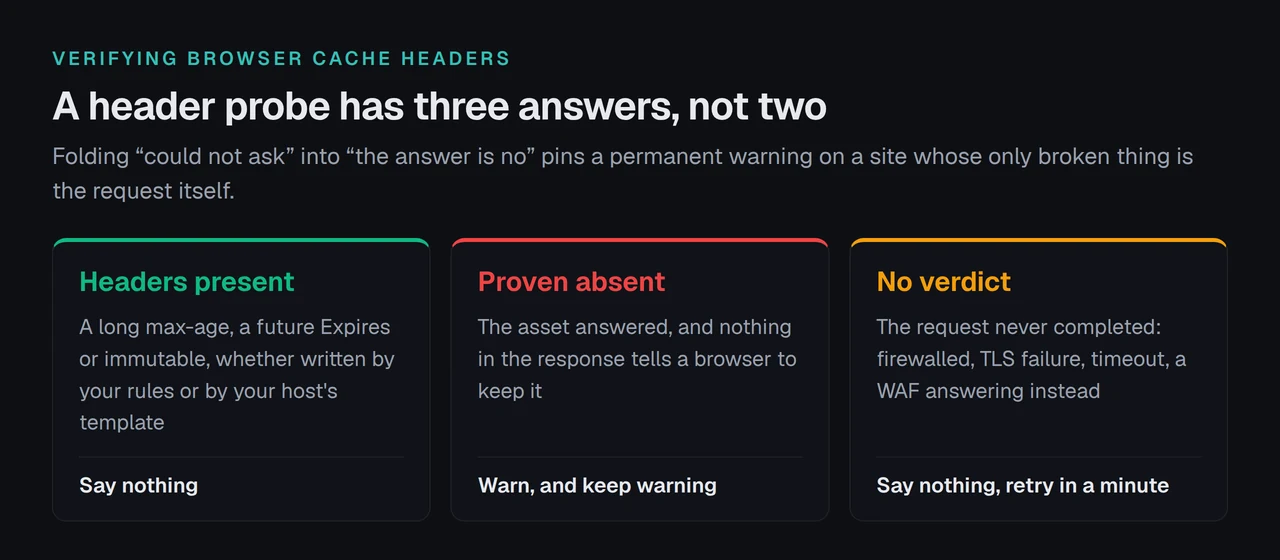
The detector is the part worth copying whatever you use. Its header probe reports three states, not two: present, proven absent, and no verdict at all when the loopback never completed. Folding "could not ask" into "the answer is no" pins a permanent warning on a site whose only broken thing is an internal request.
For a fleet, [xSpeed Hub](https://xspeedcache.com/xspeed-hub/) reads every site through one connection, and [WooCommerce stores](https://xspeedcache.com/use-cases/woocommerce/) want the document lifetime short regardless of what the assets do.
## Frequently Asked Questions
### I enabled browser caching and my PageSpeed score did not move. What happened?
Browser caching helps repeat visits. The first paint a test tool measures is a cold load, so the number it reports is the one your change does not touch.
### My headers look right in the panel but curl shows nothing. Where is the gap?
On nginx the panel stores the setting and cannot write the config. Print the block, paste it into the server block, reload.
### I pasted the asset block and my security headers disappeared. Did I break something?
That is nginx inheritance working as documented: `add_header` at one level cancels inheritance from the level above. Repeat them inside the block, or use `add_header_inherit merge;` on nginx 1.29.3 or later.
### Is `Expires` still worth sending?
It costs nothing and is ignored wherever `max-age` is present, per RFC 9111 §5.3. Apache emits both; the nginx block sends one.
### My CSS updates are not reaching visitors after a year-long rule. What do I do?
Check whether the filename changes when the file does. Fingerprinted names make a long lifetime safe; a static `style.css` makes it a trap. [Minification](https://xspeedcache.com/docs/minify/) usually supplies the fingerprint.
### My host already sends a year-long policy. Should I turn this on as well?
Probably not, and a detector that only recognises its own fingerprint will tell you otherwise. A long `max-age` from a host template is the same instruction to a browser, which is why xSpeed's probe accepts any of the three signals, and adding a second rule on top of one risks the duplicate header above.
### Do I need a plugin for any of this?
No. The directives above are the whole task, and nothing here needs a purchase. A plugin writes them, keeps them consistent across sites and probes the result, which is worth something on more than one site and worth nothing on one.
### Which free plugin should I use if not yours?
W3 Total Cache and WP Fastest Cache both write browser-cache rules, and LiteSpeed Cache does it at server level on LiteSpeed. xSpeed Cache is one option among those three, free for this panel, and its honest differentiator is the three-state probe rather than the headers themselves.
### I cleared every cache and the old file is still loading. Which cache is it?
Probably the one you cannot clear. Walk the [full list of stores in order](https://xspeedcache.com/blog/how-to-clear-wordpress-cache/); a visitor's own disk is the last and it waits out its lifetime.
### Does any of this change the page cache?
No. The [page cache](https://xspeedcache.com/docs/page-cache/) saves work on your server; browser caching removes the request. They are independent toggles, and the panel reference for the second is [the browser cache doc](https://xspeedcache.com/docs/browser-cache/).
## Your Next Hour
**What to do this week:**
1. Run `curl -sI` against one stylesheet and one page, signed out, and write down what comes back.
2. If nothing comes back, apply the block for your server family and reload.
3. On nginx, check that your global `add_header` fields survived the paste.
4. Confirm from outside with the free scan rather than from the panel.
5. If you run more than a handful of sites, the Browser Cache panel in xSpeed Cache is free, and the paid tiers start at $29 a year with a 14-day money-back guarantee. [The full feature split is published](https://xspeedcache.com/pricing/), and so is [the capability comparison](https://xspeedcache.com/features/).
Set it once, verify it from outside, and the fastest request becomes the one that never happens.