# Two Gates Refuse Your WordPress HTML at the Cloudflare Edge, and the Free Plan Clears Both
> Cloudflare caches 56 file extensions and HTML is not one. A rule fixes that gate. We measured how many WordPress sites then hit a second one they never see coming.
- Published: 2026-10-11
- Author: xSpeed Cache Team
- Tags: Cloudflare, CDN, Caching, Tutorial, TTFB, platform:cloudflare, check:D5
- Canonical: https://xspeedcache.com/blog/cloudflare-cache-wordpress-html-free/
---
Updated October 2026
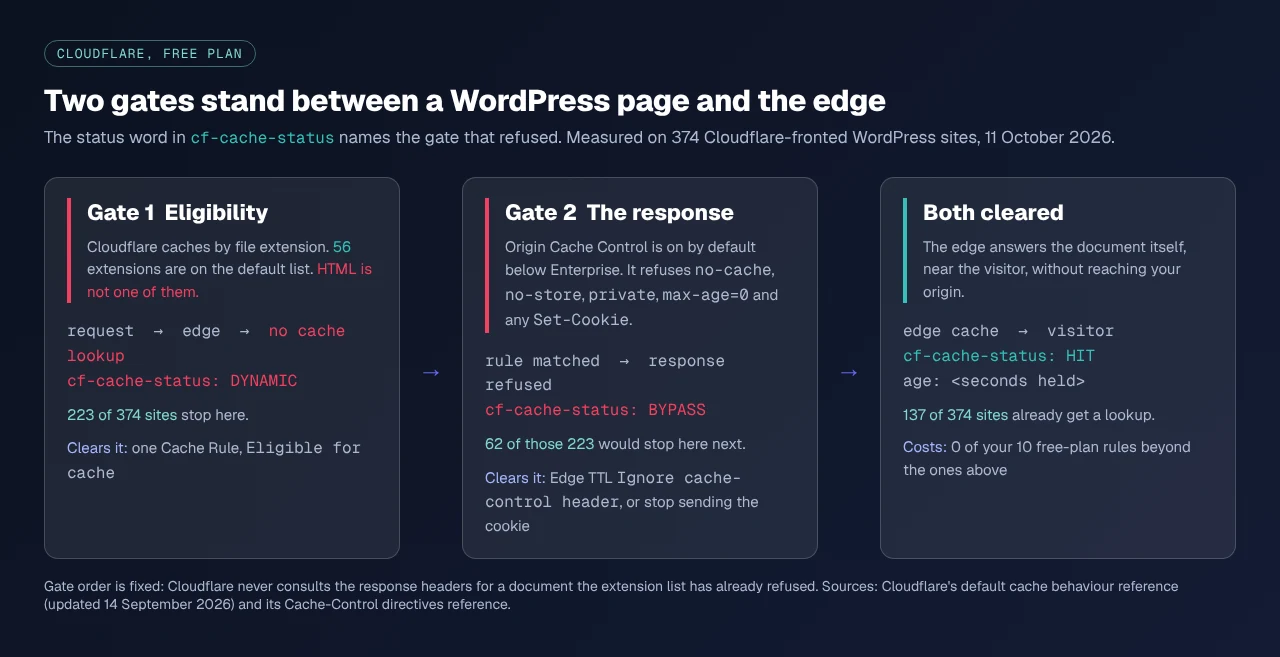
Cloudflare's default cache list covers **56 file extensions**, and its own reference, updated 14 September 2026, states the CDN "does not cache HTML or JSON by default". We probed 1,127 WordPress home pages on 11 October 2026: 374 sit behind Cloudflare, and 223 of those get no cache lookup for the document at all.
The usual advice is one sentence: add a Cache Rule. It is correct, and it is half the job. Cloudflare refuses a WordPress page at two independent points, and that rule clears only the first. Both are free-plan work.
## Quick Summary: Which Gate Is Refusing Your Page
Send one request and read `cf-cache-status`. The word names the gate.
| If you see | Do this | Why |
|:---|:---|:---|
| `DYNAMIC` | Add one Cache Rule set to **Eligible for cache** | Gate 1. The document is not on the extension list, so nothing looked |
| `BYPASS` | Fix the response, or override Edge TTL | Gate 2. A rule matched and the response itself was refused |
| `HIT` on a logged-in page | Add a bypass rule below the caching one | The rule is caching something it must not |
## Cloudflare Caches 56 File Extensions, and the Document Is Not One
Cloudflare's [default cache behaviour reference](https://developers.cloudflare.com/cache/concepts/default-cache-behavior/) is blunt: "Cloudflare only caches based on file extension and not by MIME type." We counted the published list on 11 October 2026: 56 entries, from `7Z` to `ZST`, including `CSS`, `JS` and `WOFF2`. No `HTML`, and no extensionless path, which every pretty permalink is.
Your server's headers never enter into it. `bdthemes.com`, fetched twice on 11 October 2026, answers with `cache-control: s-maxage=31536000` and `cf-cache-status: DYNAMIC`: a year of permission to any shared cache, which the edge never reads, because the document was discarded before the headers mattered.
An asset CDN does not help, whoever runs it: rewriting asset URLs leaves the document on your origin. That is the half of a distant reader's wait [a slow page for visitors abroad](https://xspeedcache.com/blog/slow-for-visitors-abroad/) works through in full.
## The Second Gate Is the Answer Your Own Server Sends
Make the document eligible and Cloudflare reads the response. The same reference lists the refusals: `Cache-Control` of `private`, `no-store`, `no-cache` or `max-age=0`, a `Set-Cookie` header, or any method but `GET`.
The directive half is negotiable and the cookie half is not. The same page says of Origin Cache Control that "Free, Pro and Business customers have this feature enabled by default", and presents switching it off as Enterprise-only. The conditions table in Cloudflare's [Cache-Control reference](https://developers.cloudflare.com/cache/concepts/cache-control/) records what being on costs: `no-cache` logs as `bypass` rather than `miss`, and a response carrying `Set-Cookie` "is not cached".
An Edge TTL override is documented as ignoring the cache-control header, and nothing in it speaks to `Set-Cookie`, which is refused separately. `gridpane.com` sends `cache-control: public, no-cache`, verified twice on 11 October 2026, so an eligibility rule alone moves it from `DYNAMIC` to `BYPASS` and no further.
## What 1,127 WordPress Sites Said Today
We took 1,225 WordPress domains from our scan index, requested each home page once with a browser user agent on 11 October 2026, and read the final response.
| Measurement | Count | Share |
|:---|---:|---:|
| Behind Cloudflare | 374 | 33.2% of 1,127 |
| `cf-cache-status: DYNAMIC` | 223 | 59.6% of 374 |
| Of those, a second refusal in the same response | **62** | **27.8% of 223** |
| Refused by a `Cache-Control` directive | 54 | `no-cache` 41, `max-age=0` 26, `no-store` 21 |
| Refused by an origin `Set-Cookie` | 12 | `PHPSESSID`, `_fbp`, WooCommerce sessions |
| Clean, so one rule finishes the job | 161 | 72.2% of 223 |
The majority case is genuinely one rule: 128 of those 161 send no `Cache-Control` at all, and Cloudflare's table gives a `200` a 120-minute Edge TTL when none is present. The minority wastes an afternoon, because the symptom reads as a different bug.
**The instrument problem, before anyone repeats this.** A naive "does the response set a cookie" test reports 43 of those 223 sites, not 12. The gap is `__cf_bm`, Cloudflare's own bot-management cookie, on 81 of the 374 and added after the cache decision. Counting it overstates the cookie branch almost fourfold, so exclude the `__cf_` and `_cfuvid` names first.
## The Free-Plan Rule Budget: Four Rules, Ten Slots, and an Order Most Guides Invert
Cloudflare's [Cache Rules documentation](https://developers.cloudflare.com/cache/how-to/cache-rules/), dated 14 August 2026, gives the Free plan **10 rules**, Pro 25, Business 50 and Enterprise 300. Ten is plenty. The order is where the usual advice runs backwards. Cache Rules all sit in one phase and their action is non-terminating, and Cloudflare's [ruleset engine reference](https://developers.cloudflare.com/ruleset-engine/about/rules/) states that "for non-terminating actions the last change made by rules in the same phase will win". A bypass placed above the caching rule is the one that gets overwritten.
| # | Rule | `Then` setting | Place |
|:---|:---|:---|:---|
| 1 | The document itself | Eligible for cache | First |
| 2 | Admin, API and cron paths | Bypass cache | Below rule 1 |
| 3 | Logged-in, comment and cart cookies | Bypass cache | Below rule 2 |
| 4 | Edge TTL, only when the origin refuses | Ignore cache-control header | Inside rule 1 |
Rule 2 matches `http.request.uri.path` starting with `/wp-admin/`, `/wp-login.php`, `/wp-json/`, `/wp-cron.php` and checkout. Rule 3 matches the `Cookie` field for `wordpress_logged_in_`, `comment_author_` and `wp_woocommerce_session_`, the discipline [the APO comparison](https://xspeedcache.com/blog/cloudflare-apo-vs-caching-plugin/) counted at 14 prefixes. Rule 4 is not a fourth rule: Edge TTL lives inside rule 1, and of its three modes in the [settings reference](https://developers.cloudflare.com/cache/how-to/cache-rules/settings/), "Ignore cache-control header and use this TTL" clears gate 2.
**The safer construction.** Write rule 1 to exclude those paths and cookies itself, so no two rules match the same request and the order cannot bite you. Four rules fit a blog, a brochure site and a simple store. Pages varying by currency or language need a custom cache key, with the cost below.
## The Clause That Keeps Your Purge Working
Almost no published rule example carries this. Cloudflare's [single-file purge reference](https://developers.cloudflare.com/cache/how-to/purge-cache/purge-by-single-file/) states that "single-file purge may also not work as expected if your Cache Rules match only on GET requests", because a purge travels as a different method. Its own example reads `http.request.method eq "GET"`, and its remedy adds `or http.request.method eq "PURGE"` to that test.
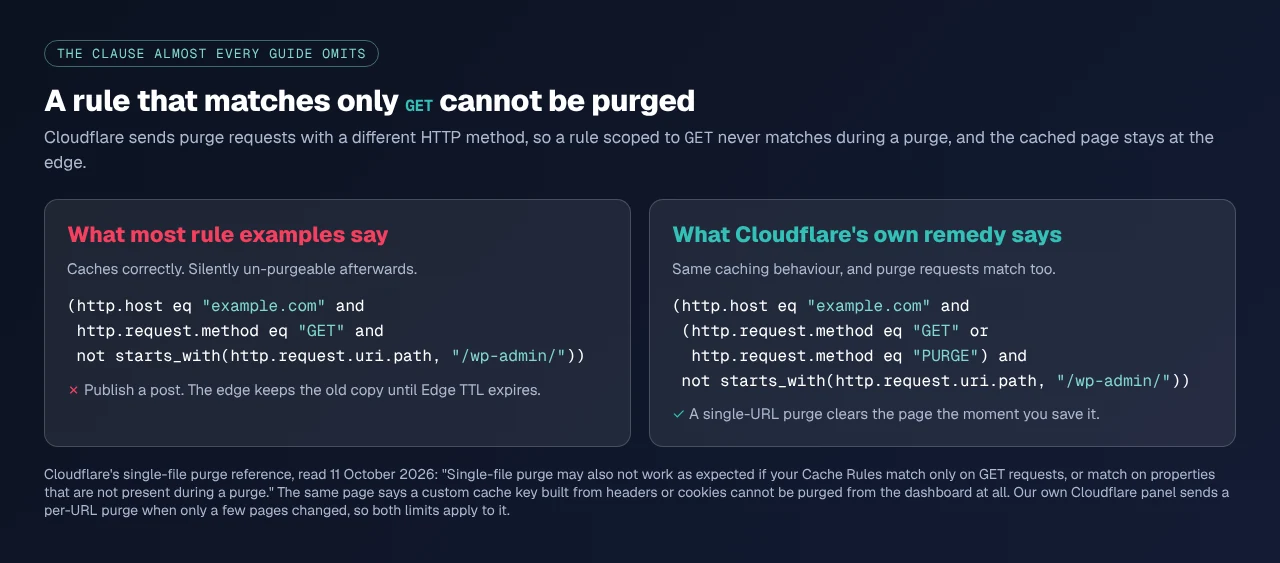
The same page records a second limit: a custom cache key built from headers or cookies cannot be cleared by single-file purge at all, because the dashboard cannot reproduce those values. Purge by prefix, tag or host still does.
## Keeping the Two Caches in Step Across Twenty-Five Sites
Our own CDN panel has the same allow-list shape and the same omission: [the CDN docs](https://xspeedcache.com/docs/cdn/) say the defaults cover 19 extensions and that "your HTML, your REST API, and admin-ajax are never rewritten". Correct for an asset rewriter, no help at gate 1. Both purge limits land on whatever clears your edge after a save, and ours is one of those. The [Cloudflare panel](https://xspeedcache.com/docs/cloudflare/) in xSpeed Cache, which we build at WPDeveloper, purges Cloudflare whenever it purges itself, and its docs record that it "purges exactly those" URLs rather than flushing the zone. A `GET`-only expression breaks that.
Zone connection, the API token, auto-purge and development mode are all free, per [Free vs Pro](https://xspeedcache.com/free-vs-pro/). Cache level, browser-cache TTL and APO are Pro, and APO also needs a paid Cloudflare plan, so the free path here stays the Cache Rule. Across a client list, [xSpeed Hub](https://xspeedcache.com/xspeed-hub/) grades a fleet from one screen, which finds the site whose rule order drifted.
One correction we owe our readers: our Cloudflare doc says HTML is not cached "unless APO is on". Our scanner has been giving better advice than our documentation, and the documentation is what changes now.
## Confirm the Edge Answered, Starting With the Scan
Run the [free xSpeed Scan](https://xspeedcache.com/scan/) on the URL. It needs no account, and check **D5**, "CDN edge serves the page", says whether the edge answered or forwarded, with the status word as evidence. We scanned `gridpane.com` while writing this: D5 read "Cloudflare forwarded this request upstream (`cf-cache-status: DYNAMIC`)" beside a desktop Lighthouse score of 100 and a server Google measured at 24ms, while first byte from Lithuania took 602ms. The scan puts that gap down to distance, not the server.
If you would rather check by hand, send a real `GET` twice to one post URL, never the home page and never a `HEAD`. That method belongs to [proving the edge is answering](https://xspeedcache.com/blog/check-cdn-caching-wordpress/), which also covers why an `Age` header settles nothing.
## Where This Goes Wrong: Three Mistakes With Edge Rules
- **Trusting the order you read elsewhere.** The last matching rule wins, so a bypass above the caching rule is overwritten rather than respected.
- **Testing on the home page.** A post can differ, and the state drifts, as [our CDN census](https://xspeedcache.com/blog/wordpress-cdn-adoption-ttfb-study/) found.
- **Stopping at one region.** Each Cloudflare data centre caches alone, so turn on [Tiered Cache](https://developers.cloudflare.com/cache/how-to/tiered-cache/) with Smart Topology, also free.
## Frequently Asked Questions
### I added the rule and my pages still say DYNAMIC. What did I miss?
Check the rule matches. Cloudflare Trace reports which rules fire for a URL. The usual cause is a hostname test written for `example.com` on a site serving `www.example.com`.
### My status changed from DYNAMIC to BYPASS. Is that worse?
Better. `DYNAMIC` means nothing looked. `BYPASS` means the rule matched and the response was refused, so its headers name the directive or cookie that did it.
### Do I need the Edge TTL override at all?
Only if your origin sends `no-cache`, `no-store`, `private` or `max-age=0` on the page. In our sample that was 54 of 223 sites. The rest send a usable directive, or none.
### My WooCommerce cart emptied for a customer after I turned this on.
The cookie bypass was missing, or sat above the caching rule and lost to it. Move it below, or exclude the cookie from the caching rule, then purge. Store boundaries are on our [WooCommerce page](https://xspeedcache.com/use-cases/woocommerce/).
### Can I just use APO instead?
Yes, when you want the cookie handling maintained for you. It costs money on both sides. The free rule set here reaches the same place if you can list your own exclusions.
### Will this replace my caching plugin?
No. The edge holds a copy for anonymous visitors. Your origin still builds every logged-in page and every miss, which is what a [page cache](https://xspeedcache.com/docs/page-cache/) is for. Ours is free on [wordpress.org](https://wordpress.org/plugins/xspeed/).
### My edits stopped appearing on the live site.
Almost certainly the purge clause. Check whether the expression tests for `GET` without allowing `PURGE`, or a custom cache key contains a cookie.
### How long should my Edge TTL be?
Long, because the purge is what shortens it. A day suits a blog once auto-purge works.
### Is 10 rules really enough?
For the four above, yes, with six spare. Sites that run out are writing per-path TTLs one expression would cover.
### Does this help readers in my own country?
Less than it helps distant ones. The gain scales with the distance between reader and origin, which [the abroad guide](https://xspeedcache.com/blog/slow-for-visitors-abroad/) measures by phase.
## Conclusion: Clear the Gate That Is Actually Refusing You
Two allow-lists sit in front of a WordPress page, ours at 19 extensions and Cloudflare's at 56, and the document is on neither. One rule fixes that. For 62 of the 223 sites measured today a second refusal waits behind it, and the status word names which one.
| Your situation | Start with |
|:---|:---|
| `DYNAMIC`, no cookies, no directives | Rules 1 to 3. Twenty minutes |
| `DYNAMIC` with `no-cache` from the origin | Rules 1 to 3, then the Edge TTL override |
**What to do this week:** send two `GET` requests to one post URL and write down the status word. Deploy the eligibility rule, put the bypass rules below it, confirm a logged-in request is still forwarded, and purge. Widen the method test to allow `PURGE` before you walk away. Re-run the [free scan](https://xspeedcache.com/scan/) and check D5 changed. If the origin half is the slow half, xSpeed Cache is free on wordpress.org and Pro is $29 a year at the founding price with a 14-day money-back guarantee, on the [pricing page](https://xspeedcache.com/pricing/).
Tell us on the wordpress.org forum which gate was refusing your site.